Windows 7 Forums Search
Welcome to Windows 7 Forums. Our forum is dedicated to helping you find solutions with any problems, errors or issues you are experiencing with Windows 7. The Windows 7 forum also covers news and updates and has an extensive Windows 7 tutorial section that covers a wide range of tips and tricks.


Windows 7 - Microphone volume too low

 
07-01-2010   #31


Win 7 x64


Update

Seems I have figured something out. Pretty simple.

I have just decided to give Teamspeak 3 a go and it seems I can be heard loud and clear. Better than previously I have been told.

I was previously testing my mic using windows recorder, the sensor dial thing on windows recording devices and the sensor device on the audio drivers config tool.

I can only conclude that these sensors are lying and do not show the true volume being detected by the microphone.

Figures.

Hope this sheds some light on others if they do the same as I have.

My System SpecsSystem Spec
12-08-2010   #32


Win7 ultimate 32bit


I'm having the same issue...
I do online gaming and I've had Windows 7 installed for a while. Initially I did NOT have this issue.

I use TeamSpeak 3 to communicate with the members of our gaming group and separately there is an 'in-game' communication that we use. I've had no issues until recently. I can't figure out what would have changed but now, I can't be heard "in-game".

1st thing I tried was to exit game and go into windows (Windows 7 ultimate 32bit) and try to use the Sound recorder program (Start/All Programs/Accessories/Sound Recorder) and it was NOT picking up my voice. TS 3 was working fine, but Windows 7 wasn't detecting my voice unless I Spoke really loudly and very close to my mic.

I thought it might be my headset, ordered new one...it arrived and SAME ISSUE.
I thought it might be my soundcard...Creative X-FI Fatility pro gamer I updated drivers...SAME ISSUE
I thought it might be my soundcard...REMOVED IT and used onboard sound (Mobo is Gigabyte P55A-UD4P) SAME ISSUE

The only variable that hasn't been eliminated is Windows 7 ITSELF...and with all the posts/topics I see on this subject I'd say we're on to something. There's DEFINITELY a sound/mic issue with Windows 7.

I'm out of things to try except a new install. However, if sound issue is a result of a fairly recent Windows update then it'll probably just resurface. Perhaps I'll go back to XP using same hardware to verify that it's not a hardware issue?

Out of things to try...
My System SpecsSystem Spec
01-09-2011   #33


windows 7


Problem with Realtek HD Audio

I just bought a new computer and have the same problem, very low volume in Skype. Then I could solve the problem with chaging setting as follows.

Control panel> sound> playback> speaker > property> Realtek HD Audio Output> Property>Level>Balance

When you click balance, you see L and R. If you just change either of the levels to 0, the volume will be set to normal (e.g. L:100, R:0).

Last edited by yu2011; 01-09-2011 at 11:01 PM..
My System SpecsSystem Spec
.


02-08-2012   #34


Windows 7 Home Premium 32bit


Just saw this problem - maybe I have solution

Hi,

It's a long time but I just encountered this problem and maybe my solution will help others.
I have the same symptoms as Steven describes.
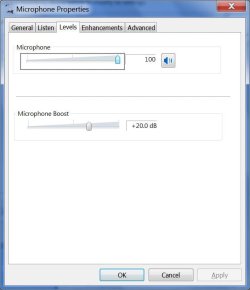
In the "recording" tab there are 2 microphones, but only one of them allows to set DB levels on its properties (mic #1) -- but Skype only works with the other mic (mic #2).
The solution is to raise the DB level in mic #1, and also do some "disable/enable tries" on the 2 microphones, so the change "propagates" from mic #1 to mic #2. It appears that although mic #2 doesn't support DB level, changing it on mic #1 does effect mic #2. Go figure. Anyway now it works.
My System SpecsSystem Spec
02-27-2012   #35


Windows 7 Home Premium 64bit


a big THANKS to Steven for this thread etc

my "Skype microphone volume" was very low

i got Windows 7 Home Premium 64-bit using a Toshiba T110-11U

here's the solution i found just now...

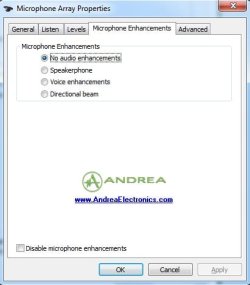
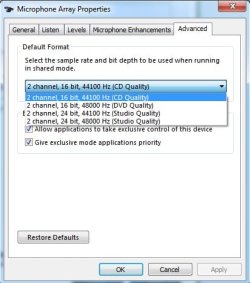
Control Panel > Sound > Recording > Microphone > Advanced > Signal Enhancements.....then.....

...uncheck "Enable audio enhancements"

and THAT'S IT !!

hope it works for you - and that you say good things through the aforementioned microphone - haha

have a good day, TC
My System SpecsSystem Spec
3 Weeks Ago   #36


Windows 7 Ultimate x32


Low mic volume in Skype - Solution that worked for me

Hi,

After upgrading the OS of my Acer Aspire 2920 from Vista to Windows 7, the volume of my built-in microphone also became unacceptably low in Skype... Funny thing is it was still working perfectly in Messenger...

Just now, I managed to fix the problem by installing the latest Windows 7 x32 Realtek Audio driver from:
Realtek

Now my microphone works perfectly in Skype!
Hope this will help!

Cheers
My System SpecsSystem Spec
Reply

 Microphone volume too low problems?


Thread Tools


Similar Threads for: Microphone volume too low
Thread Forum
Microphone volume reduced Sound & Audio
Microphone volume won't stay put Sound & Audio
Microphone volume unusably quiet under Win 7. Sound & Audio
Does program for microphone volume exist? Sound & Audio
Microphone volume meter for taskbar? Software


All times are GMT -5. The time now is 11:22 PM.


Windows 7 Forums is an independent web site and has not been authorized,
sponsored, or otherwise approved by Microsoft Corporation.
"Windows 7" and related materials are trademarks of Microsoft Corp.
© Designer Media Ltd
  

1 2 3 4 5 6 7 8 9 10 11 12 13 14 15 16 17 18 19 20 21 22 23 24 25 26 27 28 29 30