Windows 7 Forums Search
Welcome to Windows 7 Forums. Our forum is dedicated to helping you find solutions with any problems, errors or issues you are experiencing with Windows 7. The Windows 7 forum also covers news and updates and has an extensive Windows 7 tutorial section that covers a wide range of tips and tricks.


Windows 7 - Microphone volume too low


07-17-2009   #1


Windows 7


Microphone volume too low

Just installed the release candidate of Windows 7.
Was previously running Vista.
I use Skype a lot, and my microphone volume level is much lower now than it ever was.
People are telling me they can hardly hear me when I call them.
I have a Dell Inspiron 1525 laptop- the mic is built-in.
I've looked at all the obvious settings both within Skype and also within Windows, but not managed to fix this yet.
Any suggestions?

My System SpecsSystem Spec
07-17-2009   #2


Hi Steven, welcome to the forums.

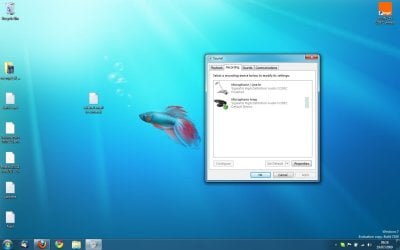
I have had the same issue with my laptop (e-system). You have to go to Control Panel -> Hardware and Sound, open the 'Sound' option. Click the 'Recording' tab and you may see 2 microphone devices, I had to 'disable' (right-click) the first device while changing the properties of the second one (volume levels + boost to +20)

Hope this helps


Jeff
My System SpecsSystem Spec
07-17-2009   #3


Windows 7


Quote   Quote: Originally Posted by Orbital Shark View Post
Hi Steven, welcome to the forums.

I have had the same issue with my laptop (e-system). You have to go to Control Panel -> Hardware and Sound, open the 'Sound' option. Click the 'Recording' tab and you may see 2 microphone devices, I had to 'disable' (right-click) the first device while changing the properties of the second one (volume levels + boost to +20)

Hope this helps


Jeff
Hi
Sorry I should have mentioned I had already tried this!
One is disabled and the other is at 100% volume.
Not sure what's going on with 2 microphone devices showing though. Can't see the difference between the 2 either. Wonder if there'd be any results by disabling the other one and altering the settings on the currently disabled one?
My System SpecsSystem Spec
.


07-17-2009   #4


Windows 7


i think he was talking about something different. disable all the other ones, right click the one you want and click properties. go to the 'levels' tab and then you can boost your microphone from +40dB to +60dB
My System SpecsSystem Spec
07-17-2009   #5


Quote   Quote: Originally Posted by 01steven View Post
Hi
Sorry I should have mentioned I had already tried this!
One is disabled and the other is at 100% volume.
Not sure what's going on with 2 microphone devices showing though. Can't see the difference between the 2 either. Wonder if there'd be any results by disabling the other one and altering the settings on the currently disabled one?
Quite possible, it's worth a try
My System SpecsSystem Spec
07-17-2009   #6


Windows 7


OK here's the latest.
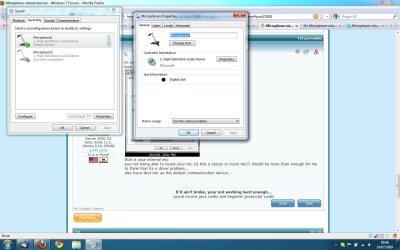
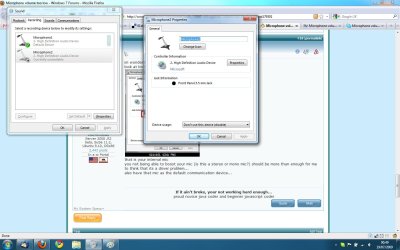
There are 2 microphones showing in the system.
They were both called 'Microphone' so I've renamed them as 'Microphone1' and 'Microphone2' to distinguish between them.
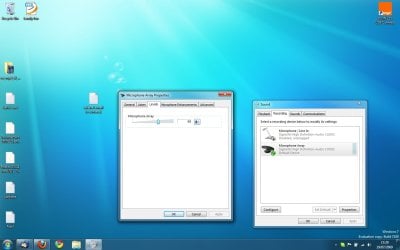
Microphone 2 has the option in properties>levels for me to add the +20DB
But this microphone when selected as the default in the system, won't work in Skype. It just tells me to plug a microphone in.
properties>levels for 'Microphone1' doesn't give me the option to boost the decibels. It's simply not there. It does work in Skype, but just far too faint.
My System SpecsSystem Spec
07-17-2009   #7


Windows 7


maybe simply get a new mic. some might be s h i tty. they're not that expensive, get one on ebay
My System SpecsSystem Spec
07-17-2009   #8


Windows 7


Quote   Quote: Originally Posted by simonfilth View Post
maybe simply get a new mic. some might be s h i tty. they're not that expensive, get one on ebay
nothing wrong with the mic
It is the built-in mic with my Dell laptop.
It worked absolutely fine on Vista
My System SpecsSystem Spec
07-17-2009   #9


windows 7 x64 rc


microphone prblems

Fresh build win 7 x64 RC asus M3N78-VM 2 gig ram amd atholonX64 dual core 6000+ on board sound "VIA" options suck but it will play speakers & mic.
only problem is on paradise chat on line,you can talk once but thats it APP. crash.admin at PCO seem to have narrowed it down to systems like thiers that dont run 32 bit or higher.Same problem with vista love the OSbut sigh might have to wait until the rest of the crowd catches up hopefully soon
P.S Other than that everything is well.

Last edited by ribbit; 07-17-2009 at 03:22 PM.. Reason: typo
My System SpecsSystem Spec
07-17-2009   #10


Windows 7 Ult x64(x2), HomePrem x32(x4), Server 08 (+VM), 08 R2 (VM) , SuSe 11.2 (VM), XP 32 (VM)


im wondering if a sound driver install would make this go away
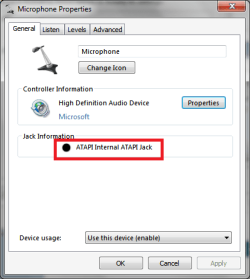
look at both and look at which one has this as the Jack info...
Microphone volume too low-mic.png
that is your internal mic
you not being able to boost your mic (is this a stereo or mono mic?) should be more than enough for me to think that its a driver problem...
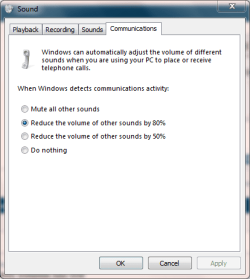
also have that mic as the default communication device...
My System SpecsSystem Spec
Reply

 Microphone volume too low


Thread Tools


Similar Threads for: Microphone volume too low
Thread Forum
Microphone volume reduced Sound & Audio
Microphone volume won't stay put Sound & Audio
Microphone volume unusably quiet under Win 7. Sound & Audio
External Microphone Volume goes low automatically Sound & Audio
Microphone volume meter for taskbar? Software


All times are GMT -5. The time now is 10:56 PM.


Windows 7 Forums is an independent web site and has not been authorized,
sponsored, or otherwise approved by Microsoft Corporation.
"Windows 7" and related materials are trademarks of Microsoft Corp.
© Designer Media Ltd
  

1 2 3 4 5 6 7 8 9 10 11 12 13 14 15 16 17 18 19 20 21 22 23 24 25 26 27 28 29 30