Windows 7 Forums Search
Welcome to Windows 7 Forums. Our forum is dedicated to helping you find solutions with any problems, errors or issues you are experiencing with Windows 7. The Windows 7 forum also covers news and updates and has an extensive Windows 7 tutorial section that covers a wide range of tips and tricks.


Windows 7 - The Audio Service Is Not Running + No Devices Found

 
07-21-2011   #1


windows 7 home premium 64-bit


The Audio Service Is Not Running + No Devices Found

i havent installed nothing updated ect . i dont no why this is happening ive tryed reinstalling ... looked at every solution online no help ... i did sys restore my pc and it worked but my wireless wouldent so im back here now ....

this is what it says


then i click playback devices in pop up menu


then i click yes and this says this


and in my device manager it shows this


i dont understand why it wont work ive installed drivers over and over and will not work :/ can some one come and teamviewer my pc ?

please get back asap thank

My System SpecsSystem Spec
07-22-2011   #2


Win 7 x64


Quote   Quote: Originally Posted by Skunner View Post
i havent installed nothing updated ect . i dont no why this is happening ive tryed reinstalling ... looked at every solution online no help ... i did sys restore my pc and it worked but my wireless wouldent so im back here now ....

this is what it says


then i click playback devices in pop up menu


then i click yes and this says this


and in my device manager it shows this


i dont understand why it wont work ive installed drivers over and over and will not work :/ can some one come and teamviewer my pc ?

please get back asap thank

Right Click on that last Screen to Enable Hidden Devices.
My System SpecsSystem Spec
08-13-2011   #3


Windows 7 Ultimate x32


Have you tried restarting the audio service in 'services.msc'?
My System SpecsSystem Spec
.


11-25-2011   #4


Windows 7 32bit


Hi, I ran into a similar problem which it turns out I partially created myself.

I replaced my motherboard and as a result did a fresh install of Windows 7 Ultimate upgrading from Windows Vista Home Edition.
I also upgraded my video card to an Asus Geforce GTX550 Ti

Now I was ready to start installing all of my other programs, drivers, updates etc. but the computer kept freezing after 5 minutes or less. To troubleshoot this I disabled my services in msconfig to try to isolate the problem. In doing so I somehow managed to disable my audio services and couldn't get them to start again. There was a red x over the speaker icon on my task bar and I kept getting error messages that my audio services needed to be started (but wouldn't start when I tried) and that no audio devices were installed in spite of the fact that I tried both the onboard audio and an Audigy sound card.

Here is the solution that worked for me.

First: The freezing problem-
I went into control panel/System and Security/Power Options and changed the setting there from Balanced to High Performance. I'm assuming this was necessary due to the high power consumption of the new video card.
This fixed the freezing problem.

Second: The no audio problem-
Open your command prompt by clicking Start button/All Programs/Accessories/Command Prompt
Type in: services.msc
In the list find the item named Power
Right click on it and select Properties
Make sure the startup type is AUTOMATIC then click the start button then ok to close the window.
Reboot your computer.

When it restarts you should have sound again unless you changed other settings in msconfig or made other changes. If you made other changes you may have to undo the mess you've made trying to find the problem which is what got me into trouble. Doing a system restore to an earlier point may help.

I do hope this helps someone. I scoured the internet trying to solve the problem and found clues here and there that brought me to this final conclusion. I hope that this post helps to save someone some time.

Good Luck
My System SpecsSystem Spec
11-29-2011   #5


windows 7 home premium 64-bit


ThankYou For Your Help But i Found a restore point and it fixed the problem .
My System SpecsSystem Spec
12-06-2011   #6


Windows 7 Ultimate x64


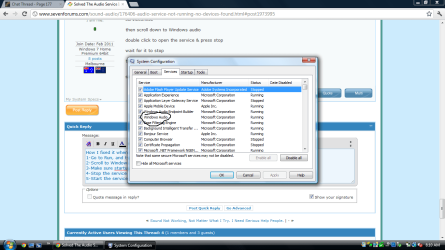
I know Skunner's problem was solved by a rollback, but I thought I would share my solution as well since Google directed me here. It turns out that my tinkering in msconfig caused my problem.

The service called "Multimedia Class Scheduler" was not running, and simply turning it back on fixed it.

You should be able to turn it back on through start - run - msconfig.exe then services and check it.
or
wallyschmo's advice on getting into services.msc to do the same.
My System SpecsSystem Spec
Reply

 The Audio Service Is Not Running + No Devices Found problems?


Thread Tools


Similar Threads for: The Audio Service Is Not Running + No Devices Found
Thread Forum
Audio Service Is Not Running - Power Service Non-Existent Sound & Audio
audio service not running Sound & Audio
The Audio Service is not running Sound & Audio
Audio Service not running Hardware & Devices
Audio service is not running Sound & Audio


All times are GMT -5. The time now is 11:23 PM.


Windows 7 Forums is an independent web site and has not been authorized,
sponsored, or otherwise approved by Microsoft Corporation.
"Windows 7" and related materials are trademarks of Microsoft Corp.
© Designer Media Ltd
  

1 2 3 4 5 6 7 8 9 10 11 12 13 14 15 16 17 18 19 20 21 22 23 24 25 26 27 28 29 30