MP3 Listing Software for Win7?

kwil

New member
Member
VIP
Local time
2:35 PM
Messages
105
[FONT=&quot]Hi...[/FONT]
[FONT=&quot]I'm a newbie on Win7 64-bit.[/FONT]
[FONT=&quot]I've a number of DVD/CD's containing many MP3 tracks.[/FONT]
[FONT=&quot]I want to create a list of MP3's within Excel(I have Office 2007) but can't seem to export the info I need from the DVD/CD's to create a list I can add to at will.[/FONT]
[FONT=&quot]The list only needs to hold the following info:
[/FONT]
[FONT=&quot]Artist - Track Name/Time[/FONT]
[FONT=&quot]Source - DVD 1/2/3/etc[/FONT]
[FONT=&quot]Can anyone suggest any software (preferably free) that can read/export to XL with ease?
[/FONT]
[FONT=&quot]I've used 'MP3Listmaker de Luhe' with XP for a good while, but the version I have won't run on Win7. It does a basic job and there's a paid-for version but frankly with such an amateurish interface it's not worth paying for.[/FONT]
[FONT=&quot]I've also tried 'Karen' software - not doing what I need.[/FONT]
[FONT=&quot]So, any suggestions or recommendations would be welcome.[/FONT]
[FONT=&quot]Many thanks[/FONT]
 

My Computer My Computer

At a glance

Microsoft Windows 7 Home Premium 64-bit 7601 ...Intel(R) Core(TM) i7-2600 CPU @ 3.40GHz8.00 GBIntel(R) HD Graphics Family
Computer type
PC/Desktop
OS
Microsoft Windows 7 Home Premium 64-bit 7601 Multiprocessor Free Service Pack 1
CPU
Intel(R) Core(TM) i7-2600 CPU @ 3.40GHz
Motherboard
ASRock H61M/U3S3
Memory
8.00 GB
Graphics Card(s)
Intel(R) HD Graphics Family
Sound Card
(1) Realtek High Definition Audio (2) High Definition Audi
Screen Resolution
1920 x 1080 x 32 bits (4294967296 colors) @ 59 Hz
Hard Drives
(1) ST3500413AS ATA Device (2) ST3500413AS ATA Device (3) Generic- Card Reader USB Device
What are you using to listen to your mp3s? Reason I ask is, you could probably export the meta-data from your listening software and transfer it to excel. If not directly, at least via copy/pasting of text.
 

My Computer My Computer

At a glance

Windows 7 X64 ProfessionalIntel® Pentium D Dual Core 3.6GHZ4GB DDR2 PC2-5300GeForce GT 440 (Fermi) 2GB 128-bit DDR3 PCI E...
Computer Manufacturer/Model Number
Dell XPS 400
OS
Windows 7 X64 Professional
CPU
Intel® Pentium D Dual Core 3.6GHZ
Motherboard
DELL Dimension 9150 MotherBoard DXP051 XPS400 FJ030
Memory
4GB DDR2 PC2-5300
Graphics Card(s)
GeForce GT 440 (Fermi) 2GB 128-bit DDR3 PCI Express 2.0 x16
Sound Card
ASUS XONAR DG 5.1 Channels PCI Interface Xonar DG
Monitor(s) Displays
2 X 23" Apple Cinema Display
Screen Resolution
1920 X 1200p
Hard Drives
250GB Intel® 510 Series SSD SATA 6G (w/TRIM) [500MB/s Reads]
1.0TB Western Digital Caviar Black SATA 6G 7200rpm 64MB Cache
PSU
375 Watt Dell
Case
Dell XPS 400 BTX Case
Cooling
Dell XPS 400 Air Cooling
Keyboard
Logitech Illuminated Keyboard
Mouse
Logitech M705 Marathon
Internet Speed
+/- 9929 Kbps
Other Info
This machine was given to me when my dad bought a new computer. I keep throwing upgrades at it and it keeps on ticking. Think I've done everything to it that can be done outside a PSU upgrade so I can run an even BETTER GPU.

My Computer My Computer

At a glance

Windows 7 Ultimate x64I76 x 1.5V DDR3 DIMM sockets supporting up to 2...GeForce GTX 580
Computer Manufacturer/Model Number
Alienware
OS
Windows 7 Ultimate x64
CPU
I7
Motherboard
GA-X58-USB3
Memory
6 x 1.5V DDR3 DIMM sockets supporting up to 24 GB of system
Graphics Card(s)
GeForce GTX 580
Sound Card
Realtek ALC892 codec 2/4/5.1/7.1-channel
Monitor(s) Displays
NEC Display Solutions E321 Black 32"
Screen Resolution
1366 x 768
Hard Drives
OCZ Colossus LT Series OCZSSD2-1CLSLT1T 3.5" 1TB SATA II MLC Internal Solid State Drive
PSU
XFX Black Edition XPS-850W-BES 850W ATX12V
Case
Antec
Cooling
Zalman
Keyboard
Microsoft
Mouse
Microsoft
You can do it with command prompt:

Run > cmd

For example, if your DVD drive is E:, type: dir E:\*.mp3 /b >list.txt
Press Enter.

The file "list.txt" file (you can name it whatever you like) will appear in the directory cmd started from.
Then copy and paste the list into an excel document.

You might want to create the "list.txt" file in a more convenient place. To do that, before you type the "dir..." line, change directories in cmd: For example, to change to the F: drive type F: then press Enter, then type cd F:\Media and press Enter to change to the "Media" directory.

In case anyone wants to make a list from a directory that doesn't have such an easy address to type, Windows 7 has given cmd a drag & drop ability, so after you type dir, you can just drag the folder whose contents you want to list to cmd and the address will be filled in for you - nice!
 

My Computer My Computer

At a glance

Windows 7
OS
Windows 7
Hi...many thanks to all for taking time to reply.
Just one question, Seth: Axiom webpage doesn't show compatibility for Win7 64-bit...So, is it compatible and can you link up easily with XL?
Would rather find out before I install...
Debugged: that's a useful way of doing it...thanks! (I'll keep it up my sleeve!)
Regards
 

My Computer My Computer

At a glance

Microsoft Windows 7 Home Premium 64-bit 7601 ...Intel(R) Core(TM) i7-2600 CPU @ 3.40GHz8.00 GBIntel(R) HD Graphics Family
Computer type
PC/Desktop
OS
Microsoft Windows 7 Home Premium 64-bit 7601 Multiprocessor Free Service Pack 1
CPU
Intel(R) Core(TM) i7-2600 CPU @ 3.40GHz
Motherboard
ASRock H61M/U3S3
Memory
8.00 GB
Graphics Card(s)
Intel(R) HD Graphics Family
Sound Card
(1) Realtek High Definition Audio (2) High Definition Audi
Screen Resolution
1920 x 1080 x 32 bits (4294967296 colors) @ 59 Hz
Hard Drives
(1) ST3500413AS ATA Device (2) ST3500413AS ATA Device (3) Generic- Card Reader USB Device
Hi kwil it is compatible it installed on my system 64bit no problem but it creates a text file of the contents of your directories. Also I know the second link is a pay for link but I'm sure when I used to use it it has excel export already built into that and also html.
 

My Computer My Computer

At a glance

Windows 7 Ultimate x64I76 x 1.5V DDR3 DIMM sockets supporting up to 2...GeForce GTX 580
Computer Manufacturer/Model Number
Alienware
OS
Windows 7 Ultimate x64
CPU
I7
Motherboard
GA-X58-USB3
Memory
6 x 1.5V DDR3 DIMM sockets supporting up to 24 GB of system
Graphics Card(s)
GeForce GTX 580
Sound Card
Realtek ALC892 codec 2/4/5.1/7.1-channel
Monitor(s) Displays
NEC Display Solutions E321 Black 32"
Screen Resolution
1366 x 768
Hard Drives
OCZ Colossus LT Series OCZSSD2-1CLSLT1T 3.5" 1TB SATA II MLC Internal Solid State Drive
PSU
XFX Black Edition XPS-850W-BES 850W ATX12V
Case
Antec
Cooling
Zalman
Keyboard
Microsoft
Mouse
Microsoft
[FONT=&quot]Hi...[/FONT]
[FONT=&quot]I'm a newbie on Win7 64-bit.[/FONT]
[FONT=&quot]I've a number of DVD/CD's containing many MP3 tracks.[/FONT]
[FONT=&quot]I want to create a list of MP3's within Excel(I have Office 2007) but can't seem to export the info I need from the DVD/CD's to create a list I can add to at will.[/FONT]
[FONT=&quot]The list only needs to hold the following info:
[/FONT]
[FONT=&quot]Artist - Track Name/Time[/FONT]
[FONT=&quot]Source - DVD 1/2/3/etc[/FONT]
[FONT=&quot]Can anyone suggest any software (preferably free) that can read/export to XL with ease?
[/FONT]
[FONT=&quot]I've used 'MP3Listmaker de Luhe' with XP for a good while, but the version I have won't run on Win7. It does a basic job and there's a paid-for version but frankly with such an amateurish interface it's not worth paying for.[/FONT]
[FONT=&quot]I've also tried 'Karen' software - not doing what I need.[/FONT]
[FONT=&quot]So, any suggestions or recommendations would be welcome.[/FONT]
[FONT=&quot]Many thanks[/FONT]
I can do Excel reports of my library with Mediamonkey. I have the paid version, but I believe the free version will do it as well....MediaMonkey » Information » Free
 

My Computer My Computer

At a glance

Win 7 Ultimate 64-bit SP1 (desktop)Intel Core 2 Duo E84002x 2GB OCZ DDR II SDRAM PC2-6400NVIDIA GeForce 9400GT
Computer type
PC/Desktop
Computer Manufacturer/Model Number
Gigabyte Technology Co., Ltd.
OS
Win 7 Ultimate 64-bit SP1 (desktop)
CPU
Intel Core 2 Duo E8400
Motherboard
Gigabyte GA-EP35-DS3R
Memory
2x 2GB OCZ DDR II SDRAM PC2-6400
Graphics Card(s)
NVIDIA GeForce 9400GT
Monitor(s) Displays
HP 2009m(primary), Acer P191W
Screen Resolution
1600x900, 1440x900
Hard Drives
Internal:WD Caviar Black 640GB 32MB cache 7200RPM
External:Samsung Story Station 1TB HDD desktop drive
500GB Toshiba portable drive
PSU
Antec Earthwatts EA500D
Case
Antec Sonata III
Cooling
4 fans
Keyboard
Logitech Wave
Mouse
Logitech M-SBF90
Internet Speed
Slow due to home Wireless-G router
Antivirus
MSE, Hitman Pro, Malwarebytes
Browser
Chrome and Palemoon
Other Info
Laptop....Acer 5750Z-4835
15.6" HD Widescreen CineCrystal™ LED-backlit LCD Display: (1366x768 resolution, 16:9 aspect ratio)
Intel® Pentium® Processor B940 (2.0GHz, 2MB L3 cache)
Windows® 7 Home Premium,500GB Hard Drive,4GB DDR3 RAM, Intel® HD Graphics,8X DVD-Super Multi Double-Layer Drive
Multi-in-1 Digital Media Card Reader,802.11b/g/n Wi-Fi
Chrome and Palemoon, MSE, Hitman Pro
[FONT=&quot]Hi...[/FONT]
[FONT=&quot]I'm a newbie on Win7 64-bit.[/FONT]
[FONT=&quot]I've a number of DVD/CD's containing many MP3 tracks.[/FONT]
[FONT=&quot]I want to create a list of MP3's within Excel(I have Office 2007) but can't seem to export the info I need from the DVD/CD's to create a list I can add to at will.[/FONT]
[FONT=&quot]The list only needs to hold the following info:
[/FONT]
[FONT=&quot]Artist - Track Name/Time[/FONT]
[FONT=&quot]Source - DVD 1/2/3/etc[/FONT]
[FONT=&quot]Can anyone suggest any software (preferably free) that can read/export to XL with ease?[/FONT]
[FONT=&quot]I believe you can do what you want using Exact Audio Copy (EAC), which is free.

I just tested it out on a CD, which is Janis Joplin's "18 Essential Songs" which I inserted into my CD tray with EAC running. EAC then went up to FreeDB to get the information (I selected the proper one from the two "hits" that were offered to me), and EAC then
[/FONT]populated its tracklist presentation, which looks like the following:

eactracks.jpg


Then from the EAC menu bar, I did Database -> Export CD information to -> DB text file. This appears to be a character-delimited (with ";") TXT file, suitable for import into Excel.

eactracklist.jpg


I think this is the exact information you're looking for, to build your spreadsheet "list" for your collection, assuming that's how you want to go.

If you're unfamiliar with EAC, you can use this excellent tutorial/guide to installation and optimization. I myself have somewhat different tweaks, but for a newcomer this is a fine getting-started "how to" explanation.


If I might recommend a more sophisticated way to develop a CD Database for your music collection, you might look at a non-free ($39.99) program named "Musifind Pro Internet Edition" (which is what I've been using for over 12 years, to keep track of my 1100 CD collection). There is no spreadsheet involved, as the program IS itself a CD-database music collection product. All kinds of powerful capabilities (also including automatic access to FreeDB when you want to add a CD to your collection). Supports album art, linkage to default music player for playing tracks you've pointed to MP3/FLAC, export database to CSV with customizable/arrangeable columns, etc.

If you're interested I can give you more details on setup, use, tips and techniques.

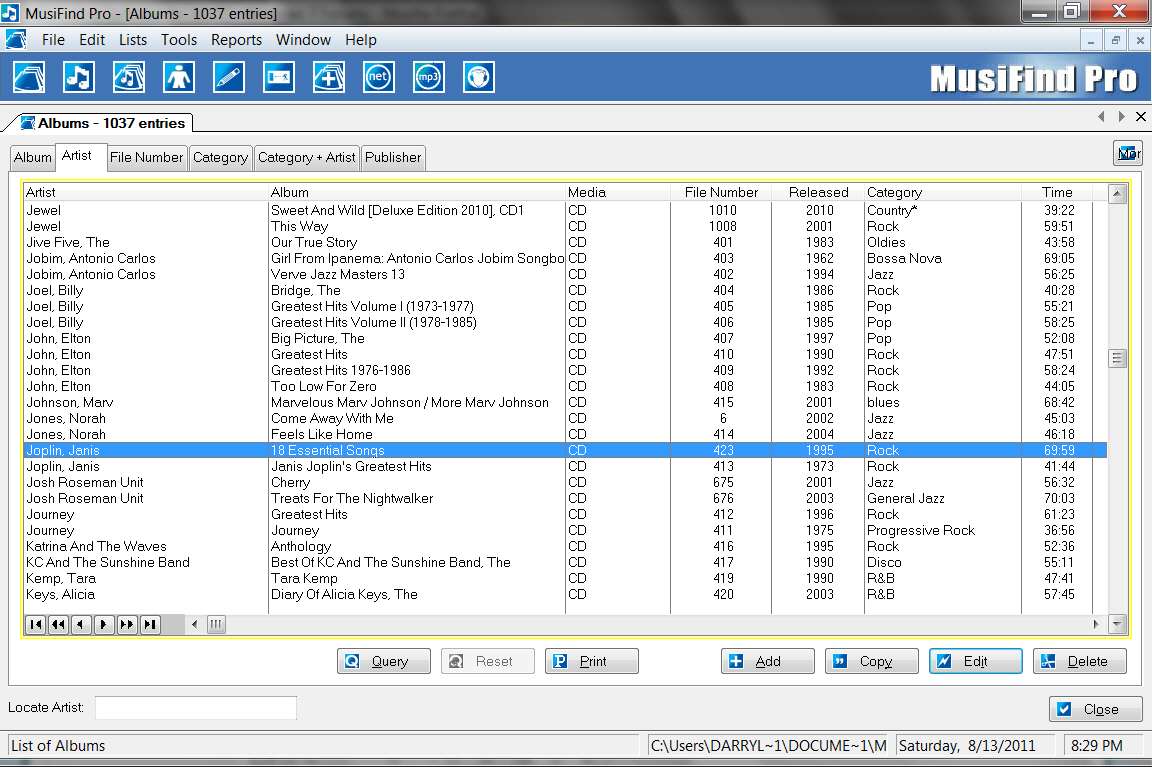
For example, that same Janis Joplin CD in my Musifind Pro database looks as follows (showing just the "albums" view, for an example):

mfpdisc.jpg


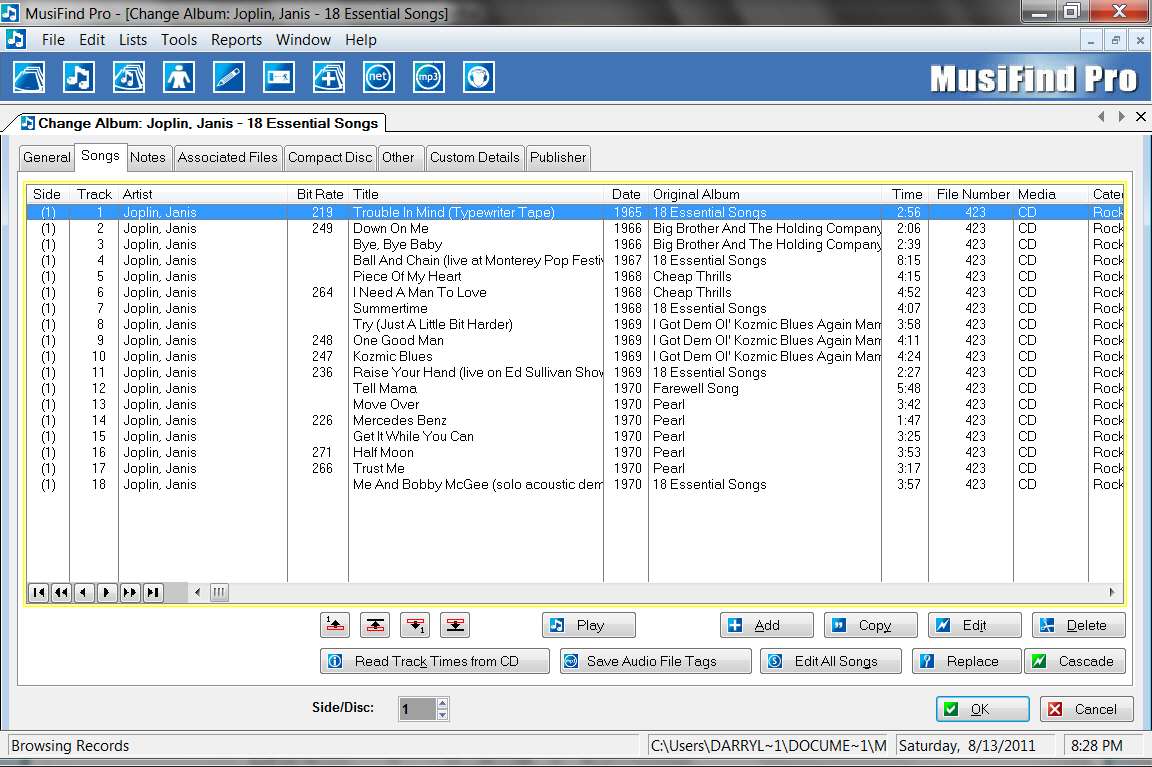
And when I open that CD and go to the "songs" tab to see the tracks, it looks as follows:

mfpsongs.jpg
 

My Computer My Computer

At a glance

Windows 7 Pro x64 (1), Win7 Pro X64 (2)i5-3350p 3.1Ghz/6MB-cache (1); E8400 3.0Ghz/6...8GB PC3-12800 DDR3 (1); 4GB PC3-10600 DDR3 (2)ATI HD7750 (1), (see TV cards); ATI R7 250 (2)
Computer type
PC/Desktop
Computer Manufacturer/Model Number
Home-built, two systems (1) and (2)
OS
Windows 7 Pro x64 (1), Win7 Pro X64 (2)
CPU
i5-3350p 3.1Ghz/6MB-cache (1); E8400 3.0Ghz/6MB-cache (2)
Motherboard
ASUS P8Z77-V Pro (1); ASUS P5Q3 (2)
Memory
8GB PC3-12800 DDR3 (1); 4GB PC3-10600 DDR3 (2)
Graphics Card(s)
ATI HD7750 (1), (see TV cards); ATI R7 250 (2)
Sound Card
Realtek ALC892 HD Audio (1); Realtek ALC1200 HD Audio (2)
Monitor(s) Displays
Eizo HD2441W LCD, Eizo S2433W (1); Eizo 24" S2433W (2)
Screen Resolution
1920x1200, 1920x1200 (1); 1920x1200 (2)
Hard Drives
(1) 1TB SATA-II (7200RPM), 2x2TB SATA-III (7200RPM), 250GB SATA-III (10000RPM) for OS; 2x2TB external USB 3.0

(2) 320GB SATA-II (7200RPM), 750GB SATA-II (7200RPM), 150GB SATA-II (10000RPM) for OS; 2TB external USB 3.0
PSU
Nesteq ECS-6001 600W (1); Nesteq ECS-5001 500W (2)
Case
Acousti-Case 360 (1) and (2)
Cooling
Noctua NH-U12P SE2 for CPU, 2x120mm case fans (1) and (2)
Keyboard
IBM PS/2 (1) and (2)
Mouse
Logitech MX Revolution wireless (1); Microsoft wired (2)
Internet Speed
100mbps down / 10mbps up
Antivirus
Microsoft Security Essentials; Malwarebyte Anti-Malware Pro
Browser
Firefox
Other Info
Ceton InfiniTV 4-tuner cablecard-enabled TV card as well as Hauppauge HVR-2250 OTA/ATSC 2-tuner TV card in (1), running under Win7 WMC
Just noticed that you'd stated:
[FONT=&quot]I've a number of DVD/CD's containing many MP3 tracks.[/FONT]
This must mean you have a set of "homemade" mix CDs/DVDs, rather than a collection of commercial retail CDs. So you're probably NOT going to be able to use FreeDB automatically invoked from any program product to find track information for your discs, since your discs are your own invention. FreeDB is worthless here.

However if I understand you correctly, you may have the track information already imbedded in the file names themselves, from the directory of your discs.

I haven't tried it myself, but I suspect EAC may be able to import THAT track information directly from the CD filenames, instead of using FreeDB. I've never done that myself, but it's a pretty sophisticated program. It might be "edit extended track information", but I'm not sure since I've never done it.

You can certainly experiment with it yourself, reading one of your homemade MP3 mix-CDs, and see if you can get exactly or close to what you want populated into the EAC tracklist presentation. That's the goal, because if you can get the tracklist presentation to look correct then you can export it to DB Txt format and you're home free.

If you can get the tracklist display to look right, you can do the export to DB text format as I described earlier, and produce that same character-delimited TXT file suitable for import into Excel... except starting from the filename directory on your discs, instead of getting the track names from FreeDB as would be possible with commercial CDs.

On the other hand, EAC may only usable for CDs with WAV tracks, not with MP3 tracks. Again, never tried it before for this kind of task.

Still just kind of thinking out loud here... but my posts may actually not be of much help to you after all. But it's worth a try for you to just install EAC and see if it can read your MP3 discs and populate the track list directly from the disc directory and filenames itself.
 

My Computer My Computer

At a glance

Windows 7 Pro x64 (1), Win7 Pro X64 (2)i5-3350p 3.1Ghz/6MB-cache (1); E8400 3.0Ghz/6...8GB PC3-12800 DDR3 (1); 4GB PC3-10600 DDR3 (2)ATI HD7750 (1), (see TV cards); ATI R7 250 (2)
Computer type
PC/Desktop
Computer Manufacturer/Model Number
Home-built, two systems (1) and (2)
OS
Windows 7 Pro x64 (1), Win7 Pro X64 (2)
CPU
i5-3350p 3.1Ghz/6MB-cache (1); E8400 3.0Ghz/6MB-cache (2)
Motherboard
ASUS P8Z77-V Pro (1); ASUS P5Q3 (2)
Memory
8GB PC3-12800 DDR3 (1); 4GB PC3-10600 DDR3 (2)
Graphics Card(s)
ATI HD7750 (1), (see TV cards); ATI R7 250 (2)
Sound Card
Realtek ALC892 HD Audio (1); Realtek ALC1200 HD Audio (2)
Monitor(s) Displays
Eizo HD2441W LCD, Eizo S2433W (1); Eizo 24" S2433W (2)
Screen Resolution
1920x1200, 1920x1200 (1); 1920x1200 (2)
Hard Drives
(1) 1TB SATA-II (7200RPM), 2x2TB SATA-III (7200RPM), 250GB SATA-III (10000RPM) for OS; 2x2TB external USB 3.0

(2) 320GB SATA-II (7200RPM), 750GB SATA-II (7200RPM), 150GB SATA-II (10000RPM) for OS; 2TB external USB 3.0
PSU
Nesteq ECS-6001 600W (1); Nesteq ECS-5001 500W (2)
Case
Acousti-Case 360 (1) and (2)
Cooling
Noctua NH-U12P SE2 for CPU, 2x120mm case fans (1) and (2)
Keyboard
IBM PS/2 (1) and (2)
Mouse
Logitech MX Revolution wireless (1); Microsoft wired (2)
Internet Speed
100mbps down / 10mbps up
Antivirus
Microsoft Security Essentials; Malwarebyte Anti-Malware Pro
Browser
Firefox
Other Info
Ceton InfiniTV 4-tuner cablecard-enabled TV card as well as Hauppauge HVR-2250 OTA/ATSC 2-tuner TV card in (1), running under Win7 WMC
Back
Top