Windows 7 Forums


Windows 7: sound not working at all drivers

09 Oct 2011   #1

Windows 7
 
 
sound not working at all drivers

I have had this problem before and I fixed I just don't remember how.
I'm working on an old computer and when I installed windows 7 for the 1st time on it, windows 7 installs all the drivers auto and it's wrong drivers and the sound doesn't work, I need to know how to disable windows 7 from installing the drivers auto and uninstall the old ones so I can fix it.
Thank You

My System SpecsSystem Spec

16 Oct 2011   #2

Windows 7 Pro x64 SP1
Philadelphia


Start > right-click My Computer > Manage > Device Manager.
Right-click the device that needs a driver change > Properties.
From there you can uninstall or search for a different driver.

Windows shouldn't be installing drivers without you being able to do anything at all, though. Usually the "Found New Hardware" dialog box opens up and asks if you want Windows to do something about finding & installing the driver, or if you want to ignore & cancel.
My System SpecsSystem Spec
16 Oct 2011   #3

Windows 7 Home Premium x64 SP1
England


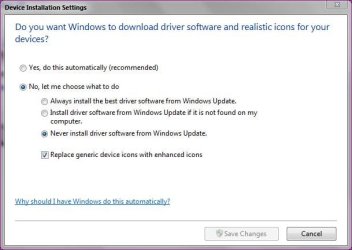
In Devices and Printers you can set windows update not to check for drivers.Right click your computer icon and select device installation settings.
sound not working at all drivers-capture.jpg

Danny
My System SpecsSystem Spec
.


16 Oct 2011   #4

Windows 7 Pro x64 SP1
Philadelphia


Thanks, Danny. I knew there was a way to make it permanently stop asking from somewhere else, but I couldn't remember where.
My System SpecsSystem Spec
16 Oct 2011   #5

Windows 7 Home Premium x64 SP1
England


Quote   Quote: Originally Posted by Miranova23 View Post
Thanks, Danny. I knew there was a way to make it permanently stop asking from somewhere else, but I couldn't remember where.
No problem
My System SpecsSystem Spec
17 Oct 2011   #6

Windows 7


Thankx for all help help guys..
I tried all your solutions, but they didn't work.
I did find the solution though, so if anyone needs the information and has the same problem
he can try what I did.
in Windows\inf - there is a file hdaudio.pnf
what you got to do is install the drivers that u do need for realtk's site, and then del this file, and restart.
I read you got to restart 3 times I don't know if that make any difference.
Hope this helps anyone,
Thanks for all the help again!
My System SpecsSystem Spec
17 Oct 2011   #7

Windows 7 Home Premium x64 SP1
England


Thanks for posting the solution
My System SpecsSystem Spec
Reply

 sound not working at all drivers problems?


Thread Tools


Similar help and support threads for: sound not working at all drivers
Thread Forum
Sound, networking, USB drivers all not working on HP G71 Windows 7 Drivers
Sound card drivers show as working but still no sound Sound & Audio
PCI Sound Card drivers not working Drivers
Nvidia sound drivers, realtek drivers, or both? Drivers
Sound & Playback drivers not working? Drivers


All times are GMT -5. The time now is 10:40 AM.


Seven Forums Android App Seven Forums IOS App Follow us on Facebook

Windows 7 Forums is an independent web site and has not been authorized,
sponsored, or otherwise approved by Microsoft Corporation.
"Windows 7" and related materials are trademarks of Microsoft Corp.
© Designer Media Ltd
  

1 2 3 4 5 6 7 8 9 10 11 12 13 14 15 16 17 18 19 20 21 22 23 24 25 26 27 28 29 30 31 32