Windows 7 Forums


Windows 7: Purchased a Diamond Extreme 7.1 sound card today, now cant get drivers

18 Oct 2011   #1

Windows 7 Home Premium 32 bit
Charleston, S.C.
 
 
Purchased a Diamond Extreme 7.1 sound card today, now cant get drivers

too load. I bought the Diamond extreme sound card. Installed it iaw directions, disable my old sound card via bios/cmos set up, saved it and re-booted. Diamond's install CD didn't work so I called them, they said go to their website and download driver for win 7. No problem, I did it saved it to the Desktop and Win Zip opened the file. I clicked on execute and it asks a few of the generic things about letting something take control etc.. All the standard answers, but once i click download or execute it doesn't do anything? Not sure whats going on? Diamond says it should work, maybe something in my Operating system? I have an HP Desktop Pavilion a 6257c w/ win 7 installed and windows defender as anti virus. Any suggestions mucho appreciato in advance!

My System SpecsSystem Spec

18 Oct 2011   #2

Windows 7 Ultimate SP1 64-Bit
Peterborough, England


If it is a zipped file, you need to extract the contents before you can install the driver.

Is it a zipped file and did you do that first?
My System SpecsSystem Spec
18 Oct 2011   #3

Windows 7 Home Premium 32 bit
Charleston, S.C.


Yes, i extracted the file and then ran the setup.exe file and thats when it does nothing??
My System SpecsSystem Spec
.


18 Oct 2011   #4

Windows 7 Home Premium 64 bit
Illinois


What's the model number of the card?
Diamond Multimedia® Sound Card XtremeSound XtremeSound
My System SpecsSystem Spec
18 Oct 2011   #5

Windows 7 Ultimate SP1 64-Bit
Peterborough, England


Quote   Quote: Originally Posted by southall View Post
Yes, i extracted the file and then ran the setup.exe file and thats when it does nothing??
Have you tried right-clicking the setup.exe file first then choosing Run As Administrator?

Also, it may pay you to disable Windows Defender first.
My System SpecsSystem Spec
18 Oct 2011   #6

Windows 7 Home Premium 32 bit
Charleston, S.C.


24 bit 7.1 Diamond Extreme
My System SpecsSystem Spec
18 Oct 2011   #7

Windows 7 Home Premium 64 bit
Illinois


DIAMOND XtremeSound 7.1/16bit Sound Card|XtremeSound

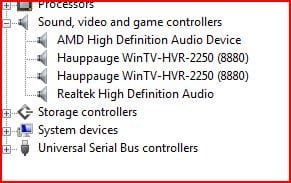
What does the device manager show?

Name:  Capture.JPG
Views: 375
Size:  24.8 KB
My System SpecsSystem Spec
18 Oct 2011   #8

Windows 7 Home Premium 32 bit
Charleston, S.C.


Thank you seavixen32- I did as you requested, ran as administrator and it worked. Now all i have to figure out as why my second set of speakers ( I have bose Companion 2 & Companion 3) both plugged in and only one set is working? LOL- a head scratcher but i hope i can get it. Once again, thank you to each and every one who responded.
My System SpecsSystem Spec
18 Oct 2011   #9

Windows 7 Ultimate SP1 64-Bit
Peterborough, England


You're very welcome, southall. Glad to be of help.

You should be able to set your speaker system up under Hardware & Sound in your Control Panel.
My System SpecsSystem Spec
20 Oct 2011   #10

Windows 7 Ultimate x64


I have the exact same sound card and it has performed well for me. After your driver install does your card show up as 24 bit? When I ran the card under XP it showed as 24 bit, but I've been unable to do anything other than 16 bit in Windows 7. Just curious.
My System SpecsSystem Spec
Reply

 Purchased a Diamond Extreme 7.1 sound card today, now cant get drivers problems?


Thread Tools


Similar help and support threads for: Purchased a Diamond Extreme 7.1 sound card today, now cant get drivers
Thread Forum
Problem with DIAMOND XS 5.1/16 bit Sound Card Sound & Audio
New Diamond Xtreme Sound 7.1/24bit (XS71DDL) - no sound. Sound & Audio
Sound card drivers show as working but still no sound Sound & Audio
Cannot recover video card & sound card drivers after crash BSOD Help and Support
FPS drop because of sound card / sound card drivers? Gaming


All times are GMT -5. The time now is 11:51 PM.


Seven Forums Android App Seven Forums IOS App Follow us on Facebook

Windows 7 Forums is an independent web site and has not been authorized,
sponsored, or otherwise approved by Microsoft Corporation.
"Windows 7" and related materials are trademarks of Microsoft Corp.
© Designer Media Ltd
  

1 2 3 4 5 6 7 8 9 10 11 12 13 14 15 16 17 18 19 20 21 22 23 24 25 26 27 28 29 30 31 32