| Windows 7: No sound in windows 7, onboard soundcard. |
29 Oct 2011
|
#1 | | Windows 7 enterprise 64bit |
No sound in windows 7, onboard soundcard. Hi guys, I'm experiencing trouble with the sound. At the moment I cant get any sound out of my computer. I use the onboard soundcard VIAŽ VT1828S 8. I think there might be some driver related issues?
What I've done:
- Installed a fresh install of windows on different harddrive to make sure the soundcard is working, and it was.
- Have installed/uinstalled newest sound driver.
Can anyone plase help me out?
Edit.
There might be a conflict with graphic card? ATI Radeon 5770
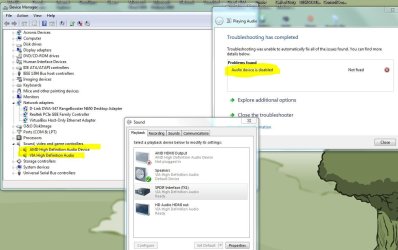
It says its disabled, but I haven't disabled it. | My System Specs |
| OS Windows 7 enterprise 64bit CPU i5 -750 socket 1156 Motherboard Asus p55d pro Memory corsair xms 1600mhz 8gb Graphics Card Ati radeon 5770 powercolor Sound Card onboard VIA VT1828S Monitor(s) Displays BenQ 24" Screen Resolution 1920x1080 Keyboard Logitech K510 Mouse Microsoft Touch Mouse PSU Seasonic 750 watt MD12 Case Corsair Obisidian 800D Cooling Noctua NH-D14 Hard Drives many.... + SSD (Crucial C300) Internet Speed 40/40 mbit fibre optics. |
30 Oct 2011
|
#2 | | Windows 8 Pro with Media Center x64 Southern California, USA |
First, use this instead of your own picture link: Screenshots and Files - Upload and Post in Seven Forums
Second, look up your motherboard manufacturer for all the drivers you need to download. Then go into windows update and download all that stuff like you need to. Then go to AMD's website and download its drivers.
You are saying you don't have a sound card, and your onboard sound isn't working at all, yes?
Dumb questions next, I know, but I still need to ask. You haven't been messing with settings, muting anything, or are missing speakers?
it is very interesting that it works on a brand new install on the same system. hmmm. do you have headphones plugged in? I'm sorry, but I can't guess as to what could be the problem. I'm nearly stumped. Could possibly be a bad onboard card. you bought your motherboard brand new? how recently? how long has the problem been occuring? | My System Specs | | Computer type PC/Desktop System Manufacturer/Model Number Dell Inspiron M5040 OS Windows 8 Pro with Media Center x64 CPU AMD E-450 APU 1.65 GHz Memory 4GB Graphics Card Built-in Radeon HD 6320 Graphics Screen Resolution 1366 x 768 Mouse Microsoft Wireless Cooling fan Hard Drives 500GB Internet Speed 2.86Mbps Download Speed, 2.85Mbps Upload Speed & 26ms Ping Antivirus Defender Browser IE10 |
30 Oct 2011
|
#3 | | Windows 7 Ultimate x64/Windows 8 Consumer Preview x64/Ubuntu 11.04 Somewhere Over The Rainbow |
Are you using headphones or speakers? If you are using either, it could be one of them that isn't working. If you have any spare headphones or speakers, plug them in and see if they work. Sometimes it isn't anything wrong with the sound card, but the external device it's connected to. | My System Specs | | System Manufacturer/Model Number Custom Build OS Windows 7 Ultimate x64/Windows 8 Consumer Preview x64/Ubuntu 11.04 CPU Intel Pentium Dual Core E6700 3.2GHz Motherboard ASUS P5G41T-M LX Memory Strontium 8192MB DDR3 1333Mhz Graphics Card msi GeForce N560GTX-M2D1GD5 1GB Sound Card Realtek HD Audio Monitor(s) Displays CHIMEI CMV 221D 22" Screen Resolution 1680x1050 Keyboard Microsoft Wireless Keyboard 1000 Mouse Microsoft Wireless Optical Mouse 2000 PSU SHAW Viper-1500w Gaming PSU Case Black eMaxx ATX Mini Tower Case Hard Drives Seagate Barracuda LP Green 3.5'' 2TB Internal HDD 5900RPM + WD Elements Desktop 1TB External HDD 7200RPM Internet Speed 100GB @ 4.76Mbps |
30 Oct 2011
|
#4 | | Windows 7 enterprise 64bit |
I'm very sure that the onboard soundcard is working properly. As i mentioned I installed a fresh windows 7 on a different harddrive just to make sure. I plugged speakers, headphones, and headphones via dac (toslink), and that worked great.
My motherboard is a Asus P55D PRO using a VIAŽ VT1828S sound module.
I'm pretty sure that there must be a driver jam or something.
I've tried to delete driver from device manager, then install a new driver from Asus website and ViA website.
The problem occurred last week. I've used a usb dac for a long time, and I recently purchased a new dac where I have to use spdif/toslink instead of usb. I plugged it in, but the dac weren't detected so I installed the driver.
I've also tried to uinstall graphic card drivers (Radeon 5770) and installed a fresh one. | My System Specs | | OS Windows 7 enterprise 64bit CPU i5 -750 socket 1156 Motherboard Asus p55d pro Memory corsair xms 1600mhz 8gb Graphics Card Ati radeon 5770 powercolor Sound Card onboard VIA VT1828S Monitor(s) Displays BenQ 24" Screen Resolution 1920x1080 Keyboard Logitech K510 Mouse Microsoft Touch Mouse PSU Seasonic 750 watt MD12 Case Corsair Obisidian 800D Cooling Noctua NH-D14 Hard Drives many.... + SSD (Crucial C300) Internet Speed 40/40 mbit fibre optics. |
30 Oct 2011
|
#5 | | Windows 8 Pro with Media Center x64 Southern California, USA |
why do you think it is the graphics card's fault then? | My System Specs | | Computer type PC/Desktop System Manufacturer/Model Number Dell Inspiron M5040 OS Windows 8 Pro with Media Center x64 CPU AMD E-450 APU 1.65 GHz Memory 4GB Graphics Card Built-in Radeon HD 6320 Graphics Screen Resolution 1366 x 768 Mouse Microsoft Wireless Cooling fan Hard Drives 500GB Internet Speed 2.86Mbps Download Speed, 2.85Mbps Upload Speed & 26ms Ping Antivirus Defender Browser IE10 |
30 Oct 2011
|
#6 | | Windows 7 enterprise 64bit |
Just trying to eliminate every option. That didn't help though. I tried to reinstall the drivers.
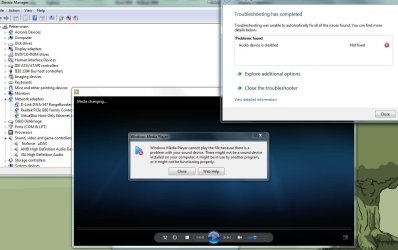
The troubleshooting says the audio device is disabled, but I haven't disabled it. It's not listed as disabled in device manager. But what is the audio device? is the the sound card or the speakers? | My System Specs | | OS Windows 7 enterprise 64bit CPU i5 -750 socket 1156 Motherboard Asus p55d pro Memory corsair xms 1600mhz 8gb Graphics Card Ati radeon 5770 powercolor Sound Card onboard VIA VT1828S Monitor(s) Displays BenQ 24" Screen Resolution 1920x1080 Keyboard Logitech K510 Mouse Microsoft Touch Mouse PSU Seasonic 750 watt MD12 Case Corsair Obisidian 800D Cooling Noctua NH-D14 Hard Drives many.... + SSD (Crucial C300) Internet Speed 40/40 mbit fibre optics. |
30 Oct 2011
|
#7 | | Windows 8 Pro with Media Center x64 Southern California, USA |
go to device manager and look at the audio and sound and speaker stuff listed there. Let me know if there are any exclaimation marks. also, there you can try uninstalling them (windows should redetect them and reinstall them, and if it doesn't, restart). then reinstall its drivers (only the audio this time). You don't have a sound card in your computer that it is detecting? no auxillary cables plugged in or headphones, etc?
You've looked through windows audio AND your device's audio settings again and again for anything to reenable the speakers? make sure all settings are listed correctly according to your setup. If nothing else works, I suggest look it up through google, and perhaps wait for another reply, because i've expended my knowledge on the issue.
ALSO, there is a chance you could have the wrong item enabled in your windows audio control. Try enabling all other audio devices (the ones in your picture at the top) and then disabling all but one (with sound plauying the whole time). Then enable another one and disable the one you had enabled.
In other words you are seeing if they all work together (the sound may be distorted or it may not work at all), and you are testing each one individually to see if it works by itself. Let me know how this goes. | My System Specs | | Computer type PC/Desktop System Manufacturer/Model Number Dell Inspiron M5040 OS Windows 8 Pro with Media Center x64 CPU AMD E-450 APU 1.65 GHz Memory 4GB Graphics Card Built-in Radeon HD 6320 Graphics Screen Resolution 1366 x 768 Mouse Microsoft Wireless Cooling fan Hard Drives 500GB Internet Speed 2.86Mbps Download Speed, 2.85Mbps Upload Speed & 26ms Ping Antivirus Defender Browser IE10 |
30 Oct 2011
|
#8 | | Windows 7 enterprise 64bit |

Quote: Originally Posted by DustSailor go to device manager and look at the audio and sound and speaker stuff listed there. Let me know if there are any exclaimation marks. also, there you can try uninstalling them (windows should redetect them and reinstall them, and if it doesn't, restart). then reinstall its drivers (only the audio this time). You don't have a sound card in your computer that it is detecting? no auxillary cables plugged in or headphones, etc?
You've looked through windows audio AND your device's audio settings again and again for anything to reenable the speakers? make sure all settings are listed correctly according to your setup. If nothing else works, I suggest look it up through google, and perhaps wait for another reply, because i've expended my knowledge on the issue.
ALSO, there is a chance you could have the wrong item enabled in your windows audio control. Try enabling all other audio devices (the ones in your picture at the top) and then disabling all but one (with sound plauying the whole time). Then enable another one and disable the one you had enabled.
In other words you are seeing if they all work together (the sound may be distorted or it may not work at all), and you are testing each one individually to see if it works by itself. Let me know how this goes. Ok, this is how the device manager looks like:
I've tried several times to reinstall it from device manager without success. I don't have any other sound cards connected. I have to devices connected at the moment, one dac (spdif/toslink) and one headphone (regular jack).
I have no clue what to do now. I really don't want to format the disk and install a new windows. Trying to play a song:
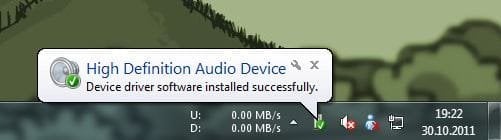
This happens when I choose to uinstall the VIA soundcard in device manager (after restart): | My System Specs | | OS Windows 7 enterprise 64bit CPU i5 -750 socket 1156 Motherboard Asus p55d pro Memory corsair xms 1600mhz 8gb Graphics Card Ati radeon 5770 powercolor Sound Card onboard VIA VT1828S Monitor(s) Displays BenQ 24" Screen Resolution 1920x1080 Keyboard Logitech K510 Mouse Microsoft Touch Mouse PSU Seasonic 750 watt MD12 Case Corsair Obisidian 800D Cooling Noctua NH-D14 Hard Drives many.... + SSD (Crucial C300) Internet Speed 40/40 mbit fibre optics. |
30 Oct 2011
|
#9 | | Windows 7 enterprise 64bit |
I'm very close to giving up. Just format and install a fresh window. That will take me hours of hours to get everything back, but at least it will work... | My System Specs | | OS Windows 7 enterprise 64bit CPU i5 -750 socket 1156 Motherboard Asus p55d pro Memory corsair xms 1600mhz 8gb Graphics Card Ati radeon 5770 powercolor Sound Card onboard VIA VT1828S Monitor(s) Displays BenQ 24" Screen Resolution 1920x1080 Keyboard Logitech K510 Mouse Microsoft Touch Mouse PSU Seasonic 750 watt MD12 Case Corsair Obisidian 800D Cooling Noctua NH-D14 Hard Drives many.... + SSD (Crucial C300) Internet Speed 40/40 mbit fibre optics. |
30 Oct 2011
|
#10 | | Windows 8 Pro with Media Center x64 Southern California, USA |
why don't you try removing the dac and see if your headphones work straight from the computer.
I looked up some stuff for you:
Here is worth a try: Audio Device is Disabled - Microsoft Answers
Here is a similar problem: "Audio Device is Disabled"...um, not - Page 2
Run an sfc /scannow in CMD prompt
Try this: Hardware devices are not working or are not detected in Windows
It has been said that you can disable or enable the on board sound in the bios, and you can also change it. If you have changed it (like from hd to ac97) while the operating system is on your computer, try changing it back. if it doesn't work, you will need to repair install or reinstall (assuming this is indeed the issue). | My System Specs | | Computer type PC/Desktop System Manufacturer/Model Number Dell Inspiron M5040 OS Windows 8 Pro with Media Center x64 CPU AMD E-450 APU 1.65 GHz Memory 4GB Graphics Card Built-in Radeon HD 6320 Graphics Screen Resolution 1366 x 768 Mouse Microsoft Wireless Cooling fan Hard Drives 500GB Internet Speed 2.86Mbps Download Speed, 2.85Mbps Upload Speed & 26ms Ping Antivirus Defender Browser IE10 No sound in windows 7, onboard soundcard. problems? All times are GMT -5. The time now is 04:44 PM. | |