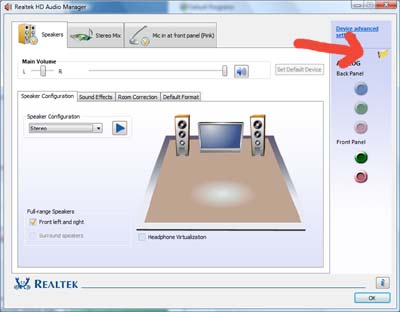
I installed Windows 7 (x86 so x32 for instalations) recently and from beggining I had problems with sound. After installing windows all other drivers were ok(video,motherboard,ethernet) but there were no sound. Windows showed that there is sound drivers instaled S/pdif(or something like that) and as I turned music on bars moved, but there was no sound from speakers. I havent muted anything by myself and wtf I just installed win it shouldnt be mutted anyway.
So I installed realtek newest audio High definition drivers which is my integrated sound card compatable with, restarted PC and vualia it worked. New icon appeared, I heard sound from music/movies. But then I shutted down my pc, turned it in couple of hours and they werent there anymore> Windows showed that there are no outputs or smth, red cross were on sound sign, then installed default drivers who were at the begging then I installed it. And bam I can't hear sound again. I read that problem might be when windows sended updates it sends realtek lan instead of sound or smth like that. And I found it in update history that win send realtek lan, but I dont know if disabling it could solve the problem. Do you guys have any Idea?
So I installed realtek newest audio High definition drivers which is my integrated sound card compatable with, restarted PC and vualia it worked. New icon appeared, I heard sound from music/movies. But then I shutted down my pc, turned it in couple of hours and they werent there anymore> Windows showed that there are no outputs or smth, red cross were on sound sign, then installed default drivers who were at the begging then I installed it. And bam I can't hear sound again. I read that problem might be when windows sended updates it sends realtek lan instead of sound or smth like that. And I found it in update history that win send realtek lan, but I dont know if disabling it could solve the problem. Do you guys have any Idea?
My Computer
At a glance
Windows 7 Ultimate 32bit.
- OS
- Windows 7 Ultimate 32bit.