| Windows 7: Realtek High Definition Audio Troubles - Not Detecting Anything |
13 Nov 2011
|
#1 | | Windows 7 Home Premium x64 |
Realtek High Definition Audio Troubles - Not Detecting Anything Hello, thanks in advance for reading.
Previously I had Realtek HD Manager installed, but under the direction of another, I uninstalled it, as it wasn't detecting any devices plugged into it.
I am still having the same problem, and when I attempt to install Realtek again, it comes with either : 
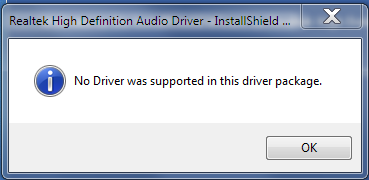
Or this, and it will repeatedly come up no matter how many times I allow it, until it eventually just closes itself. 
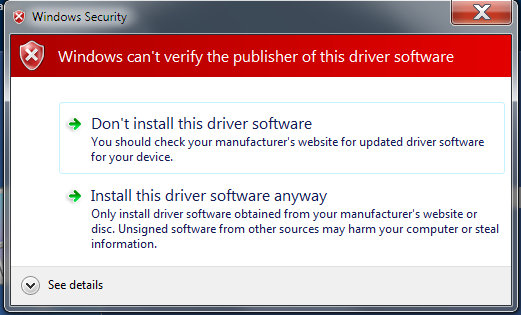
edit : This is for any of the drivers available on the website, the first one being RC266 Vistax64, the second one being AC97.
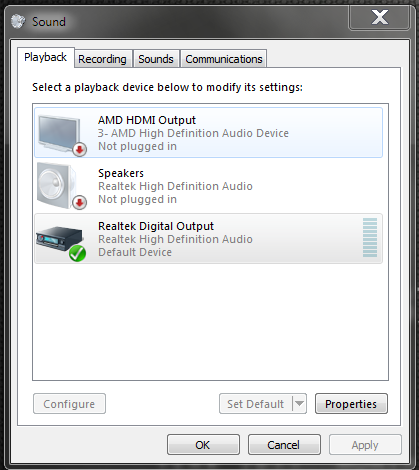
Here is an image of the playback devices : 
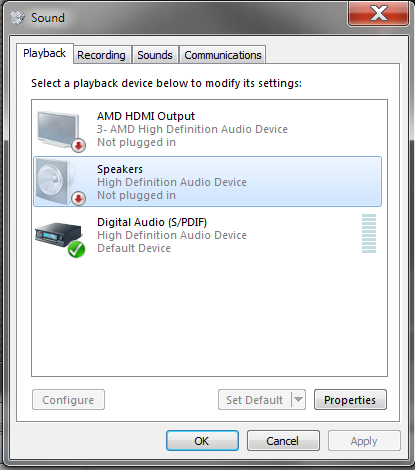
Previously, instead of "High Defintion Audio Device", it was shown "Realtek High Definition ect ect."
It used to show "Digital Output" being the only one plugged in, and on the HD Audio Manager, nothing else was detected.
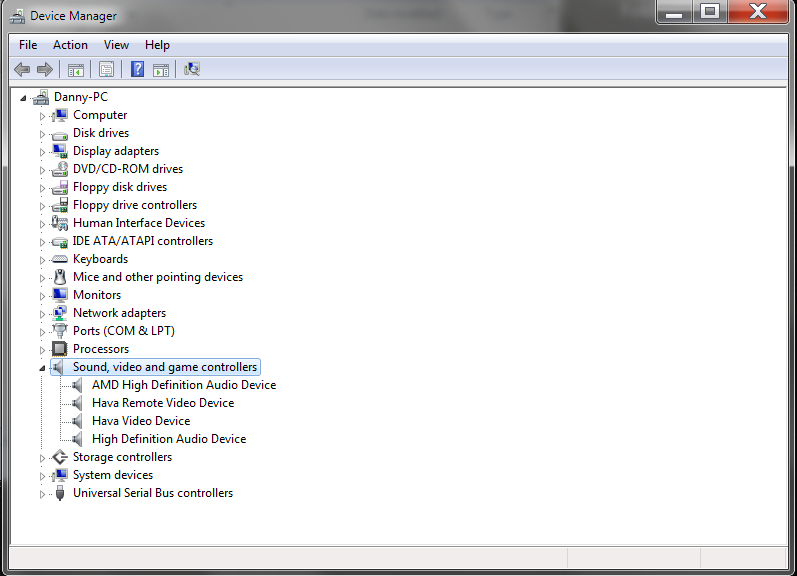
Device Manager :
AMD Athlon II X2 250
A780L3G Mobo [Integrated Sound]
AMD Radeon HD 6670
Windows 7 Home Premium x64
Any help would be appreciated, thank you.
~FX | My System Specs |
| OS Windows 7 Home Premium x64 CPU AMD Athlon II X2 250 Motherboard Biostar A780L3G Memory 8GB, 2x4GB Corsair PC3-10700H Graphics Card AMD Radeon HD 6670 Sound Card Realtek ALC662 Monitor(s) Displays Hannspree HF 225 Screen Resolution 1920 x 1080 |
13 Nov 2011
|
#2 | | Windows 7, 64 bit Home SP1, Win 8 Pro 64 bit Citrus Co, FL |
High Definition Audio Device suggests a generic Windows installed sound driver rather than the RealTek driver.
Make sure you are getting the correct driver, either Vista or Windows 7 for 64 bit OS, from the PC or motherboard vendor's site. Windows XP drivers are not compatible. If you get the warning on a valid driver, click the Install anyway and it should install. | My System Specs | | Computer type PC/Desktop System Manufacturer/Model Number My Own Build OS Windows 7, 64 bit Home SP1, Win 8 Pro 64 bit CPU Intel i7 3770 Motherboard Gigabyte GA-Z77X-UD5H Memory 16GB GSkill Ripsaw F3-14900CL9Q-16GBXL Graphics Card Sapphire HD7770 Sound Card RealTek Monitor(s) Displays Viewsonic VA2448 Series 24" LED Screen Resolution 1920X1080 Keyboard Kensington wired Mouse Logitech Wireless PSU Antec High Current Gamer HCG-620M Modular Case Coolermaster HAF XM Cooling Corsair H80 Liquid cooling with aftermarket Nexus quiet fans Hard Drives 240GB Intel 520 SSD for Win 7
128GB OCZ Vertex 4 SSD for Win 8
1 TB Seagate drive for backup Internet Speed 40 MB/sec (Cable) Antivirus Microsoft Security Essentials and Malwarebytes Browser I.E9/Firefox Other Info Sonar X2 Professional 64 bit Recording Software with Roland Octa-Capture and MAudio Fast Track Ultra 8R recording interfaces, Frontier Tranzport wireless control unit, Behringer BCF2000 Control Surface.
Five USB connected optical drives for CD Audio production using Nero 11
Other systems: Desktop with i5 3550 CPU, LenovoZ560 Laptop with Win 7 64 bit HP, SP1, new iPad |
13 Nov 2011
|
#3 | | Windows 7 Home Premium x64 |
Correct driver, 64 bit and Windows 7.
After clicking install, it will load for a few seconds, then pop up again.
It will do this repeatedly for 5~10 times, then it will close itself.
~FX | My System Specs | | OS Windows 7 Home Premium x64 CPU AMD Athlon II X2 250 Motherboard Biostar A780L3G Memory 8GB, 2x4GB Corsair PC3-10700H Graphics Card AMD Radeon HD 6670 Sound Card Realtek ALC662 Monitor(s) Displays Hannspree HF 225 Screen Resolution 1920 x 1080 |
13 Nov 2011
|
#4 | | Windows 7 Ultimate x64 Service Pack 1 Doncaster, UK |
Download the zipped version of the audio driver from Realtek and extract the contents to a folder. Now, follow the instructions in the following Tutorial, remembering to browse for this folder when instructed. http://www.vistax64.com/tutorials/19...ll-driver.html | My System Specs | | System Manufacturer/Model Number Dwarf Dwf/11/2012 OS Windows 7 Ultimate x64 Service Pack 1 CPU Intel Core-i5-3570K 4-core @ 3.4GHz (Ivy Bridge) (OC 4.2GHz) Motherboard ASRock Z77 Extreme4-M Memory 4 x 4GB DDR3-1600 Corsair Vengeance CMZ8GX3M2A1600C9B (16GB) Graphics Card 2 x AMD Radeon HD7770 1GB CrossFired (OC 1100MHz/1250MHz) Sound Card Realtek High Definition on board solution (ALC 898) Monitor(s) Displays ViewSonic VA1912w Widescreen (VGA) Screen Resolution 1440x900 Keyboard Microsoft Comfort Curve Keyboard 3000 (USB) Mouse Microsoft Comfort Mouse 3000 for Business (USB) PSU XFX Pro Series 850W Semi-Modular Case Gigabyte IF233 Cooling 1 x 120mm Front Inlet 1 x 120mm Rear Exhaust Hard Drives OCZ Agility 3 SSD 120GB SATA III x2 (RAID 0)
Samsung HD501LJ 500GB SATA II x2
Hitachi HDS721010CLA332 1TB SATA II
Iomega 1.5TB Ext USB 2.0
WD 2.0TB Ext USB 3.0 Internet Speed NetGear DG834Gv3 ADSL Modem/Router (Ethernet) ~4.0 Mb/s (O2) Antivirus Avast! 7.0.1474 Browser IE 9 Other Info Optical Drive: HL-DT-ST BD-RE BH10LS30 SATA Bluray
Lexmark S305 Printer/Scanner/Copier (USB)
CTF-430 Tablet & Pen
WEI Score: 7.7/7.9/7.4/7.4/7.9
Asus Eee PC 1011PX Netbook (Windows 7 x86 Starter) |
13 Nov 2011
|
#5 | | Windows 7 Home Premium x64 |

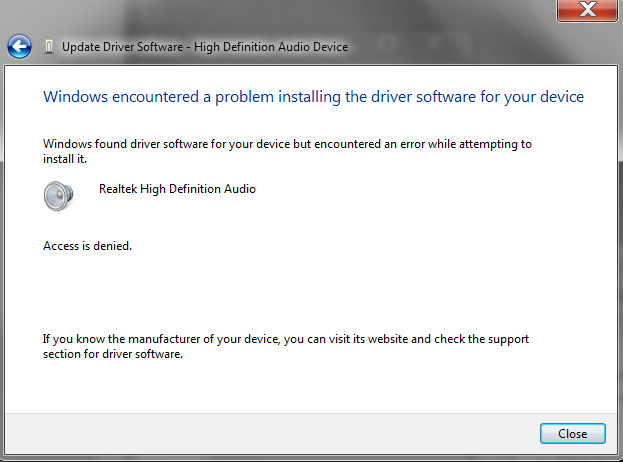
Quote: Originally Posted by Dwarf Download the zipped version of the audio driver from Realtek and extract the contents to a folder. Now, follow the instructions in the following Tutorial, remembering to browse for this folder when instructed. Device Manager - Install Driver - Vista Forums Thank you, but I get this :
~FX | My System Specs | | OS Windows 7 Home Premium x64 CPU AMD Athlon II X2 250 Motherboard Biostar A780L3G Memory 8GB, 2x4GB Corsair PC3-10700H Graphics Card AMD Radeon HD 6670 Sound Card Realtek ALC662 Monitor(s) Displays Hannspree HF 225 Screen Resolution 1920 x 1080 |
13 Nov 2011
|
#6 | | Windows 7 Home Premium x64 |
Nevermind, fixed that problem with this : Take Ownership of a File/Folder [I took ownership of C:]
But now I have this, and still no sound. 
"Speakers" I believe is the front and back audio jacks.
Still says not plugged in, Digital Output gives no sound.
~FX | My System Specs | | OS Windows 7 Home Premium x64 CPU AMD Athlon II X2 250 Motherboard Biostar A780L3G Memory 8GB, 2x4GB Corsair PC3-10700H Graphics Card AMD Radeon HD 6670 Sound Card Realtek ALC662 Monitor(s) Displays Hannspree HF 225 Screen Resolution 1920 x 1080 |
13 Nov 2011
|
#7 | | Windows 7 Pro-x64 South Texas |
The Digital Output is for the S/PDIF jack(s) in the back. You would use these, for example, if you are sending the audio to a digital receiver/amp that has it's own speakers. One jack might be for using a single wire cable and another might be for an optical cable. Or you may have a combination jack. Fill in your system specs and someone may be able to give better personalized help.
In any case, if you are plugging speakers into your PC for sound, you want the Speakers to be the default output. | My System Specs | | Computer type PC/Desktop System Manufacturer/Model Number Built 2/11/2011 OS Windows 7 Pro-x64 CPU i7-2600 3.4GHz - 3.8GHz Turbo Motherboard Intel DH67BL-B3 Memory 8Gb - 2x4GB, Muskin 991770 PC3-1333 Graphics Card Integrated Intel HD 2000 Sound Card Integrated Intel 10.1 HD, RealTek ALC892 Monitor(s) Displays Asus LCD VH222H, Haier HL24XSL2a Screen Resolution 1920x1080, 1920x1080 Keyboard Logitech EX100 Wireless Mouse Logitech EX100 Wireless PSU Seasonic 650W 80+ Gold Modular Case Rosewill Defender Cooling Stock CPU, Four 120mm case fans, PCH fan added Hard Drives Crucial C300-128Gb,
Western Digital WD5002AALX - 500Gb,
Western Digital WD7501AALS - 750Gb Internet Speed 2.5/1.5 Mbs Antivirus Microsoft Security Essentials Browser Microsoft Internet Explorer 10 Other Info Antec Veris Premier-Multimedia IR Station,
Cyber Accoustics-3602 Speakers,
AFT XM-5U Card Reader,
Hauppauge TV-HVR-2250,
Sony LX300 USB Turntable |
13 Nov 2011
|
#8 | | Windows 7 Home Premium x64 |

Quote: Originally Posted by carwiz The Digital Output is for the S/PDIF jack(s) in the back. You would use these, for example, if you are sending the audio to a digital receiver/amp that has it's own speakers. One jack might be for using a single wire cable and another might be for an optical cable. Or you may have a combination jack. Fill in your system specs and someone may be able to give better personalized help.
In any case, if you are plugging speakers into your PC for sound, you want the Speakers to be the default output. Thanks for the insight.
I know I need the Speakers to be default, but it shows as not plugged in.
I have no optical cables or HDMI cables plugged into the Comp.
Normally I'd be using headphones plugged into the front jack [3.5], but my monitor [HF225] has speakers built in, that I can plug in the back if I choose to.
Filled out my system specs.
~FX | My System Specs | | OS Windows 7 Home Premium x64 CPU AMD Athlon II X2 250 Motherboard Biostar A780L3G Memory 8GB, 2x4GB Corsair PC3-10700H Graphics Card AMD Radeon HD 6670 Sound Card Realtek ALC662 Monitor(s) Displays Hannspree HF 225 Screen Resolution 1920 x 1080 |
13 Nov 2011
|
#9 | | Windows 7 Pro-x64 South Texas |
Check to see if there's a BIOS update for your motherboard. Is this a new or recent build? | My System Specs | | Computer type PC/Desktop System Manufacturer/Model Number Built 2/11/2011 OS Windows 7 Pro-x64 CPU i7-2600 3.4GHz - 3.8GHz Turbo Motherboard Intel DH67BL-B3 Memory 8Gb - 2x4GB, Muskin 991770 PC3-1333 Graphics Card Integrated Intel HD 2000 Sound Card Integrated Intel 10.1 HD, RealTek ALC892 Monitor(s) Displays Asus LCD VH222H, Haier HL24XSL2a Screen Resolution 1920x1080, 1920x1080 Keyboard Logitech EX100 Wireless Mouse Logitech EX100 Wireless PSU Seasonic 650W 80+ Gold Modular Case Rosewill Defender Cooling Stock CPU, Four 120mm case fans, PCH fan added Hard Drives Crucial C300-128Gb,
Western Digital WD5002AALX - 500Gb,
Western Digital WD7501AALS - 750Gb Internet Speed 2.5/1.5 Mbs Antivirus Microsoft Security Essentials Browser Microsoft Internet Explorer 10 Other Info Antec Veris Premier-Multimedia IR Station,
Cyber Accoustics-3602 Speakers,
AFT XM-5U Card Reader,
Hauppauge TV-HVR-2250,
Sony LX300 USB Turntable |
16 Nov 2011
|
#10 | | Windows 7 Home Premium x64 |

Quote: Originally Posted by carwiz Check to see if there's a BIOS update for your motherboard. Is this a new or recent build? BIOS updated, then downgraded back, still does not work.
Built it around July ~ August.
~ES | My System Specs | | OS Windows 7 Home Premium x64 CPU AMD Athlon II X2 250 Motherboard Biostar A780L3G Memory 8GB, 2x4GB Corsair PC3-10700H Graphics Card AMD Radeon HD 6670 Sound Card Realtek ALC662 Monitor(s) Displays Hannspree HF 225 Screen Resolution 1920 x 1080 Realtek High Definition Audio Troubles - Not Detecting Anything problems? All times are GMT -5. The time now is 12:08 PM. | |