OK. There are many possible solutions to this problem depending upon what exactly causes it. But let me start with this as the most probable.(may not be too.

) So its gonnabe a hit and try.
Some corrupted .dll files in the System32 folder can cause this vanishing speaker icon. Atleast one user found it to be. The solution is to replace the corrupt .dll files. But first one has to find whether there are any.
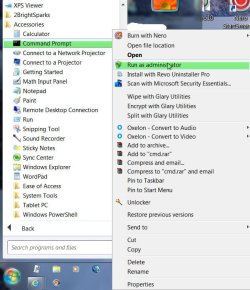
Start > All Programs > Accessories > Command Prompt > Right click
Run as Administrator.
Type
sfc /scannow after the command prompt and press
Enter
When finished open the sfc log file at C > Windows > logs > CBS > CBS.log
Search for anything "cannot repair"
Report if there is any and then the procedure to copy the .dll files from the Windows 7 Installation Disk can be taken up. Some other expert can help you on this if I go missing.
If this is not the case other solutions can be rolled out.
EDIT:SFC - see Brink's tutorial
here