
| Windows 7: 4.1 audio only coming out of rear right speaker |
19 Nov 2011
|
#1 | | |
4.1 audio only coming out of rear right speaker As above.
I have a 4.1 surround system that I've been told can work with just the 3 port motherboard sound (red-green-blue ports), but the only sounds are coming out of the rear right speaker. Which is still screwy because it's activating RR when it should be coming out of RL.
I believe I have it set up correctly: Green jack => Green port (front speakers)
Black jack => Blue port (rear speakers) Red jack => Red port (subwoofer)
This is what it looks like from the Speakers properties window:
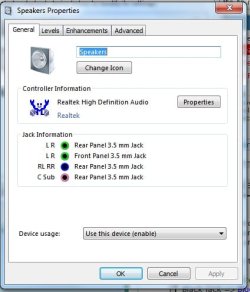
I do have "Disable front panel jack detection" marked, so it shouldn't be trying to play the front speakers through the headphones jack. But I'm thinking that might be the problem.
Any ideas?
Thanks in advance. | My System Specs |
| |
19 Nov 2011
|
#2 | | Windows 7, 64 bit Home SP1, Win 8 Pro 64 bit Citrus Co, FL |
Do you have the speakers configured in the Sound Panel/Playback? Click to highlight your speakers and then click the Configure button in the lower left of the panel.
In my setup, 4.1 is not an option, and may not be in yours so the 4.1 may never work completely right. 5.1 (or 7.1) is what is normally used, not the older 4.1 systems. | My System Specs | | Computer type PC/Desktop System Manufacturer/Model Number My Own Build OS Windows 7, 64 bit Home SP1, Win 8 Pro 64 bit CPU Intel i7 3770 Motherboard Gigabyte GA-Z77X-UD5H Memory 16GB GSkill Ripsaw F3-14900CL9Q-16GBXL Graphics Card Sapphire HD7770 Sound Card RealTek Monitor(s) Displays Viewsonic VA2448 Series 24" LED Screen Resolution 1920X1080 Keyboard Kensington wired Mouse Logitech Wireless PSU Antec High Current Gamer HCG-620M Modular Case Coolermaster HAF XM Cooling Corsair H80 Liquid cooling with aftermarket Nexus quiet fans Hard Drives 240GB Intel 520 SSD for Win 7
128GB OCZ Vertex 4 SSD for Win 8
1 TB Seagate drive for backup Internet Speed 40 MB/sec (Cable) Antivirus Microsoft Security Essentials and Malwarebytes Browser I.E9/Firefox Other Info Sonar X2 Professional 64 bit Recording Software with Roland Octa-Capture and MAudio Fast Track Ultra 8R recording interfaces, Frontier Tranzport wireless control unit, Behringer BCF2000 Control Surface.
Five USB connected optical drives for CD Audio production using Nero 11
Other systems: Desktop with i5 3550 CPU, LenovoZ560 Laptop with Win 7 64 bit HP, SP1, new iPad |
19 Nov 2011
|
#3 | | Windows 7 Pro-x64 South Texas |
Click on the Levels tab and see if the speaker volume is turned up. There's also a Balance level for front and rear speakers. You may have to scroll down to get to the speakers. | My System Specs | | Computer type PC/Desktop System Manufacturer/Model Number Built 2/11/2011 OS Windows 7 Pro-x64 CPU i7-2600 3.4GHz - 3.8GHz Turbo Motherboard Intel DH67BL-B3 Memory 8Gb - 2x4GB, Muskin 991770 PC3-1333 Graphics Card Integrated Intel HD 2000 Sound Card Integrated Intel 10.1 HD, RealTek ALC892 Monitor(s) Displays Asus LCD VH222H, Haier HL24XSL2a Screen Resolution 1920x1080, 1920x1080 Keyboard Logitech EX100 Wireless Mouse Logitech EX100 Wireless PSU Seasonic 650W 80+ Gold Modular Case Rosewill Defender Cooling Stock CPU, Four 120mm case fans, PCH fan added Hard Drives Crucial C300-128Gb,
Western Digital WD5002AALX - 500Gb,
Western Digital WD7501AALS - 750Gb Internet Speed 2.5/1.5 Mbs Antivirus Microsoft Security Essentials Browser Microsoft Internet Explorer 10 Other Info Antec Veris Premier-Multimedia IR Station,
Cyber Accoustics-3602 Speakers,
AFT XM-5U Card Reader,
Hauppauge TV-HVR-2250,
Sony LX300 USB Turntable |
19 Nov 2011
|
#4 | | Windows 7 Pro-x64 South Texas |
Ditto what Fireberd says also. Forgot about the Configuration. | My System Specs | | Computer type PC/Desktop System Manufacturer/Model Number Built 2/11/2011 OS Windows 7 Pro-x64 CPU i7-2600 3.4GHz - 3.8GHz Turbo Motherboard Intel DH67BL-B3 Memory 8Gb - 2x4GB, Muskin 991770 PC3-1333 Graphics Card Integrated Intel HD 2000 Sound Card Integrated Intel 10.1 HD, RealTek ALC892 Monitor(s) Displays Asus LCD VH222H, Haier HL24XSL2a Screen Resolution 1920x1080, 1920x1080 Keyboard Logitech EX100 Wireless Mouse Logitech EX100 Wireless PSU Seasonic 650W 80+ Gold Modular Case Rosewill Defender Cooling Stock CPU, Four 120mm case fans, PCH fan added Hard Drives Crucial C300-128Gb,
Western Digital WD5002AALX - 500Gb,
Western Digital WD7501AALS - 750Gb Internet Speed 2.5/1.5 Mbs Antivirus Microsoft Security Essentials Browser Microsoft Internet Explorer 10 Other Info Antec Veris Premier-Multimedia IR Station,
Cyber Accoustics-3602 Speakers,
AFT XM-5U Card Reader,
Hauppauge TV-HVR-2250,
Sony LX300 USB Turntable |
20 Nov 2011
|
#5 | | |

Quote: Originally Posted by fireberd Do you have the speakers configured in the Sound Panel/Playback? Click to highlight your speakers and then click the Configure button in the lower left of the panel.
In my setup, 4.1 is not an option, and may not be in yours so the 4.1 may never work completely right. 5.1 (or 7.1) is what is normally used, not the older 4.1 systems. I checked, and I set it to Quadraphonic. 
Quote: Originally Posted by carwiz Click on the Levels tab and see if the speaker volume is turned up. There's also a Balance level for front and rear speakers. You may have to scroll down to get to the speakers. Speaker volume is up to 100% across the board.
Now instead of just the RR giving off RL output, ALL sounds are going through RR speaker. So when it tests the speakers, L, R, RL, RR all get outputted from RR. And each at different loudness too.
Screwier and screwier.... | My System Specs | | |
20 Nov 2011
|
#6 | | Windows 7 Pro-x64 South Texas |
Are you certain the speakers work? Do you have a radio or other device to test them?
What is the configuration of your speakers? Is the subwoofer on a separate plug or part of a front/rear set (2.1)?
Remove the plugs and re-insert. Make sure they are going in all the way. | My System Specs | | Computer type PC/Desktop System Manufacturer/Model Number Built 2/11/2011 OS Windows 7 Pro-x64 CPU i7-2600 3.4GHz - 3.8GHz Turbo Motherboard Intel DH67BL-B3 Memory 8Gb - 2x4GB, Muskin 991770 PC3-1333 Graphics Card Integrated Intel HD 2000 Sound Card Integrated Intel 10.1 HD, RealTek ALC892 Monitor(s) Displays Asus LCD VH222H, Haier HL24XSL2a Screen Resolution 1920x1080, 1920x1080 Keyboard Logitech EX100 Wireless Mouse Logitech EX100 Wireless PSU Seasonic 650W 80+ Gold Modular Case Rosewill Defender Cooling Stock CPU, Four 120mm case fans, PCH fan added Hard Drives Crucial C300-128Gb,
Western Digital WD5002AALX - 500Gb,
Western Digital WD7501AALS - 750Gb Internet Speed 2.5/1.5 Mbs Antivirus Microsoft Security Essentials Browser Microsoft Internet Explorer 10 Other Info Antec Veris Premier-Multimedia IR Station,
Cyber Accoustics-3602 Speakers,
AFT XM-5U Card Reader,
Hauppauge TV-HVR-2250,
Sony LX300 USB Turntable |
20 Nov 2011
|
#7 | | |

Quote: Originally Posted by carwiz Are you certain the speakers work? Do you have a radio or other device to test them?
What is the configuration of your speakers? Is the subwoofer on a separate plug or part of a front/rear set (2.1)?
Remove the plugs and re-insert. Make sure they are going in all the way. Yes, I know they work. The backstory is that I had an audio card (Creative Xi-Fi, or something along those lines) and the speakers worked fine. I got a new graphics card, but it's a double-wide (GeForce 560 Ti), so now there's no room for the sound card because otherwise it'll be right on top of the video card. Hence the move back to onboard sound.
The configuration (I'm no expert on speakers, so please bear with me) is that the 4 speakers (R, L, RR, RL) all plug into the subwoofer. From there, the subwoofer plugs into the computer with a red, green, and black cable. | My System Specs | | |
20 Nov 2011
|
#8 | | Windows 7 Pro-x64 South Texas |
Check your BIOS. Some motherboards require the on-board audio to be "enabled".
Then Configure your sound as 5.1 and disable the Center channel. Quad is four speakers. The subwoofer may be confusing the setup.
Some system specs would help. | My System Specs | | Computer type PC/Desktop System Manufacturer/Model Number Built 2/11/2011 OS Windows 7 Pro-x64 CPU i7-2600 3.4GHz - 3.8GHz Turbo Motherboard Intel DH67BL-B3 Memory 8Gb - 2x4GB, Muskin 991770 PC3-1333 Graphics Card Integrated Intel HD 2000 Sound Card Integrated Intel 10.1 HD, RealTek ALC892 Monitor(s) Displays Asus LCD VH222H, Haier HL24XSL2a Screen Resolution 1920x1080, 1920x1080 Keyboard Logitech EX100 Wireless Mouse Logitech EX100 Wireless PSU Seasonic 650W 80+ Gold Modular Case Rosewill Defender Cooling Stock CPU, Four 120mm case fans, PCH fan added Hard Drives Crucial C300-128Gb,
Western Digital WD5002AALX - 500Gb,
Western Digital WD7501AALS - 750Gb Internet Speed 2.5/1.5 Mbs Antivirus Microsoft Security Essentials Browser Microsoft Internet Explorer 10 Other Info Antec Veris Premier-Multimedia IR Station,
Cyber Accoustics-3602 Speakers,
AFT XM-5U Card Reader,
Hauppauge TV-HVR-2250,
Sony LX300 USB Turntable |
21 Nov 2011
|
#9 | | |

Quote: Originally Posted by carwiz Remove the plugs and re-insert. Make sure they are going in all the way. This seems to have solved it. I don't know why, but I unplugged EVERYTHING and plugged it all back together. Maybe the computer just needed everything to be reconnected to recognize it. I'm not sure.
The other thing I did was uninstall all the old Creative drivers and programs, which didn't make a difference until I reconnected everything, but perhaps that helped.
Also, the system is now set to 5.1 Speakers.
Thanks for all your help! | My System Specs | | |
21 Nov 2011
|
#10 | | Windows 7 Pro-x64 South Texas |
Glad you have it working.
Sometimes it's the simple things that give the most trouble. | My System Specs | | Computer type PC/Desktop System Manufacturer/Model Number Built 2/11/2011 OS Windows 7 Pro-x64 CPU i7-2600 3.4GHz - 3.8GHz Turbo Motherboard Intel DH67BL-B3 Memory 8Gb - 2x4GB, Muskin 991770 PC3-1333 Graphics Card Integrated Intel HD 2000 Sound Card Integrated Intel 10.1 HD, RealTek ALC892 Monitor(s) Displays Asus LCD VH222H, Haier HL24XSL2a Screen Resolution 1920x1080, 1920x1080 Keyboard Logitech EX100 Wireless Mouse Logitech EX100 Wireless PSU Seasonic 650W 80+ Gold Modular Case Rosewill Defender Cooling Stock CPU, Four 120mm case fans, PCH fan added Hard Drives Crucial C300-128Gb,
Western Digital WD5002AALX - 500Gb,
Western Digital WD7501AALS - 750Gb Internet Speed 2.5/1.5 Mbs Antivirus Microsoft Security Essentials Browser Microsoft Internet Explorer 10 Other Info Antec Veris Premier-Multimedia IR Station,
Cyber Accoustics-3602 Speakers,
AFT XM-5U Card Reader,
Hauppauge TV-HVR-2250,
Sony LX300 USB Turntable 4.1 audio only coming out of rear right speaker problems? All times are GMT -5. The time now is 04:39 AM. | |