Solved Wireless headphones give no sound after new Monitor Installation

TedPacheco

New member
Member
Local time
9:45 PM
Messages
20
I bought These wireless headphones about 3 months ago at Future Shop. When I first installed them to my computer, they were working very fine until two days ago when I had to change my monitor because the screen lights died out. I then, bought a new monitor LCD P2770FH 27" manufactured by Samsung.

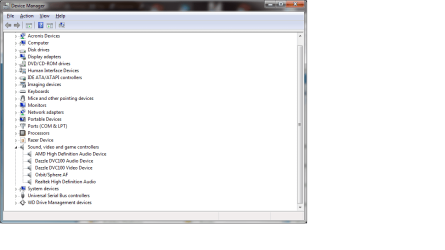
With the new monitor installed, I couldn't anymore see my USB Audio Codec Driver in my Sound Window, the one I used to set as default so that I can enjoy my Sennheiser wireless Headphones. To get to the Sound Window, one has to right-click the speaker in the notification area, then left-click Playback devices. That will open the sound Panel or window where one can see all the speakers and microphone. The only speaker I have now is "Realtek High definition Audio" . That means I can't use my headphones anymore, but my speakers are working fine and I really don't Know what to do.

This is very mind-boggling since I don't seem to be able to find a solution after surfing the WEB for a week now. I was wondering if you could help me with this ordeal.

See My system specs below.

View attachment 185671

Sound Window.png

Sound, Video and Game Controllers in Device Manager.png
 

Attachments

  • System Specs.png
    System Specs.png
    42 KB · Views: 57

My Computer My Computer

At a glance

Windows 7
OS
Windows 7
Try updating the driver for your wireless Headset an re-plugging the USB transmitter.
 

My Computer My Computer

At a glance

Windows 7 Ultimate x64Intel Core2 Quad Q8300 2.5GhzKingston HyperX 4x1GB DDR2 1066MhzAsus/Nvidia 9500GT 1GB
Computer type
PC/Desktop
Computer Manufacturer/Model Number
Self Build
OS
Windows 7 Ultimate x64
CPU
Intel Core2 Quad Q8300 2.5Ghz
Motherboard
Asus P5QD Turbo
Memory
Kingston HyperX 4x1GB DDR2 1066Mhz
Graphics Card(s)
Asus/Nvidia 9500GT 1GB
Sound Card
On-Board HD
Monitor(s) Displays
22" Widescreen TFT
Screen Resolution
1920x1080
Hard Drives
2x 320Gb Seagate SATAII RAID 0
2x 80Gb Seagate SATAII RAID 0
1x 1tb hybrid (8gb ssd)
PSU
650w
Case
ATX
Cooling
140mm front, 120mm Rear, 80mm Chipset + stock CPU and GPU
Keyboard
Plastic one
Mouse
Plastic one
Internet Speed
4Mbps
Other Info
Laptop: HP Elitebook 2560p
i5 @2.7Ghz 4GB DDR3
Hi

How do you connect to your monitor? If it's via HDMI, it might send sound to the monitor via the HDMI cable...

Grtz?
Martin
 

My Computer My Computer

At a glance

Windows 7 Home Premium 32 bit
Computer type
Laptop
Computer Manufacturer/Model Number
HP Probook 4710s
OS
Windows 7 Home Premium 32 bit
Hard Drives
Fujitsu
Mouse
Touchpad
Thanks for both replies.

My wireless headphones "Sennheiser" only has two cords: one is audio cord that goes to the audio jack in the back of my monitor and the other one is power cord which goes to an electric outlet. According to the support team at Sennheiser it is supposed to work just like that, which holds true with my previous monitor.

Things I have already tried:
- Uninstalling every driver under "Universal Serial Bus Controllers" in Device Manager and rebooting.
- Uninstalling everything under Sound, Video and Game controllers in device Manager and rebooting.
- I even ran "Driver Detective" to see if some driver is out-of-date. The results came up with no out-of-date drivers and the USB audio codec Driver I used to set as default in the Sound window under Playback tab whenever I wanted to use my headphones is shown in that application as unplugged device among others. I have already checked everything connected to my PC and all seemed to be in proper order. Like I already said my speakers are working fine.
- In BIOS: Onboard audio is enabled.
-Finally, I tried to unplug everything UBS cord connected to my PC after shutting it down. Then, I restarted the PC and plugged them back one by one.

All of these were to no avail. I am at a standstill and it's very frustrating.

Now my responses to both suggestions above:
1) The HDMI cable (Optical cable) is not connected as shown in my attachments above.
2) I don't know of any driver for my headset. The only driver shown in the Sound window is the "Realtek High Definition Audio Device" seen in the attachments above and it is set as the default speaker.

Anymore suggestions would be greatly appreciated.
 

My Computer My Computer

At a glance

Windows 7
OS
Windows 7
So the headphones are not USB at all, they connect to an existing 3.5mm output and power and transmit from a peripheral device.

Were they connected to a USB Audio adapter? If so I should imagine this is wherein your problem lies.

Please try connecting the headphones transmitter to the (green) 3.5mm headphone jack on the back panel (assuming desktop by limited system specs)
 

My Computer My Computer

At a glance

Windows 7 Ultimate x64Intel Core2 Quad Q8300 2.5GhzKingston HyperX 4x1GB DDR2 1066MhzAsus/Nvidia 9500GT 1GB
Computer type
PC/Desktop
Computer Manufacturer/Model Number
Self Build
OS
Windows 7 Ultimate x64
CPU
Intel Core2 Quad Q8300 2.5Ghz
Motherboard
Asus P5QD Turbo
Memory
Kingston HyperX 4x1GB DDR2 1066Mhz
Graphics Card(s)
Asus/Nvidia 9500GT 1GB
Sound Card
On-Board HD
Monitor(s) Displays
22" Widescreen TFT
Screen Resolution
1920x1080
Hard Drives
2x 320Gb Seagate SATAII RAID 0
2x 80Gb Seagate SATAII RAID 0
1x 1tb hybrid (8gb ssd)
PSU
650w
Case
ATX
Cooling
140mm front, 120mm Rear, 80mm Chipset + stock CPU and GPU
Keyboard
Plastic one
Mouse
Plastic one
Internet Speed
4Mbps
Other Info
Laptop: HP Elitebook 2560p
i5 @2.7Ghz 4GB DDR3
That"s right the headphones are not USB and they were not connected to a USB audio adpter. The peripheral device for transmission is where the headphones sit for the batteries to be recharged when I am not using them.

Connecting the headphones' audio cord (transmitter) to the 3.5 mm headphone jack in the back panel of my PC did indeed make things work. I got sound. I really, really thank you, Sub Styler, for your advice. Even if I'll have to unplug and replug the speakers and headphones whenever I want to use either one of them, I can live with that. It's better than nothing.

A great many thanks again Sub.

PS- Just by curiosity, where doest it come from that "USB audio Codec Driver". Is there a site where one can download it or is part of a chipset?
 

My Computer My Computer

At a glance

Windows 7
OS
Windows 7

My Computer My Computer

At a glance

Windows 7 Ultimate x64Intel Core2 Quad Q8300 2.5GhzKingston HyperX 4x1GB DDR2 1066MhzAsus/Nvidia 9500GT 1GB
Computer type
PC/Desktop
Computer Manufacturer/Model Number
Self Build
OS
Windows 7 Ultimate x64
CPU
Intel Core2 Quad Q8300 2.5Ghz
Motherboard
Asus P5QD Turbo
Memory
Kingston HyperX 4x1GB DDR2 1066Mhz
Graphics Card(s)
Asus/Nvidia 9500GT 1GB
Sound Card
On-Board HD
Monitor(s) Displays
22" Widescreen TFT
Screen Resolution
1920x1080
Hard Drives
2x 320Gb Seagate SATAII RAID 0
2x 80Gb Seagate SATAII RAID 0
1x 1tb hybrid (8gb ssd)
PSU
650w
Case
ATX
Cooling
140mm front, 120mm Rear, 80mm Chipset + stock CPU and GPU
Keyboard
Plastic one
Mouse
Plastic one
Internet Speed
4Mbps
Other Info
Laptop: HP Elitebook 2560p
i5 @2.7Ghz 4GB DDR3
No, I don't have a front panel audio output that connects to an internal USB header, but I am sure going to check the URL address you gave me for amazon and I'll let you know if I come up with anything .

Thanks again Buddy.
 

My Computer My Computer

At a glance

Windows 7
OS
Windows 7
Two thumbs up for you, Sub. I just got back from buying a 3.5 mm audio jack splitter adapter. It allows me to connect both my headphones and my speaker to the audio jack in the back of the PC and guess what. They are both working. I am basically in heaven thanks to you, Buddy.

I don't know how to thank you anymore.

Respectful salutations.
 

My Computer My Computer

At a glance

Windows 7
OS
Windows 7
Back
Top