Windows 7 Forums Search
Welcome to Windows 7 Forums. Our forum is dedicated to helping you find solutions with any problems, errors or issues you are experiencing with Windows 7. The Windows 7 forum also covers news and updates and has an extensive Windows 7 tutorial section that covers a wide range of tips and tricks.


Windows 7 - Sound control panel configuration

 
12-24-2011   #1


Windows 7 Professional x64


Sound control panel configuration

I just got new 5.1 surround sound speakers and i have a couple of problems configuring them properly.

1. with higher frequency there's a static noise, which i believe has to do with treble, in the control panel the sound configuration doesnt offer any option to change this, any tool which i could use?

2.i changed the speaker volume according to where they are, so for example my right speaker for being much closer is quieter.
but now this configuration is assigned to all my jackets, so if i plug in my headphones in the front jacket i have the same alteration.
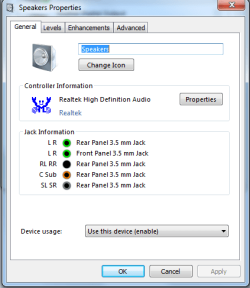
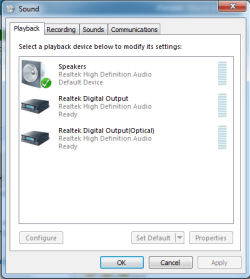
Sound control panel configuration-sound2.pngSound control panel configuration-sound1.png
in the jack information it specifies ALL jacks for that device.
and in the device list there used to be a headphone device too, not just speakers and the 2 other realtek stuff.

is there anyway to change the jacks for the specific devices?

maybe an overall different software which works better and has more options.
thanks for any help.

My System SpecsSystem Spec
12-24-2011   #2


Windows 7 x64 sp1


The high pitched sound usually occurs when you have your out set greater than about 75% of the computer's max and are using high end speakers.
The audio devices in computers just aren't made to push super high volumes and they get over strained when you push the volume way up.

I'm guessing the speakers are already amplified.
I guess that leads to my biggest burning question.

I see you have optical out as an option.
why are you not using that? I mean it's 1 cable for all the channels.
My System SpecsSystem Spec
12-25-2011   #3


Windows 7 Professional x64


i dont think i have those jacks.
i have (output):
Line-Out: Green - Line Out, is a connector for speakers or headphones.
RS-Out: Black - Rear-Surround Out in 4/5.1/7.1 channel mode
CS-Out: Orange - Center/Subwoofer Out in 5.1/7.1 Channel mode
SS-Out: Gray - Side Surround Out 7.1 channel mode

iam currently using the green, black and orange jack as specified in the speakers manual.
then ive got a line in and a mic line in.
plus a line out: green and another mic at the front panel.

EDIT: i do have that optical port, but i dont have such a cable and my speakers have no such connector.
My System SpecsSystem Spec
.


12-25-2011   #4


Windows 7 Professional x64


entirely new problem now, all speakers work fine but when i play any sort of sound, movie music, be it from vlc media player or youtube the sound only comes from the front left and right speaker, the center, subwoofer and both rear speakers emit a quite static noise.
in windows i have it set to 5.1 channels and i cant find a solution, i searched in google and there were a few similar problems, but none had a solution.
My System SpecsSystem Spec
Reply

 Sound control panel configuration problems?


Thread Tools


Similar Threads for: Sound control panel configuration
Thread Forum
Sound in Control Panel problem Drivers
Can't open sound control panel Sound & Audio
Sound options in Control Panel unresponsive Sound & Audio
Can't open sound control panel Sound & Audio


All times are GMT -5. The time now is 11:28 PM.


Windows 7 Forums is an independent web site and has not been authorized,
sponsored, or otherwise approved by Microsoft Corporation.
"Windows 7" and related materials are trademarks of Microsoft Corp.
© Designer Media Ltd
  

1 2 3 4 5 6 7 8 9 10 11 12 13 14 15 16 17 18 19 20 21 22 23 24 25 26 27 28 29 30