Windows 7 Forums


Windows 7: no stereo mix option,help?

04 Jan 2012   #1

Windows 7 Ultimate 32bit
 
 
no stereo mix option,help?

I switched to Windows 7 with SP1 after Win XP but I noticed after installing Realtek newest drivers for my motherboard (it has ALC662 realtek audio chip) I don't have anymore option to record external sound from stereo mix,and in fact I don't even see stereo mix option in mixer so I can not activate it.All this worked normally in Windows XP but not in 7.
What do I need to do to be able to record external sound from my sound card,where has "stereo mix" option dissapear

My System SpecsSystem Spec

04 Jan 2012   #2

Windows 7 Ultimate x64 Service Pack 1
Doncaster, UK


Hi paparazzo79 and welcome to Windows 7 Forums

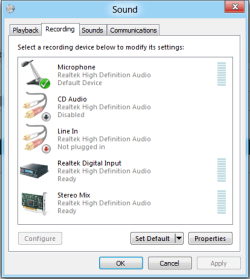
Stereo Mix is still available, however it needs to be enabled. Right-click the speaker icon in the Notification Area and choose Recording Devices from the pop-up menu. The Stereo Mix option should be displayed, if not you might need to scroll until it shows. If you don't see it, this means that it is hidden or disconnected. Right-click on the dialogue panel and check both Show Disabled Devices and Show Disconnected Devices.

no stereo mix option,help?-capture.png
My System SpecsSystem Spec
04 Jan 2012   #3

Windows 7 Ultimate 32bit


OK I did enabled it it was hidden.currently my microphone from my webcam is set as default recording device.And I set it as default device with microphone,it's green checked,thank you so much it works now.
It was hidden but I could not find it.
My System SpecsSystem Spec
.


04 Jan 2012   #4

Windows 7 Ultimate x64 Service Pack 1
Doncaster, UK


You're welcome.
My System SpecsSystem Spec
28 Feb 2012   #5

Windows 7 Ultimate 32bit


I have the same problem on my new toshiba notebook with connexant audio card,except now recording devices and disabled devices are both checked,but I only see Microphone under recording devices tab.What should I do to enable stero mix option?
My System SpecsSystem Spec
28 Feb 2012   #6

Windows 7 SP1, Home Premium, 64-bit


Quote   Quote: Originally Posted by paparazzo79 View Post
I have the same problem on my new toshiba notebook with connexant audio card,except now recording devices and disabled devices are both checked,but I only see Microphone under recording devices tab.What should I do to enable stero mix option?
Some sound cards do NOT support stereo mix, regardless of settings.

You can try older drivers--XP or Vista--in compatibility mode. That works in some cases.

If not, you would need to buy another internal or external sound card that is known to support stereo mix in Windows 7.
My System SpecsSystem Spec
19 Mar 2013   #7

Windows 7 Untimate x64


I have a Lenovo Think Centre M92p being built now for me.
The only sound card they offer with that model is the Realtek 662. This is my first Lenovo after using Dell's since '04 and most recently their POS Alienware Aurora R4 ATX. With that one I had ordered it with a Sound Blaster X-Fi Titanium. You could record off the board with this card, (after you d/l the driver).

I use it a lot for work.

After researching this question about 'what you hear' I am reading both no and yes as here.

Not sure when, but I do plan to get a different card but until the system arrives I guess it's anyone's guess if it will or won't?

...but I do have a question, this is a 5.1 card, I assume it has 5.1 jacks on the back, yes?

Thanks for any feedback..

Zb
My System SpecsSystem Spec
Reply

 no stereo mix option,help? problems?


Thread Tools


Similar help and support threads for: no stereo mix option,help?
Thread Forum
Asus motherboard No stereo mix option, need help. Sound & Audio
Solved No 5.1 option in Realtek HD Audio Mgr - only stereo Sound & Audio
Solved Stereo only option in Sounds applet in Control Panel Sound & Audio
Formatting option while selecting custom option... Installation & Setup
Sigmatel Audio - No 'Wave Out/Stereo Mix' option Sound & Audio


All times are GMT -5. The time now is 08:38 AM.


Seven Forums Android App Seven Forums IOS App Follow us on Facebook

Windows 7 Forums is an independent web site and has not been authorized,
sponsored, or otherwise approved by Microsoft Corporation.
"Windows 7" and related materials are trademarks of Microsoft Corp.
© Designer Media Ltd
  

1 2 3 4 5 6 7 8 9 10 11 12 13 14 15 16 17 18 19 20 21 22 23 24 25 26 27 28 29 30 31 32