|
Welcome to Windows 7 Forums. Our forum is dedicated to helping you find solutions with any problems, errors or issues you are experiencing with Windows 7. The Windows 7 forum also covers news and updates and has an extensive Windows 7 tutorial section that covers a wide range of tips and tricks.
Windows 7 - Question about getting best quality files off a CD |
01-10-2012
|
#1 | | Windows 7 Ultimate 64 bit |
Question about getting best quality files off a CD so i have a really high quality CD with .cda files on it.
windows media player lets me rip them as WAV and high quality mp3s at 192kbps.
can these .cda's be ripped to anything genuinely? like if i had a program that could rip to FLAC, would it really be FLAC?
i know you cant convert these things to anything genuine except for what it was from the start. except in a declining order of quality.
whats a good program to get FLAC files off this CD?
| My System Specs | | OS Windows 7 Ultimate 64 bit |
01-10-2012
|
#2 | | Windows 7 SP1, Home Premium, 64-bit |
WAVs are every bit as good as FLAC. Both are lossless.
You could convert them from WAV to FLAC, but I don't know why you would other than to save space.
I'm not sure what you mean by "I know you can't convert these things to anything genuine...". If you convert a WAV to an MP3, it's a genuine MP3, etc.
I can't name a program that will rip directly to FLAC, but there may be some. The easiest thing for you is to rip to WAV and then convert to FLAC if you must. | My System Specs | | System Manufacturer/Model Number Ignatz Special; 4 speed manual gearbox; factory air conditioning; one of one OS Windows 7 SP1, Home Premium, 64-bit CPU Intel Sandy Bridge i5-2500, not overclocked Motherboard Gigabyte H67A-UD3H-B3, full ATX Memory 4 GB Crucial DDR3-1333 Graphics Card none; graphics are integrated on CPU Sound Card onboard: Realtek ALC892; external: USB Behringer UF0-202 Monitor(s) Displays NEC 90GX2-BK 19" LCD Screen Resolution 800 x 640 Keyboard Leopold Tenkeyless with Cherry Blue switches, USB Mouse Logitech or Microsoft optical wired; either USB or PS 2 PSU Seasonic SS-560KM, modular Case Antec Solo II Cooling CPU: Scythe Big Shuriken; Case: Scythe Slipstream 800 & 500 Hard Drives System: Intel 320 Series SSD, 80 GB;
Data: Samsung Spinpoint 103SJ, 1 TB;
Backup: WD Caviar Green WD15EADS-00P8B0, 1.5TB Other Info Power consumption of this system, including monitor: 68 watts at idle; 144 watts at full load |
01-10-2012
|
#3 | | Windows 7, 64 bit Professional. SP1 |
When you rip as a wav file, that is "full fidelity" and "CD Quality" the same as what the commercial red book CD audio quality is. | My System Specs | | System Manufacturer/Model Number Home Built OS Windows 7, 64 bit Professional. SP1 CPU Intel Q6600 Motherboard Intel DP35DP Memory 8GB, A Data DDR2, PC 2-6400 Graphics Card NVIDIA GTS 450 OC Sound Card Ht Omega Striker 7.1 Monitor(s) Displays Viewsonic VA2448 Series 24" LED Screen Resolution 1920X1080 Keyboard Microsoft Mouse Logitech Wireless PSU XFX 750 Watt Black Edition, Modular Case Antec Nine Hundred Cooling Zerotherm CF900 Hard Drives 1 TB Hitachi Win 7 system drive
750 GB Western Digital With Vista 32 bit.
1 TB Seagate drive with Windows 8
1.5TB for Acronis Tru Image backups Internet Speed 40 MB/sec (Cable) Other Info ProTools MP9 and Sonar X1D Extended PE DAW with Roland Octa-Capture and MAudio Fast Track Ultra 8R recording interfaces, Frontier Tranzport wireless control unit, Behringer BCF2000 Cointrol Surface.
Five USB connected optical drives for CD Audio production using Nero 11
Other systems: LenovoZ560 Laptop with Win 7 64 bit HP, SP1, Dell Dimension E510 with Vista 32 bit HP, new iPad |
01-10-2012
|
#4 | | Windows 7 Ultimate 64 bit |

Quote: Originally Posted by ignatzatsonic WAVs are every bit as good as FLAC. Both are lossless.
You could convert them from WAV to FLAC, but I don't know why you would other than to save space.
I'm not sure what you mean by "I know you can't convert these things to anything genuine...". If you convert a WAV to an MP3, it's a genuine MP3, etc.
I can't name a program that will rip directly to FLAC, but there may be some. The easiest thing for you is to rip to WAV and then convert to FLAC if you must. what i meant was you can't convert like, lower quality to higher quality ... like it would have the extension but none of the other properties.
Ok im probably going to rip the .cda's to .wav, but i want a higher bitrate than what windows mediaplayer offers... 
Quote: Originally Posted by fireberd When you rip as a wav file, that is "full fidelity" and "CD Quality" the same as what the commercial red book CD audio quality is. awesome! thank you, i like the term "full fidelity" so is bit rate the same way?
since in windows mediaplayer i only the option for 190kbps does that mean that THATS the bit rate of the file on the CD?
or is bitrate variable. ... like here i guess to put it in understandable terms (i'm new to this stuff)
uhh if you raise the bitrate of a .wav from 190kbps to 320kbps is that... a real/genuine/same qaulity as a 320kbps .wav?
is the bitrate of the .wav the bitrate of that .wav forever? the bitrate it was recorded in?
or will bitrate differences be noticeable if raised using a program.
analogously, if you (idk why anyone would) take a .wav with a bitrate of 320kbps and lower it to 190kbps .... what happens? lol nothing?
thanks guys.
---------------------------
so now i am okay with just ripping the .cda to .wav, but i just need a higher bitrate than 190kbps. will look up a program.
----
where can i see these statistics of a file??? like the bitrate, obviously the type in the extension. how can i see the bitrate? | My System Specs | | OS Windows 7 Ultimate 64 bit |
01-10-2012
|
#5 | | Windows 7 Ultimate 64 bit |
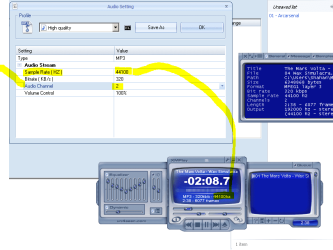
okay sorry, answered some of my questions, but in this picture... what is sample rate? what effect does that have? and what sample rate should my media player have.
the picture is of a mp3 converter program and of a mediaplayer | My System Specs | | OS Windows 7 Ultimate 64 bit |
01-10-2012
|
#6 | | |
sample rate of 44100 is the same as a standard audio CD.
in simple terms, when the music file gets converted from analogue to digital, a measurement of the volume is made 44100 times a second, which results in a very accurate digital representation of the original sound file.
keep this figure as it is - making it any higher won't make your music sound any better - making it lower will make it worse!
your screenshot shows the data rate of 320 kB/s, which looks wrong - i think the programmer has made an error here, it should say 320 k b/s. 1 kB is a kilobyte which equals 8 kb (kilobit).
strictly speaking, you will lose a little bit of fidelity here as you're ripping to mp3, which is a lossy format - although saying that, i strongly doubt if you will hear any quality difference, as 320 kb/s is a high data rate, and you aren't losing very much.
looking at your equaliser setting, it doesn't seem as if you're that interested in fidelity anyways!
Last edited by mickey megabyte; 01-10-2012 at 03:01 PM..
| My System Specs | | System Manufacturer/Model Number mickey megabyte 1234 OS ultimate 64 sp1 CPU i5 2500K 3.3@4.2GHz Motherboard MSI P67A-GD53 Memory 8 gigs GSkill Ripjaws 1600 Graphics Card amd hd6950 Sound Card creative x-fi gamer Monitor(s) Displays samsung 24" Screen Resolution 1920x1080 Keyboard saitek eclipse ii Mouse logitech g3 PSU antec 550 Case antec three hundred Cooling i'm a cooling fan Hard Drives ocz vertex 2e 60 gig, samsung f3 1tb, buffalo 2tb ext Internet Speed about 4 Mbps Other Info i love win7 |
01-10-2012
|
#7 | | Windows 7 Ultimate 64 bit |

Quote: Originally Posted by mickey megabyte sample rate of 44100 is the same as a standard audio CD.
in simple terms, when the music file gets converted from analogue to digital, a measurement of the volume is made 44100 times a second, which results in a very accurate digital representation of the original sound file.
keep this figure as it is - making it any higher won't make your music sound any better - making it lower will!
your screenshot shows the data rate of 320 kB/s, which looks wrong - i think the programmer has made an error here, it should say 320 k b/s. 1 kB is a kilobyte which equals 8 kb (kilobit).
strictly speaking, you will lose a little bit of fidelity here as you're ripping to mp3, which is a lossy format - although saying that, i strongly doubt if you will hear any quality difference, as 320 kb/s is a high data rate, and you aren't losing very much.
looking at your equaliser setting, it doesn't seem as if you're that interested in fidelity anyways!  yeah lol i think the program is foreign... or something i'll make sure thanks for pointing that out, also NOO i do care about fidelity lol... im just messing around with the EQ.
whats a good EQ setting? i know its highly up to the user but whats good? or high fidelity? all leveld? | My System Specs | | OS Windows 7 Ultimate 64 bit |
01-10-2012
|
#8 | | Windows 7 Home Premium 64bit |
You can always Compress.
Say FLAC or CD to 320 MP3.
But you can not add quality. In otherwords, taking a 320bit rate MP3, and converting it to 1000 bitrate FLAC will still sound like the 320bit version, maybe slightly worse.
So just remember, compressing is a one way thing. You cant add bits back once they been removed. | My System Specs | | System Manufacturer/Model Number Custom (Self Build) OS Windows 7 Home Premium 64bit CPU Intel Core i7 2700k (4.5Ghz) Motherboard eVGA P67 SLI Memory 2x4GB Mushkin Redline Ridgebacks (@1866) Graphics Card EVGA GTX570 SuperClocked (1280MB) Sound Card XiFi Titanium HD Monitor(s) Displays LG W2453V Screen Resolution 1920x1080 Keyboard Saitek Cyborg PSU Seasonic x750 Case Corsair 600T (SE White) Cooling eVGA Superclocked CPU Cooler Hard Drives [OS SSD]Intel 320 (80GB) -- Intel X25-V (40GB) --WD Black (1TB)x2 -- WD Blue (640GB) Other Info LG BD/DVD |
01-10-2012
|
#9 | | Windows 7 SP1, Home Premium, 64-bit |

Quote: Originally Posted by Sporus
whats a good EQ setting? i know its highly up to the user but whats good? or high fidelity? all leveld? Rip it "flat" with no EQ adjustments.
After you get it ripped, then experiment and see what EQ settings you like. Make the adjustments in an audio editor such as Audacity and resave as another WAV.
If you are going to convert to mp3, do that as the final step, after all editing and EQ adjustments. | My System Specs | | System Manufacturer/Model Number Ignatz Special; 4 speed manual gearbox; factory air conditioning; one of one OS Windows 7 SP1, Home Premium, 64-bit CPU Intel Sandy Bridge i5-2500, not overclocked Motherboard Gigabyte H67A-UD3H-B3, full ATX Memory 4 GB Crucial DDR3-1333 Graphics Card none; graphics are integrated on CPU Sound Card onboard: Realtek ALC892; external: USB Behringer UF0-202 Monitor(s) Displays NEC 90GX2-BK 19" LCD Screen Resolution 800 x 640 Keyboard Leopold Tenkeyless with Cherry Blue switches, USB Mouse Logitech or Microsoft optical wired; either USB or PS 2 PSU Seasonic SS-560KM, modular Case Antec Solo II Cooling CPU: Scythe Big Shuriken; Case: Scythe Slipstream 800 & 500 Hard Drives System: Intel 320 Series SSD, 80 GB;
Data: Samsung Spinpoint 103SJ, 1 TB;
Backup: WD Caviar Green WD15EADS-00P8B0, 1.5TB Other Info Power consumption of this system, including monitor: 68 watts at idle; 144 watts at full load |
01-10-2012
|
#10 | | |

Quote: Originally Posted by Sporus ...
whats a good EQ setting? i know its highly up to the user but whats good? or high fidelity? all leveld? what's a good eq setting? whatever sounds good to your ears!
every piece of music, every set of speakers, the room that they are in, and the listener's ears and preferences are all different, so it's impossible to recommend a set setting. personally, i leave my eq flat, then add a bit of bass on my hifi amp - it's definitely a personal thing.
*edit* i had to edit my first post above - i may have misled you about your 44100 sample rate - i meant to say making it lower will make your music sound worse - oops! keep it at 44100. | My System Specs | | System Manufacturer/Model Number mickey megabyte 1234 OS ultimate 64 sp1 CPU i5 2500K 3.3@4.2GHz Motherboard MSI P67A-GD53 Memory 8 gigs GSkill Ripjaws 1600 Graphics Card amd hd6950 Sound Card creative x-fi gamer Monitor(s) Displays samsung 24" Screen Resolution 1920x1080 Keyboard saitek eclipse ii Mouse logitech g3 PSU antec 550 Case antec three hundred Cooling i'm a cooling fan Hard Drives ocz vertex 2e 60 gig, samsung f3 1tb, buffalo 2tb ext Internet Speed about 4 Mbps Other Info i love win7 Question about getting best quality files off a CD problems? All times are GMT -5. The time now is 11:34 PM. |  |