Hello,
I'm gonna try and lay out my problem very simply, and then tell you what I have tried/done.
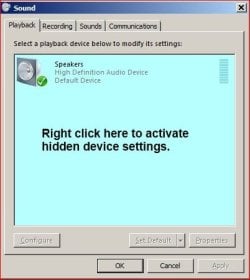
PROBLEM: When I plug in Headphones, I can not hear anything, and in the playback devices, nothing is shown to be plugged in. This goes the same for my other audio device which is a bose sound dock (for ipod but I connect using a 3.5mm to 3.5mm cable)
Okay, so here goes. When I first build the system and installed windows, i wasn't thinking much of the sound as i was installing updates and video card drivers and what-not. I did, at some point, connect the bose to the computer using the 3.5mm jack on the front panel of the computer. It worked fine, I heard the little sounds the computer makes when logging on. Since then I have had troubles with my network card and ran windows update and various other things.
Now no sound works at all. When I realized this I tried:
-Changing the actual front panel cable that is connected to the mobo from hd audio to ac 97 (and changing the setting in the bios)
-Searched for many hours online trying many different solutions such as:
-updating drivers
-rolling back drivers
Other things i've tried:
-system restore
-update bios
-install audio drivers from mobo disc
I have moved past being extremely frustrated and I now just dont know what else to do.
I would greatly appreciate any feedback what so ever
Ask me any questions you want
I'm gonna try and lay out my problem very simply, and then tell you what I have tried/done.
PROBLEM: When I plug in Headphones, I can not hear anything, and in the playback devices, nothing is shown to be plugged in. This goes the same for my other audio device which is a bose sound dock (for ipod but I connect using a 3.5mm to 3.5mm cable)
Okay, so here goes. When I first build the system and installed windows, i wasn't thinking much of the sound as i was installing updates and video card drivers and what-not. I did, at some point, connect the bose to the computer using the 3.5mm jack on the front panel of the computer. It worked fine, I heard the little sounds the computer makes when logging on. Since then I have had troubles with my network card and ran windows update and various other things.
Now no sound works at all. When I realized this I tried:
-Changing the actual front panel cable that is connected to the mobo from hd audio to ac 97 (and changing the setting in the bios)
-Searched for many hours online trying many different solutions such as:
-updating drivers
-rolling back drivers
Other things i've tried:
-system restore
-update bios
-install audio drivers from mobo disc
I have moved past being extremely frustrated and I now just dont know what else to do.
I would greatly appreciate any feedback what so ever
Ask me any questions you want
My Computer
At a glance
Windows 7 64-bitAMD Athlon II X2 270 3.40 GHz4GB DDR3XFX Radeon 6790 1GB
- OS
- Windows 7 64-bit
- CPU
- AMD Athlon II X2 270 3.40 GHz
- Motherboard
- ASUS M5 A88-V EVO
- Memory
- 4GB DDR3
- Graphics Card(s)
- XFX Radeon 6790 1GB
- Hard Drives
- Western Digital "Caviar Green" 1TB 3.5in SATA
- PSU
- Corsair TX650
- Case
- Cooler Master HAF 932 Advanced Blue Edition
- Keyboard
- Razer Lycosa
- Mouse
- Logitech M110