
Windows 7 Forums Search
Welcome to Windows 7 Forums. Our forum is dedicated to helping you find solutions with any problems, errors or issues you are experiencing with Windows 7. The Windows 7 forum also covers news and updates and has an extensive Windows 7 tutorial section that covers a wide range of tips and tricks.


Windows 7 - Front panel to motherboard connection

 
02-01-2012   #1


Windows 7 Ulimate x64, Windows 7 Pro x64


Front panel to motherboard connection

I want to connect a front panel HD audio to my computers but not sure what goes where on the motherboard headers. Just to clarify two completely different systems no connection apart from network.


The front panel lines are Bass, Centre, Gnd, Rear-R, Rear-L, Front-R, Front-L, Mic –L & Mic-R. No problems with Gnd, but that leaves the other lines.


The motherboard headers are:
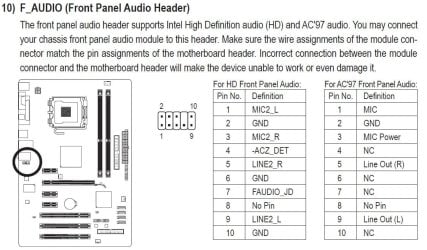
On the Gigabyte motherboard the 2 mic and gnd are obvious but what lines do the ACZ_Det , FAudio_JD & Line2 L & R go to.
On the ASUS motherboard Port1 L & R, Port2 L & R, Sense_Send, Presence#, Sense1_Retur and Sense2_Retur.


Oh where is the naming convention for these things

My System SpecsSystem Spec
02-01-2012   #2


Win 7 Home Premium 64bit Ver 6.1.7600 Build 7601 - SP1


Hi Bursal, welcome to 7F!

Since you failed to fill out your System Specs, except that you are working with Gigabyte, and Asus MB's it took me a while to at least get you to where you need to go to find the information you are looking for.

For Gigabyte go to: GIGABYTE - Support & Downloads - Downloads - Motherboard
You will see that there are already a list of MB's, and you can download their manuals there, but if you don't want to go through at least 6pages I suggest you do the search.

To give you a look at what I found, and make no mistake. I have no idea if this is your board.
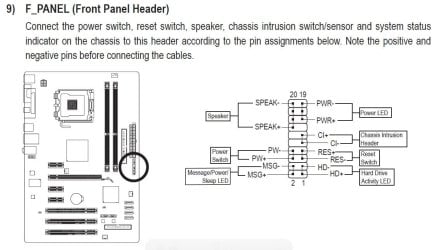
These pixs are from a GA-P41T-D3P User's Manual:
Front panel to motherboard connection-gbmb.jpgFront panel to motherboard connection-gbmb1.jpg

Descriptions to all the connections are below each diagram.


For the Asus it is a little different.
Go to: ASUSTeK Computer Inc. -Support- Drivers and Download
From there you can either automatically detect your MB or manually drill down for the manual of your board.

You already have the information you seek if you have the manuals to these boards
My System SpecsSystem Spec
02-02-2012   #3


Windows 7 Ulimate x64, Windows 7 Pro x64


Hi Anak

Thanks for the reply. I have both of the motherboard manuals but the problem is I don't understand the different terminology, ie is the which pin matches which line as there is nothing similar in the names. Even the two motherboards use different terms.
My System SpecsSystem Spec
.


02-02-2012   #4


Windows 7, 64 bit Professional. SP1


The standard "HD Audio" front panel connection does not have surround sound options, on all that I've seen. Also, there should be a missing (no) pin that lines up with the HD Audio connector for the case front panel.
My System SpecsSystem Spec
02-02-2012   #5


Win 7 Home Premium 64bit Ver 6.1.7600 Build 7601 - SP1


Are you assembling your own connectors from parts you have purchased from an electronics supply house?
If you are I can understand your angst.

One thought to keep in mind, are you sure those two boards have HD audio available?
Here is a similar thread:
AC'97 and HD audio front panel layouts
My System SpecsSystem Spec
02-02-2012   #6


Windows 7 Ulimate x64, Windows 7 Pro x64


Thanks for the replies and yes I am getting closer to solving the problem.

Both motherboards have HD audio, the ASUS has a VIA VT1818 8 channel HD Audio Codec which supports Jack-Detection, Multistreaming and Front Panel Jack-Retasking. The Gigabyte has a Realtek ALC889 codec which supports 2, 4, 5.1 & 7.1 channels and Dolby Home Threatre.

The front panel has four ports, Mic-in, Front_out, Rear_out and Cen/Bass, with a 9 line ribbon cable and individual connectors Centre, Bass, Front-R, Front-L, Rear-R, Rear-L, Mic-R, Mic-L and Gnd.

This is the info I have:
ASUS Header -Pin 1 - Port 1L, Pin 2 - Gnd, Pin 3 - Micpwr, Pin 4 - Presence#, Pin 5 - Port2R, Pin 6 - Sense1_Retur, Pin 7 - Sense_Send, Pin 8 - NC, Pin 9 - Port2L, Pin 10 - Sense2_Retur.

Gigabyte Header - Pin 1 - Mic2L, Pin 2 - Gnd, Pin 3 – Mic2_R, -AC_Det, Pin 5 - Line2_R, Pin 6 - Gnd, Pin 7 - Faudio_JD, Pin 8 - No Pin, Pin 9 - Line2_L, Pin 10 - Gnd.

From all of the reading I have done I assume that both headers have the same pin outs and that:
Pin 1 is Mic-L, Pin 2 is Gnd, Pin 3 is Mic-R, Pin 4 unknown (either Presence# or -AC_Det), Pin 5 is Front-R, Pin 6 is probablly Rear-R, Pin 7 is unknown (either Presence# or -AC_Det), Pin 8 is NC, Pin 9 is Front-L and Pin 10 is probablly Rear-L.

So I am left with front panel lines Centre, Bass, Rear left & right. I would assume that Sense1_Retur is Rear-R and Sense2_Retur is Rear-L, so now I am left with Bass and Centre.


Thanks again for your help.

Last edited by Bursal; 02-02-2012 at 06:44 PM..
My System SpecsSystem Spec
02-02-2012   #7


Windows 7 Ultimate x64


Well I don't know.
First I read this Creative Worldwide Support and thought it will only support front out and mic then I read this FRONTX - AC97 - HD High Definition - Intel Front Panel Audio Cable so your guess is as good as mine. But either way looks like you can't connect the Bass and Centre.

You could try contacting ASUS and Gigabyte they may be able to confirm what can be supported and how to plug it in.
My System SpecsSystem Spec
02-02-2012   #8


Windows 7 Ultimate x64


Looking at it again, if you compare the two pages you will find the pins for Line Out/Headphones, Mic and GND do match.

So at your own risk you could try the arrangement given in the second link for the ASUS board, although it does say
Quote:
In most cases, you do not have to shift the wires in the header connector, as these wires have been arranged to match perfectly with the IFPA / AC97 pinouts.
My System SpecsSystem Spec
02-04-2012   #9


Windows 7 Pro X64 SP1


Quote   Quote: Originally Posted by Bursal View Post
I want to connect a front panel HD audio to my computers but not sure what goes where on the motherboard headers. Just to clarify two completely different systems no connection apart from network.


The front panel lines are Bass, Centre, Gnd, Rear-R, Rear-L, Front-R, Front-L, Mic –L & Mic-R. No problems with Gnd, but that leaves the other lines.


The motherboard headers are:
On the Gigabyte motherboard the 2 mic and gnd are obvious but what lines do the ACZ_Det , FAudio_JD & Line2 L & R go to.
On the ASUS motherboard Port1 L & R, Port2 L & R, Sense_Send, Presence#, Sense1_Retur and Sense2_Retur.


Oh where is the naming convention for these things
It would be helpful to us (and you) if you supplied the model numbers of the motherboards, and the model of your case.

I take it from what you write that the case's front panel cable uses discrete pins rather than HD Audio or AC97 block connectors. Is that correct? (Some of the younger posters here may never have seen such a case, but I have one on hand like that. It's from 1997.)
My System SpecsSystem Spec
02-04-2012   #10


Windows 7 Ulimate x64, Windows 7 Pro x64


Thanks for erveryone who has replied, your time is much appreciated. I am beginning to think this will be one of those unsolved mysteries and will just use the USB ports.

The motherboards are Gigabyte - GA-880GM-USB3 and ASUS M4A87TD-EVO. The panel I would like to use is a 5.25" drive that I was given, no brand.
My System SpecsSystem Spec
Reply

 Front panel to motherboard connection problems?


Thread Tools


Similar Threads for: Front panel to motherboard connection
Thread Forum
Solved Front panel audio connections to motherboard Not Working! Sound & Audio
Front audio Panel doesn't work (ASUS P7P55D motherboard) Sound & Audio
front panel jacks Sound & Audio
Can a bad front panel cause a BSOD? Crashes and Debugging
Front panel.. Sound & Audio


All times are GMT -5. The time now is 01:49 AM.


Windows 7 Forums is an independent web site and has not been authorized,
sponsored, or otherwise approved by Microsoft Corporation.
"Windows 7" and related materials are trademarks of Microsoft Corp.
© Designer Media Ltd
  

1 2 3 4 5 6 7 8 9 10 11 12 13 14 15 16 17 18 19 20 21 22 23 24 25 26 27 28 29 30