Realtek HD Changing Jack output reassignments ( FIX )

Hope someone can help me out I just bought a new old stock motherboard because my old one died. It was a different brand motherboard.

Tis motherboard is still the LGA775. Asus P5QL-EM motherboard

This motherboard has Realtek ALC1200. I tried the newest version and old versions of the drivers and nothing will let me assign the Audio jacks manually like my old motherboard would.


I need 2 audio inputs. How can I change the grey output and make it an input?

It seems like everything in this thread Don't mention how to change an output to an input :(

Thanks the Newbie
 

My Computer

Computer type
PC/Desktop
Computer Manufacturer/Model Number
Custom Build
OS
Windows 7 Professional 64 Bit
CPU
Q6600
Motherboard
Asus P5QL-EM
Memory
4gb
Graphics Card(s)
Onboard
I don't know if your board is physical capable to use both jacks as line-in, chance are that one of em is not hardwired for that. Did you find the registery-keys I suggested in my other post?
 

My Computer

Computer type
Laptop
Computer Manufacturer/Model Number
Clevo P170em
OS
Windows 7 Ultimate x64
CPU
i7-3610QM
Motherboard
Clevo thinghy
Memory
2x4GB Crucial DDR3-1600
Graphics Card(s)
AMD 7970M
Hard Drives
Crucial M4-CT256M4SSD3 ATA Device (256 GB, SATA-III)
SAMSUNG HM641JI (640 GB, 5400 RPM, SATA-II)
WDC WD7500BPVT (750 GB, 5400 RPM, SATA-II)
Antivirus
Microsoft Security Essentials
Browser
Firefox
hi
im new to this form and saw ur post
im running windows 7 home premium on hp 620
at first i had a problem where my laptop thought that i always had the headphones plugged in and as such the speakers didnt work
now thts solved for some reason my speakers arent working, i only get the audio when i plug in headphones in the mic connectors in the front of my laptop i think the reason (im total crap at computers! :P ) is that its jack is labled as "front panel 3.5 mm jack." is there anyway to change this to its internal speakers
 

My Computer

Computer type
Laptop
Computer Manufacturer/Model Number
HP
OS
Windows 7 Home Premium
Browser
Internet Explorer
help pls?

hey guys, unfortunately, what i tried doesn't seem to be working, i can't even get to the proper folder, so if any of you would be so kind t oexplan this dummy style to me, please do.
first off, i would like to switch my audio and microphone jack around, since my audio jack just broke today.
i am using a (dutch!!) win 7 64 bit OS(i don't know wich tho) and my audio sollution is done by realtek.

if any of you could help me it would be greatly appreciated
 

My Computer

Computer type
Laptop
Computer Manufacturer/Model Number
hp pavilion g6 something something
OS
windows 7 64 bit
CPU
amd vision a4
Motherboard
unknown
Memory
8gb ddr3
Graphics Card(s)
apu integrated
Hard Drives
500 gb 2.5" hdd
Antivirus
norton
Browser
firefox
Windows 8.1

I have windows 8.1 64 instaled. I dont see any pins in regsiter only the 18 pin. Before win 8.1 i was running win 7 and it worked pefectly i saw all pins but after i upgraded to win 8.1 i dont have pins (only pin18) in register :confused:
 

My Computer

Computer type
PC/Desktop
OS
Windows 8.1 pro 64
Hello,

My problem is I installed Windows 7, the latest realtek drivers 2.73, and there is no settings folder in the registry under 0000, only a drivers folder. I have uninstalled and installed the realtek drivers several times. Does anyone know how to force the pin assignments. I have also searched the registry for PIN(long one there) and realtek, with no success. Thanks in advance

IP35 Pro and HD Drivers
 
Last edited:

My Computer

Computer type
PC/Desktop
OS
Windows7
Similar jack swap problem, Asus X54L

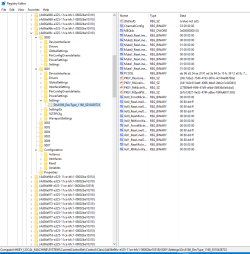
Hi! I have a similar problem.......I have an Asus X54L laptop, my audio output jack is broken so i want to use my mic. jack for audio output. after reading trough most of the posts, i cant figure out the logics behind this pin changing routine. :o This is what my regedit looks like at :D
"HKEY_LOCAL_MACHINE\SYSTEM\CurrentControlSet\Control\Class\{4D36E96C-E325-11CE-BFC1-08002BE10318}\0000\Settings\Drv6050_DevType_0889_SS80863a3e"
50gi.jpg
 

My Computer

Computer type
Laptop
Computer Manufacturer/Model Number
Asus X54L
OS
Windows 7 home premium 64bit
No 1/2/3/4 Pins

I'm running at Windows 8.1 Pro
here's some pics..
any suggestions??

it works on win 7 but when i update my windows it not works anymore
Driver at latest version
 

Attachments

  • Screenshot_1.png
    Screenshot_1.png
    109.4 KB · Views: 2
  • Screenshot_2.png
    Screenshot_2.png
    105 KB · Views: 2

My Computer

Computer type
PC/Desktop
Computer Manufacturer/Model Number
Custom Build
OS
Windows 8.1 Pro & Windows 7 Ultimate
CPU
Intel Pentium G645
Motherboard
ECS H61H2-MV (v1.0)
Memory
V-GEN Memory 4GB DDR3 1333MHz
Graphics Card(s)
Power Color ATI Radeon HD5570
Hard Drives
Seagate 500GB 7200RPM 3.5Inch
Seagate 250GB 5400RPM 2.5Inch
Antivirus
Smadav :v
Browser
Google Chrome
Fixed this (for some cases)

Hey All,

Was running from forum to forum trying to solve this. I have z97 mobo that I upgraded recently, old mobo allowed me to hotswap in windows. Followed various instructions, including those from reaper-x, all to no avail. Changing pins in the registry changed back upon restart. Also, in my registry only 4 pins were listed: Pin15, Pin18, Pin19, and Pin1a. Any attempt to modify or delete those values was undone whenever I restarted.

What I was trying to do: Have a pair of speakers sitting on my desk and a pair of headphones both take output as though they were the front speaker. I then turn my speakers on or off depending on whether I want to listen through headphones (speakers off) or just in the room (speakers on)

WHAT WORKED (for me): Brute force! Rather than trying to pick the RIGHT pin, I just took all non-listed pins and set them to binary value 04 00 00 00.
1e1b1879_RealtekJackFix01.png


When I rebooted, I opened up the realtek audio HD program and low-and-behold, my orange jack had become a front speaker!
fbf99646_RealtekJackFix02.png


If you are so inclined, you could also go through and delete each pin you added to figure out exactly which one caused the switch, or add more pins in the "Pin00" through "Pin0F". Just adding in all the pins as 04 00 00 00 (front speaker) solved my problem so I'll leave it here.

NOTE: If you are using a setup that already uses the orange jack, remapping this won't help you unless you don't mind losing the center/sub. This will only work if you are just trying to get two 'front speaker' outputs, without a more complex speaker setup.

Hope this helps!

x-posting this to some other websites that I looked for assistance on.
 

My Computer

Computer type
PC/Desktop
Computer Manufacturer/Model Number
custom
OS
Windows 7 Pro x64
Where there's a will...

Wow, guys!

I mean, wow!

Whoever discovered this needs some big time credit!!!

Does this only work if you have HD (etc) audio 'devices' (speakers and stuff) that you're connecting to?


I'm trying to see if I can do some kind of

app A -> audio device A (speakers)
app B -> audio device B (analog headphones in port 1)

I've just bought an SPDIF cable and subsequently discovered my old sony minisystem is optical OUT, not in. any suggestions for aspiring music producer kit (Hardware)? Do I need an amp and a mixer and some cabs for live setup?

I've been told previously that what I'm doing CAN'T be done (physically impossible due to underlying audio bus), and I fear that may be why I (and some others thread posters, ie bartrum) can't do some of this AWESOME stuff that y'all are doing...

Couple of q's in there.... I'll add one more to close

How do you identify which ALC (97,297,997,665) you have ? Found datasheet(s), they should help SOMEONE work out who can do what....

Very pleased for everyone (anyone!) that's had success with their audio endeavours - sure you all worked hard for your efforts, you deserve your rewards...
 

My Computer

Computer type
Laptop
Computer Manufacturer/Model Number
Dell
OS
Windows 7 Ultimate 64bit
CPU
2.2
Memory
8Gb
Graphics Card(s)
NVIDIA
Screen Resolution
1280/762
Mouse
built in pad || iphone || MS wireless
Internet Speed
100MB
Antivirus
Avast
Browser
Chrome, Chrome portable
Thankyou very much

A big Salute for this website and (Unforeseen) of the post no.115 I followed it with the help of reaperx post (which is located in another website) and managed to reassign the pins correctly ... took me days to solve it and also was about to buy a new sound card just for the sake of remapping those pins so I could use my hometheatre speakers the way they used to be . absolutely fantastic effort and hope all the best for the people who have struggles in managing the same problem :party::):cool:
 

My Computer

Computer type
PC/Desktop
Computer Manufacturer/Model Number
custom build
OS
windows 7 32bit
Throught these years I have looked for the info on this subject, lot of people unhappy about their audio not working because of the realtek settings. Thanks for all the work you people do in this forum. I will try to explain in short what is my problem:

- I have Gigabyte motherboard (look for my profile for detailed info) with onboard audio Realtek HD (driver for realtek installed from the gigabyte website - basically probably the same as realtek website driver, but this one has azalia in its name *.exe). I have also Geforce graphic card with Nvidia hd audio drivers installed, probably for HDMI

- since I have bought my computer, I've been having this problem: whenever I reboot computer, I lost sound. Everything is recognised as plugged in, unmuted, but there is no sound. What I have to do then is uninstall realtek driver, install it again and plug in the jacks and it works. Does it has to do with exclusive rights option or not, I tried it yesterday, it seems not because my sound is gone again (will check when i get home).

- another problem is using gaming headphones. Two days ago I purchased headphones, and only sound is working, but no mic. Strange thing is: when I first plug in mic in rear pink, it is recognised as rear pink on realtek panel. Then if i plug in headphones/green jack in rear green, it is recognised as rear green on realtek panel. BUT although I selected my mic on popup right, it is labeled as NOT PLUGGED IN in Properties (Recording devices).
If i plug in green jack in rear green, popup recognition becomes screwed up...It shows green as green, but when I plug in mic in rear pink, it recognise it as rear blue.
It's all mixed up, I think i saw even that when plugging in green i rear green, and pink in rear pink, it gets recognized as rear blue and pink, but i am not sure of this (will check).
I checked the pins in registry, if plugging in first pink then green, it show correct pins (I think Pin14 and PIN18, values 1 and 2, or other way 2 and 1, but that is correct). Just that my mic seems NOT PLUGGED IN, when it should have been. Is there any registry entries that can be changed that tell us which devices are plugged in, unplugged? Maybe those starting with PKEY_XXXX?


Any help will be appreciated. I saw many technicaly powerfull people here (I work in IT myself).

P.S. Last night I manage to get it work with green jack in rear green and pink jack in front pink, but it is all still messed up. Wanted to plug in speakers after finished gaming, when I unplug headphones and plug the speakers in (just green jack in rear green), my speakers didnt work again (and probably wont work until i reinstall the driver).

 

My Computer

Computer type
PC/Desktop
OS
Windows 7 Ultimate x64
CPU
Intel i3
Motherboard
Gigabyte GA-HSSM-S2
Graphics Card(s)
NVIDIA GTS 450
Hi.

I registered for the sole purpose to post in this thread, especially now that I see that it's still alive. I've been to many threads like this over the years, but always managed to solve my issues. Well I just got a new PC and the new realtek audio manager that came with it doesn't allow me to switch the jacks around the way I used to so I needed a good solution, without registry hacking and reboots.

So I present to you the fix I came up with: a small command line utility that allows you to send jack retask commands directly to the driver with the same mechanism that the HD audio manager uses - only this one is not limited in what values it can send. To use it you need to experiment around a bit as the IDs used for the pins and the tasks may be different for each device, for example on my setup the pins are in the teens. Check the registry after using the command on what the driver changed - or use a utility like process monitor to monitor the changes in real-time.

I hope this will fix many of your issues, it's a perfect solution for mine to toggle the speakers on and off.
Oh yeah, source code is included for the paranoid :)

Realtek audio jack retasking utility

edit: fixed url
 
Last edited:

My Computer

Computer type
PC/Desktop
OS
Windows 10 64bit
Hello BoyC :)

If you're still around, cannot open it :confused:
 

My Computer

Computer type
Laptop
Computer Manufacturer/Model Number
HP Presario CQ70
OS
windows 7 professional 64 bit
CPU
CPU Genuine Intel (R) CPU [email protected]
Motherboard
APCI x 64 - based PC
Memory
RAM 3 GB
Graphics Card(s)
Toshiba MK2555 GSX ATA
Sound Card
Conexant High Def Smart Audio 221,
Monitor(s) Displays
monitor Generic PnP.
Screen Resolution
?
Hard Drives
HDAUDIO Soft Data Fax Modern with smart CP
PSU
?
Keyboard
Standard PS/2 keyboard
Mouse
PS/2 Compatible mouse
Antivirus
Hyjackthis and Superanti spyware, Mamb Ccleaner
Browser
Google Chrome
Thanks BoyC :), I'll study that.

PS Where neighbours, I'm in Austria;)
 

My Computer

Computer type
Laptop
Computer Manufacturer/Model Number
HP Presario CQ70
OS
windows 7 professional 64 bit
CPU
CPU Genuine Intel (R) CPU [email protected]
Motherboard
APCI x 64 - based PC
Memory
RAM 3 GB
Graphics Card(s)
Toshiba MK2555 GSX ATA
Sound Card
Conexant High Def Smart Audio 221,
Monitor(s) Displays
monitor Generic PnP.
Screen Resolution
?
Hard Drives
HDAUDIO Soft Data Fax Modern with smart CP
PSU
?
Keyboard
Standard PS/2 keyboard
Mouse
PS/2 Compatible mouse
Antivirus
Hyjackthis and Superanti spyware, Mamb Ccleaner
Browser
Google Chrome
Please help with headphones profile

Have a notebook Acer 5740, Windows 7, last realtek drivers.
When I plug my headphones they plays with a profile of notebook speakers. Is it possible to separate speakers and headphones? Thanks in advice.
 

Attachments

  • Image_002.jpg
    Image_002.jpg
    36.1 KB · Views: 29
  • Image_003.jpg
    Image_003.jpg
    56 KB · Views: 1
  • Image_004.jpg
    Image_004.jpg
    250.8 KB · Views: 4
  • Image_005.jpg
    Image_005.jpg
    25.7 KB · Views: 29

My Computer

Computer type
PC/Desktop
OS
Windows 7
Hello,

I know this is a thread three years dead, but this seems to be the most comprehensive thread on the net.

I am trying to use this solution in W10_64. I tried it once, screwed it up, and then reimaged the system.

Interestingly enough, on the second go around the folder 00xx/DevType_0888_SSxxxxxxxx was never created.

How can I manually add this? Is there an installer I missed? Currently using R282 drivers. Could reverting to a previous version possibly fix this?

01.PNG


Thanks in advance.
 

My Computer

Computer type
PC/Desktop
Computer Manufacturer/Model Number
Custom
OS
Win10_x64
CPU
i7700k
Motherboard
Asus Z270i
Memory
16gb
Graphics Card(s)
1080ti
Hard Drives
1tb samsung 970 evo
assorted other drives.
Browser
chrome/ff
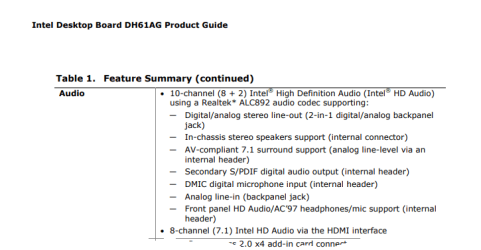
On the intel DH61AG board not exist the 6 rear jack slots only the on board heder (analog surround),whether it can be activated to get 5.1 to work directly from 18pin from the motherboard without jack detection?
 

My Computer

Computer type
PC/Desktop
Computer Manufacturer/Model Number
intel
OS
Windows 7 Ultimate x64
CPU
i3
Motherboard
DH61AG
Memory
8g
Graphics Card(s)
hd4000
Hard Drives
500gb
Antivirus
avast
Browser
firefox
The Intel DH61AG has an internal header providing surround sound connection. So, I assume there is cables supplied in the box.

Audio - Intel DH61AG.PNG

See Intel Product Guide DH61AG page 32-33 for location of header and pin-out descriptions.
 

My Computer

Computer type
PC/Desktop
OS
Windows 7 x64, Vista x64, 8.1 smartphone
CPU
Intel E8400 65W 64-bit
Motherboard
Gigabyte EP45-UD3LR
Memory
DDR2 2 x 2GB, 1GB x 2
Graphics Card(s)
XFX Radeon HD5750
Sound Card
AMD High Definition Audio; Realtek High Definition Audio
Monitor(s) Displays
iiyama prolite X2377HDS
Screen Resolution
1920 x 1080
Hard Drives
500GB 7200 rpm Seagate ST3500413AS 16MB, 500GB 5400 rpm Toshiba MQ02ABF050H 32MB, 200GB 7200 rpm Seagate ST3200820AS 8MB, 2TB 7200 rpm Western Digital WD20EZRX 64MB
PSU
Enermax Liberty Modular
Case
Antec P193 Midi Tower
Keyboard
Mionix ZIBAL 60
Mouse
Razer USB 2.0 Diamondback Mouse or Huion Graphics Tablet
Browser
Internet Explorer, Lunascape, Firefox, Opera, Avast Safezone
Back
Top