Realtek HD Changing Jack output reassignments ( FIX )

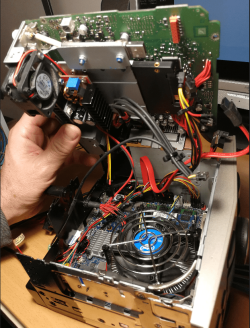
Unfortunately, I do not have a cable, I suppose it should be on a pc case,but I built this motherboard in a car
and I planned 4.1 sound
yes analog line-level via an internal heder -but in the realtek manager there is no option for only stereo
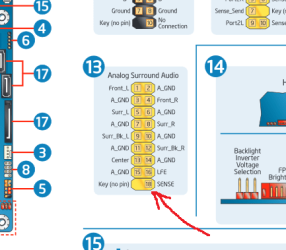
DH61AG.png

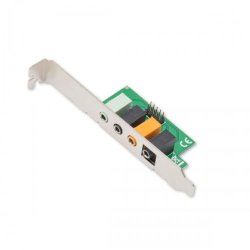
I suppose I need something like this
SD-PEX63081.pt02-500x500.jpg
the problem is in jeck detection, realtek does not see that something is connected
 
Last edited:

My Computer

Computer type
PC/Desktop
Computer Manufacturer/Model Number
intel
OS
Windows 7 Ultimate x64
CPU
i3
Motherboard
DH61AG
Memory
8g
Graphics Card(s)
hd4000
Hard Drives
500gb
Antivirus
avast
Browser
firefox

My Computer

Computer type
PC/Desktop
OS
Windows 7 x64, Vista x64, 8.1 smartphone
CPU
Intel E8400 65W 64-bit
Motherboard
Gigabyte EP45-UD3LR
Memory
DDR2 2 x 2GB, 1GB x 2
Graphics Card(s)
XFX Radeon HD5750
Sound Card
AMD High Definition Audio; Realtek High Definition Audio
Monitor(s) Displays
iiyama prolite X2377HDS
Screen Resolution
1920 x 1080
Hard Drives
500GB 7200 rpm Seagate ST3500413AS 16MB, 500GB 5400 rpm Toshiba MQ02ABF050H 32MB, 200GB 7200 rpm Seagate ST3200820AS 8MB, 2TB 7200 rpm Western Digital WD20EZRX 64MB
PSU
Enermax Liberty Modular
Case
Antec P193 Midi Tower
Keyboard
Mionix ZIBAL 60
Mouse
Razer USB 2.0 Diamondback Mouse or Huion Graphics Tablet
Browser
Internet Explorer, Lunascape, Firefox, Opera, Avast Safezone
yes but where to buy only the cable with header & jack 3.5 end
be sure to work it.
the only way is to go with optical S/PDF to D/A converter end amp
 

My Computer

Computer type
PC/Desktop
Computer Manufacturer/Model Number
intel
OS
Windows 7 Ultimate x64
CPU
i3
Motherboard
DH61AG
Memory
8g
Graphics Card(s)
hd4000
Hard Drives
500gb
Antivirus
avast
Browser
firefox
this is what I'm trying to do,but this with sound was not expected:cry:
indeex.png
 

My Computer

Computer type
PC/Desktop
Computer Manufacturer/Model Number
intel
OS
Windows 7 Ultimate x64
CPU
i3
Motherboard
DH61AG
Memory
8g
Graphics Card(s)
hd4000
Hard Drives
500gb
Antivirus
avast
Browser
firefox
Hi, neilsouth, Quite interesting tutorial of changing jack position to get the audio.
I have a realtek speakers and the output plug is plugged in the green jack of the three jack provided at the rear of the pc.
I now have a hdmi connection, which implies both video and jack is transmitting through it.
But, i doubt that if I enable hdmi as default device, the audio test bar shows green upraising of audio signal, but no audio could actually be heard . Normal analog sound could be heard if i select the deafult speakers, i think analog speakers.
I am giving here the jack information from the general properties of the hdmi device as shown.

how do I change it to suit the hdmi connection please
I have added a registry key as per the instructions in the first post, as there was no key in my registry has that label.
 

Attachments

  • JACK INFORMATION OF HDMI SYSTEM.jpg
    JACK INFORMATION OF HDMI SYSTEM.jpg
    307.5 KB · Views: 1
  • digital audio device.jpg
    digital audio device.jpg
    145 KB · Views: 0

My Computer

Computer type
PC/Desktop
Computer Manufacturer/Model Number
custom build
OS
Microsoft Windows 7 Ultimate 64-bit 7601 Multiprocessor Free Service Pack 1
CPU
Intel(R) Core(TM)2 Duo CPU E7200 @ 2.53GHz
Motherboard
To be filled by O.E.M. To be filled by O.E.M.
Memory
4.00 GB
Graphics Card(s)
NVIDIA GeForce 210
Sound Card
(1) NVIDIA High Definition Audio (2) Realtek High Definiti
Screen Resolution
1920 x 1080 x 32 bits (4294967296 colors) @ 60 Hz
Hard Drives
ST3500312CS ATA Device
why no reply to my query
 

My Computer

Computer type
PC/Desktop
Computer Manufacturer/Model Number
custom build
OS
Microsoft Windows 7 Ultimate 64-bit 7601 Multiprocessor Free Service Pack 1
CPU
Intel(R) Core(TM)2 Duo CPU E7200 @ 2.53GHz
Motherboard
To be filled by O.E.M. To be filled by O.E.M.
Memory
4.00 GB
Graphics Card(s)
NVIDIA GeForce 210
Sound Card
(1) NVIDIA High Definition Audio (2) Realtek High Definiti
Screen Resolution
1920 x 1080 x 32 bits (4294967296 colors) @ 60 Hz
Hard Drives
ST3500312CS ATA Device
Hi, Still no reply. Has the writer of this tutorial not available
 

My Computer

Computer type
PC/Desktop
Computer Manufacturer/Model Number
custom build
OS
Microsoft Windows 7 Ultimate 64-bit 7601 Multiprocessor Free Service Pack 1
CPU
Intel(R) Core(TM)2 Duo CPU E7200 @ 2.53GHz
Motherboard
To be filled by O.E.M. To be filled by O.E.M.
Memory
4.00 GB
Graphics Card(s)
NVIDIA GeForce 210
Sound Card
(1) NVIDIA High Definition Audio (2) Realtek High Definiti
Screen Resolution
1920 x 1080 x 32 bits (4294967296 colors) @ 60 Hz
Hard Drives
ST3500312CS ATA Device
Back
Top