| Windows 7: Realtek HD Changing Jack output reassignments ( FIX ) |
12 Jul 2009
|
| | vista x64/ win 7 x64 626 posts south of france |

Quote: Originally Posted by simonfilth what i don't understand, is why the hell do they work normally when i test them in those 2 applications? but any other thing, only 2 speakers work. i'd hang around till 7 is final. Realtek will surely release a good driver. Their chipsets are so common on motherboards they really need to or lose marketshare.
If you look at the speed they release new driverversions...
The problem is here with this new layer between hte hardware and the driver that got introduced to enable 7 to switch outputs on the fly.
If you just try to imagine the enormous complexity of the whole thing, it boggles my mind. | My System Specs |
| System Manufacturer/Model Number me and myself OS vista x64/ win 7 x64 CPU phenom 9950 BE Motherboard ASUS M2A-VM HDMI Memory 8 gb Graphics Card nvidia gts 250 Sound Card realtek HD onboard Monitor(s) Displays dual hd 19" tft Screen Resolution 1440x900 Keyboard logitech g11 Mouse usb wireless MS laser 6000 Cooling standard issue Hard Drives 2 x 500 gb WDC
1 x 500 gb Seagate
1 x 1000 gb Seagate
1 80 gb raptor
1 usb 160 gb Internet Speed 18 mb (according to my provider :) |
21 Jul 2009
|
| | Windows 7 Build 7100 10 posts |
Thank you so much, this has solved my problems. I thank you humbly for your intense deep registry skills. I applaud you sir. | My System Specs | | System Manufacturer/Model Number Self Built OS Windows 7 Build 7100 CPU Intel Core 2 Duo E8500 3.16GHz 6mb L2 Cache 1333Mhz FSB 45nm Motherboard Asus P5K Pro Memory 4x 1gb Corsair XMS2 DDR2-800 4-4-4-12 Graphics Card XFX Geforce 9800GTX+ 512mb DDR3 Sound Card Mobo PSU Gigabyte Superb 720 Watt Case Antec "Three hundred" gaming case Cooling Thermaltake Golden Orb 2 Hard Drives Samsung 750Gb Sata2 32Mb Cache 7200RPM |
21 Jul 2009
|
| | Windows 7 x64 Build 7600.16384 24 posts |
Quick question; I'm fed up with the crappy X-FI Xtreme Music and thinking about using my onboard sound. However, I have a 5.1 speaker system and a microphone but there doesn't seem to be enough ports to plug them all in. (I need anologue connexions, not SP/DIF. It seems absurd that you can't use a microphone with a 5.1 speaker system with onboard sound. Or am I missing something? | My System Specs | | System Manufacturer/Model Number Home Built OS Windows 7 x64 Build 7600.16384 CPU Athlon 64 6000+ Motherboard Asus M2N4-SLI Memory 4 GB DDR PC6400 Graphics Card GeForce 8800 GTS O/C to 600/900 Sound Card Soundblaster X-Fi XtremeMusic |
21 Jul 2009
|
| | vista x64/ win 7 x64 626 posts south of france |
there should be connectors on your motherboard for linking up another audiojack panel. If not, well you need another soundcard. | My System Specs | | System Manufacturer/Model Number me and myself OS vista x64/ win 7 x64 CPU phenom 9950 BE Motherboard ASUS M2A-VM HDMI Memory 8 gb Graphics Card nvidia gts 250 Sound Card realtek HD onboard Monitor(s) Displays dual hd 19" tft Screen Resolution 1440x900 Keyboard logitech g11 Mouse usb wireless MS laser 6000 Cooling standard issue Hard Drives 2 x 500 gb WDC
1 x 500 gb Seagate
1 x 1000 gb Seagate
1 80 gb raptor
1 usb 160 gb Internet Speed 18 mb (according to my provider :) |
11 Aug 2009
|
| | |
Hi;
I hope someone is still following this thread
I did change everything as described....I want to connect 2 front speekers
but whenever I change the values they automatica;;y change back to their defaults after repluging the jack
If i keep the jack plugged it will not work...if i replug it it goes back
what should i do? | My System Specs | | |
12 Aug 2009
|
| | |
Hey
I'm having this same issue as well. My Speaker jack randomly stopped working, so I'm trying to get my speakers to work through the Line-In or Mic jacks.
I've been searching for countless hours on how to remap the jacks and finally came across this thread, which describes how to solve my problem, except that I am using Realtek AC'97 on Windows XP, not Realtek HD on Windows 7.
There's nothing to edit in the "0000" folder.
Here's what I have:
If anyone can share the appropriate changes to make for this fix in my situation, I would really appreciate it.
Thanks | My System Specs | | System Manufacturer/Model Number GQ 6074 OS XP CPU Athlon XP 2400+ Motherboard 741GX-M Memory 1.5GB Sound Card Realtek AC'97 on-board |
12 Aug 2009
|
| | |
I have a little sound card issue with the mb on-board realtek sound
When i use something like skyp, I get the audio from skype through both headphones and speakers, also the person at the other end gets my mic audio, plus my windows sounds, which app are much louder, so if i am talking to them and i click something which ping's or bongs, they get almost deafened.....
not a biggy, but if anyone else has had this and knows of a cure, please share for the sake of my friends hearing! | My System Specs | | System Manufacturer/Model Number gigabyte ga35p ds3r v1 OS win7 CPU q6600 Motherboard gigabyte ga35p ds3r v1 Memory 4gb ocz ddr2 1033 Graphics Card ati 4850 Sound Card Onboard ac96 realtek Monitor(s) Displays Hitachi lcdv42v01ldp thing on dvi/hdm PSU cheap 650w thing, systems pulls only 220w at wall Case metal - oh with a imon ultrabay which are very very poor Cooling lots of noisy fans Hard Drives lots, boot drive 2*samsung 500gb in raid 0 on intel ich8 / mb |
12 Aug 2009
|
| | Windows 7 Ult, Windows 8 Pro, 7,893 posts San Diego |
New Windows 7 drivers available from realtek here. Realtek | My System Specs | | System Manufacturer/Model Number Home built OS Windows 7 Ult, Windows 8 Pro, CPU Q9650-4.275GHz, E8600 4.5GHz, E6750-3.8GHz Motherboard Evga 780i FTW Memory G.Skill PC2 9600 1200Mhz 5 5 5 15 2T Graphics Card GTX480 Sound Card Asus Xonar D2 Monitor(s) Displays HannsG Screen Resolution 1680X1050 Keyboard Logitech G15 Mouse Logitech G9 PSU ThermalTake Toughpower 1000Watt modular Case ThermalTake XaserV Cooling Xigmatek S1283 Hard Drives GSkill Phoenix Pro 120GB SSD Internet Speed T1 |
13 Aug 2009
|
| | |
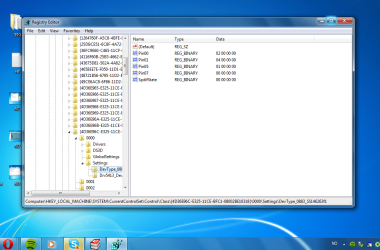
Still doesn't work. So I have to create a binary that I call pin00 and the code is 04 00 00 00 ?
And the last map is called different, it's Drv5911_DevType_0888_SS1462735a | My System Specs | | |
13 Aug 2009
|
| | |
i have tested last driver 2.30 on Windows 7 x64 rtm and in some appz still real dont work where exacly i must change those values i have somethink like that in my registry. Code: Windows Registry Editor Version 5.00
[HKEY_LOCAL_MACHINE\SYSTEM\CurrentControlSet\Control\Class\{4D36E96C-E325-11CE-BFC1-08002BE10318}\0001\Settings\Drv5911_DevType_0883_SS1043829f]
"Vol0_RearLineOutWave3_{8a74ffae-8766-480f-af6d-325fcf9ab324}"=hex:00,00,00,00
"Vol1_RearLineOutWave3_{8a74ffae-8766-480f-af6d-325fcf9ab324}"=hex:00,00,00,00
"Mute0_RearLineOutWave3_{8a74ffae-8766-480f-af6d-325fcf9ab324}"=hex:00,00,00,\
00
"Mute1_RearLineOutWave3_{8a74ffae-8766-480f-af6d-325fcf9ab324}"=hex:00,00,00,\
00
"Vol0_RearLineOutWave3_{b25a6526-9703-4117-9d7f-260a5df5cc34}"=hex:00,00,00,00
"Vol1_RearLineOutWave3_{b25a6526-9703-4117-9d7f-260a5df5cc34}"=hex:00,00,00,00
"Mute0_RearLineOutWave3_{b25a6526-9703-4117-9d7f-260a5df5cc34}"=hex:00,00,00,\
00
"Mute1_RearLineOutWave3_{b25a6526-9703-4117-9d7f-260a5df5cc34}"=hex:00,00,00,\
00
"Vol0_RearLineOutWave3_{594ac582-b82a-4024-99e7-dc5b358e0f30}"=hex:00,00,00,00
"Vol1_RearLineOutWave3_{594ac582-b82a-4024-99e7-dc5b358e0f30}"=hex:00,00,00,00
"Mute0_RearLineOutWave3_{594ac582-b82a-4024-99e7-dc5b358e0f30}"=hex:00,00,00,\
00
"Mute1_RearLineOutWave3_{594ac582-b82a-4024-99e7-dc5b358e0f30}"=hex:00,00,00,\
00
"Vol0_RearLineOutWave3_{a5b27de2-40f3-469e-9a4d-2cd8d5d9284d}"=hex:00,00,00,00
"Vol1_RearLineOutWave3_{a5b27de2-40f3-469e-9a4d-2cd8d5d9284d}"=hex:00,00,00,00
"Mute0_RearLineOutWave3_{a5b27de2-40f3-469e-9a4d-2cd8d5d9284d}"=hex:00,00,00,\
00
"Mute1_RearLineOutWave3_{a5b27de2-40f3-469e-9a4d-2cd8d5d9284d}"=hex:00,00,00,\
00
"Vol0_RearLineOutWave3_{185fede3-9905-11d1-95a9-00c04fb925d3}"=hex:00,00,fa,ff
"Vol1_RearLineOutWave3_{185fede3-9905-11d1-95a9-00c04fb925d3}"=hex:00,00,fa,ff
"Mute0_RearLineOutWave3_{185fede3-9905-11d1-95a9-00c04fb925d3}"=hex:00,00,00,\
00
"Mute1_RearLineOutWave3_{185fede3-9905-11d1-95a9-00c04fb925d3}"=hex:00,00,00,\
00
"Vol0_RearLineOutWave3_{093c0065-6b45-4582-87d7-5a6742f6e859}"=hex:00,00,f4,ff
"Vol1_RearLineOutWave3_{093c0065-6b45-4582-87d7-5a6742f6e859}"=hex:00,00,f4,ff
"Mute0_RearLineOutWave3_{093c0065-6b45-4582-87d7-5a6742f6e859}"=hex:00,00,00,\
00
"Mute1_RearLineOutWave3_{093c0065-6b45-4582-87d7-5a6742f6e859}"=hex:00,00,00,\
00
"Mute0_RearLineOutWave3_{8fd300d3-ffe1-44f3-a9eb-6f4395d73c9f}"=hex:00,00,00,\
00
"Mute1_RearLineOutWave3_{8fd300d3-ffe1-44f3-a9eb-6f4395d73c9f}"=hex:00,00,00,\
00
"Vol0_RtMicInWave_{2bc31d6a-96e3-11d2-ac4c-00c04f8efb68}"=hex:00,00,00,00
"Vol1_RtMicInWave_{2bc31d6a-96e3-11d2-ac4c-00c04f8efb68}"=hex:00,00,00,00
"Vol0_RearMicInPinkWave_{2bc31d6a-96e3-11d2-ac4c-00c04f8efb68}"=hex:00,00,00,\
00
"Vol1_RearMicInPinkWave_{2bc31d6a-96e3-11d2-ac4c-00c04f8efb68}"=hex:00,00,00,\
00
"Vol0_FrontMicInPinkWave_{2bc31d6a-96e3-11d2-ac4c-00c04f8efb68}"=hex:00,00,00,\
00
"Vol1_FrontMicInPinkWave_{2bc31d6a-96e3-11d2-ac4c-00c04f8efb68}"=hex:00,00,00,\
00
"Vol0_FrontMicInGreenWave_{2bc31d6a-96e3-11d2-ac4c-00c04f8efb68}"=hex:00,00,00,\
00
"Vol1_FrontMicInGreenWave_{2bc31d6a-96e3-11d2-ac4c-00c04f8efb68}"=hex:00,00,00,\
00
"Vol0_RearLineOutWave3_{185fedfb-9905-11d1-95a9-00c04fb925d3}"=hex:00,80,dd,ff
"Vol1_RearLineOutWave3_{185fedfb-9905-11d1-95a9-00c04fb925d3}"=hex:00,80,dd,ff
"Mute0_RearLineOutWave3_{185fedfb-9905-11d1-95a9-00c04fb925d3}"=hex:00,00,00,\
00
"Mute1_RearLineOutWave3_{185fedfb-9905-11d1-95a9-00c04fb925d3}"=hex:00,00,00,\
00
"Vol0_RearLineOutWave3_{dff21be1-f70f-11d0-b917-00a0c9223196}"=hex:00,80,dd,ff
"Vol1_RearLineOutWave3_{dff21be1-f70f-11d0-b917-00a0c9223196}"=hex:00,80,dd,ff
"Mute0_RearLineOutWave3_{dff21be1-f70f-11d0-b917-00a0c9223196}"=hex:01,00,00,\
00
"Mute1_RearLineOutWave3_{dff21be1-f70f-11d0-b917-00a0c9223196}"=hex:01,00,00,\
00
"Vol0_RearLineOutWave3_{930a479f-0487-4baa-9672-4c7c36c0efb2}"=hex:00,80,dd,ff
"Vol1_RearLineOutWave3_{930a479f-0487-4baa-9672-4c7c36c0efb2}"=hex:00,80,dd,ff
"Mute0_RearLineOutWave3_{930a479f-0487-4baa-9672-4c7c36c0efb2}"=hex:01,00,00,\
00
"Mute1_RearLineOutWave3_{930a479f-0487-4baa-9672-4c7c36c0efb2}"=hex:01,00,00,\
00
"Vol0_RearLineOutWave3_{185fedf9-9905-11d1-95a9-00c04fb925d3}"=hex:00,80,dd,ff
"Vol1_RearLineOutWave3_{185fedf9-9905-11d1-95a9-00c04fb925d3}"=hex:00,80,dd,ff
"Mute0_RearLineOutWave3_{185fedf9-9905-11d1-95a9-00c04fb925d3}"=hex:00,00,00,\
00
"Mute1_RearLineOutWave3_{185fedf9-9905-11d1-95a9-00c04fb925d3}"=hex:00,00,00,\
00
"Vol0_SecondaryLineOutWave_{185fede3-9905-11d1-95a9-00c04fb925d3}"=hex:00,00,\
fa,ff
"Vol1_SecondaryLineOutWave_{185fede3-9905-11d1-95a9-00c04fb925d3}"=hex:00,00,\
fa,ff
"Mute0_SecondaryLineOutWave_{185fede3-9905-11d1-95a9-00c04fb925d3}"=hex:00,00,\
00,00
"Mute1_SecondaryLineOutWave_{185fede3-9905-11d1-95a9-00c04fb925d3}"=hex:00,00,\
00,00
"Vol0_RearLineOutWave3_{ba697e2a-bc14-4c0d-9e16-3935f2f15e08}"=hex:00,80,dd,ff
"Vol1_RearLineOutWave3_{ba697e2a-bc14-4c0d-9e16-3935f2f15e08}"=hex:00,80,dd,ff
"Mute0_RearLineOutWave3_{ba697e2a-bc14-4c0d-9e16-3935f2f15e08}"=hex:00,00,00,\
00
"Mute1_RearLineOutWave3_{ba697e2a-bc14-4c0d-9e16-3935f2f15e08}"=hex:00,00,00,\
00
"ChannelConfig"=hex:3f,00,00,00
"PKEY_RearLineOutWave3"="{5825fe7e-9e68-4ae8-bb4e-985cd649a991}"
"PKEY_RtSpdifWave"="{7ee5b5da-da14-4668-ba9d-28fe0b51612f}"
"PKEY_RtLineInWave"="{3a8fe8d0-5eef-4dc2-9172-3c213cf7f746}"
"PKEY_RtMicInWave"="{d069b450-3fe3-4265-a002-d69a61e1647f}" 0000 - ist some ati driver too me so 0001 ist realtek
so i cheange in realtek menager to 5.1 and environment to room | My System Specs | | OS W7 RTM x64 CPU X3220 @ 3.5GHz @ Karakorum Motherboard P5K PRO Memory HyperX 1066MHz 2x2GB CL5 @ 1033MHz Graphics Card Sapphire Radeon 4850 @ def Sound Card Realtek HD Audio Monitor(s) Displays LG W2252TQ Screen Resolution 1680x1050 Keyboard Logitech Deluxe 250 Mouse Genius:) PSU Pentagram SF 620W Case Fever Wizard Cooling Air Hard Drives WD 160 AAJS
WD 640 AAKS Internet Speed 512kB/s Other Info SkyStar 2 Realtek HD Changing Jack output reassignments ( FIX ) problems? All times are GMT -5. The time now is 07:46 PM. | |