How to disable volume auto-leveling?

mostafaz4

New member
when i try to open songs with many media players without equalizer it plays perfectly but when i activate equalizer the player volume down and volume up during the song and that is very annoying especially in rock songs

my sound card : VIA high definition audio
 
Last edited:

My Computer

OS
Win7 Ultimate x32
CPU
Intel Dual Core 3GHz
Motherboard
Gigabite MT-S2P
Memory
2GB
Graphics Card(s)
Intel G41 1GB
Sound Card
VIA High Definition Audio
Screen Resolution
1280x1024
Hard Drives
Hitachi 1TB
Internet Speed
512 Kbit
my card sound is giving me a problem right now or i would help you on this..
but you can go right click on volume icon and choose playback devices.. the problem must be solved in there.. look and see.
 

My Computer

OS
Windows Ultimate 32 bit.
CPU
AMD Phenom(tm) 8450 triple-core 2.10 GHz
Motherboard
Supphire
Memory
3 GB
Monitor(s) Displays
ATI Radeon HD 4650 1G
Hard Drives
Western Digital 320 GB
i tried and nothing new :(

any ideas ??
 

My Computer

OS
Win7 Ultimate x32
CPU
Intel Dual Core 3GHz
Motherboard
Gigabite MT-S2P
Memory
2GB
Graphics Card(s)
Intel G41 1GB
Sound Card
VIA High Definition Audio
Screen Resolution
1280x1024
Hard Drives
Hitachi 1TB
Internet Speed
512 Kbit
If I install my sound card's driver soon, I will come back to you.. and I hope really that I can help
 

My Computer

OS
Windows Ultimate 32 bit.
CPU
AMD Phenom(tm) 8450 triple-core 2.10 GHz
Motherboard
Supphire
Memory
3 GB
Monitor(s) Displays
ATI Radeon HD 4650 1G
Hard Drives
Western Digital 320 GB
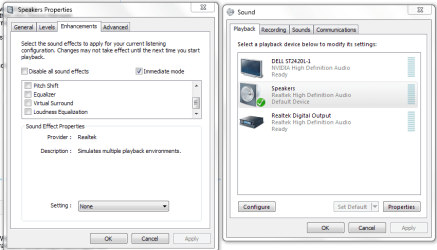
Right-click the speaker icon in your system tray and choose Playback Devices.

Double-click Speakers and click Properties then the Enhancements tab.

Enable 'Disable All Sound Effects' and click OK.

Sound.PNG
 

My Computer

Computer Manufacturer/Model Number
HP Pavilion Elite 495UK
OS
Windows 7 Ultimate SP1 64-Bit
CPU
Intel Core i7 870 @ 2.93GHz
Motherboard
MSI 2A9C (CPU1)
Memory
8Gb Dual-Channel DDR3 @ 664MHz
Graphics Card(s)
nVidia GeForce GTX 460 1024MB dedicated RAM
Sound Card
Realtek HD Audio
Monitor(s) Displays
HP2310i
Screen Resolution
1920 x 1080
Hard Drives
1x1954GB Hitachi HDS22020ALA 330 (RAID), 1x1954GB Hitachi External for backup and storage
PSU
460W
Case
HP Elite
Cooling
Air cooled
Keyboard
Logitech K750 solar-powered keyboard
Mouse
Logitech Wireless M180 mouse
Internet Speed
2Mb
Other Info
Pure Avanti Flow Internet Radio with iPod Dock, 64Gb iPod, HP USB Speakers, Sony MDR-V500 Headphones, Sony Vaio F-Series Laptop
Its already checked.
 

My Computer

OS
Win7 Ultimate x32
CPU
Intel Dual Core 3GHz
Motherboard
Gigabite MT-S2P
Memory
2GB
Graphics Card(s)
Intel G41 1GB
Sound Card
VIA High Definition Audio
Screen Resolution
1280x1024
Hard Drives
Hitachi 1TB
Internet Speed
512 Kbit
have you tried to change the media player?? try to play the same music on other music players... and even try to change the music.. i mean you may have an album corrupted this way or something
 

My Computer

OS
Windows Ultimate 32 bit.
CPU
AMD Phenom(tm) 8450 triple-core 2.10 GHz
Motherboard
Supphire
Memory
3 GB
Monitor(s) Displays
ATI Radeon HD 4650 1G
Hard Drives
Western Digital 320 GB

My Computer

OS
Win7 Ultimate x32
CPU
Intel Dual Core 3GHz
Motherboard
Gigabite MT-S2P
Memory
2GB
Graphics Card(s)
Intel G41 1GB
Sound Card
VIA High Definition Audio
Screen Resolution
1280x1024
Hard Drives
Hitachi 1TB
Internet Speed
512 Kbit
Back
Top