Windows 7: Can I stream stereomix audio with Xi-Fi Go! Pro?
21 Mar 2012
nuggetman
Windows 7
3 posts
Can I stream stereomix audio with Xi-Fi Go! Pro?
Basically I used to stream audio to a friend but then I got a new laptop with a crappy sound card that doesn't have stereomix (even hidden). So I bought an x-fi Go! Pro as I read on-line that it enables the stereo mix option.
So is it possible for me to stream say music on my laptop to my friend via cam or justin.tv? At the minute the levels on justin.tv say that its picking up the music but it doesn't seem to be actually be streaming it.
I'v looked at a lot of articles on here about this but so far no luck. I'm not looking to record sound (i have software to do that) I want to stream the stereomix.
(Or someone suggested using a double ended jack and an audio splitter)
System Manufacturer/Model Number Me OS Win 7 Ultimate x64 CPU Phenom II x4 955 @ 4 GHz. Motherboard Asus M5A97 EVO Memory 2x2 GB Kingston HyperX DDR3 1600 Graphics Card Sapphire HD 6850 Sound Card Xonar DGX w/ Logitech X-530 Monitor(s) Displays Acer S232HL Abid Screen Resolution 1920x1080
Keyboard Logitech Wave Mouse Logitech G5 v2 PSU Antec Earthwatts 650W Green Case Antec Three Hundred Cooling Cooler Master 212 EVO Hard Drives 120 GB OCZ Vertex 3
500 GB Seagate 7200.12 Internet Speed 24000/1000
21 Mar 2012
nuggetman
Windows 7
3 posts
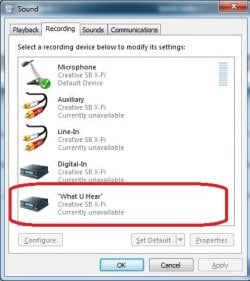
Hey thanks for the reply. I currently have "What you hear" set to default, The X-Fi Mic set to Ready and my on board mic set to disable. That's everything in my Recording settings. The levels on the screen bounce up and down fine but when I try to stream it, nothing is picked up except my speech... Same goes for recording.
In the Playback tab the X-Fi Go speakers have also a microphone setting. Check this one is not disable.
Computer type PC/Desktop System Manufacturer/Model Number [June 2013] - Full Tower OS Windows 7 Professional SP1 - x64 CPU Ivy Bridge Core i5 K Motherboard Asus H77 Chipset (ATX) Memory G.Skill DDR3 PC3-12800 (16Gb) Graphics Card Sapphire HD 7770 Vapor-X Oc Sound Card SBXi-Fi Xtreme Audio (w/5.1 sound system) Monitor(s) Displays Asus Led 21,5" Screen Resolution 16/9
Keyboard Razer + Razer gamepad Mouse Razer PSU 700w 80+ Gold (ErP Lot6 ready) Case Thermaltake Chaser A71 Cooling Gelid Solutions (PWM Push/pull Fans) Hard Drives Internal:
500Go Sata 6Gb/s (x2)
500Go Sata 3Gb/s (x2)
SSD 60Go Sata 6Gb/s Antivirus MSE 4.2 Browser IE10 Rtm