
Windows 7 Forums


Windows 7: Volume control in middle of screen.

02 Apr 2012   #1

Windows 7 64bit
 
 
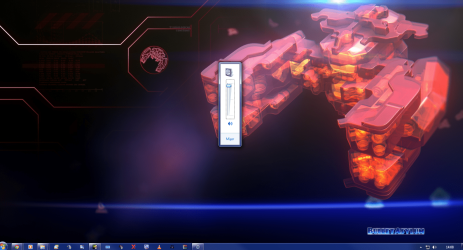
Volume control in middle of screen.

Will not move seems to have happened after Catalyst update. Running dual monitors.

Attached Thumbnails
Volume control in middle of screen.-volume.png  
My System SpecsSystem Spec

02 Apr 2012   #2

Dual Booting Windows 7 Ultimate x64 & BackTrack 5
MY


1) Right-click the Start icon and select Properties.
Click Taskbar tab > click 'Customize...' in Motification area' section.
Uncheck 'Always show all icons and notifications on the taskbar' (it looks like you have this on)
Click 'Restore default icon behaviors'
test to see if taht fixes the issue.

If all is OK, Re-check the 'Always show all icons and notifications on the taskbar' if you like and test again.

I hope this helps.

DragonARMY http://www.facebook.com/100003250779989

Last edited by DragonARMY; 02 Apr 2012 at 03:55 PM..
My System SpecsSystem Spec
02 Apr 2012   #3

Windows 7 64bit


Ok thanks 'Always show all icons and notifications on the taskbar' was off setting it to on then off again fixed it.
My System SpecsSystem Spec
.


03 Apr 2012   #4

Windows 7 64bit


After a reboot it seems problem is back again.
My System SpecsSystem Spec
21 Oct 2012   #5

Windows 8 Pro x64


I know that this thread is old, but just in case someone else finds this using Google (like I did) - you were right to suggest that this could be caused by a Catalyst Upgrade, as in my case it's caused by HydraVision Desktop Manager's option to Enable Dialog Repositioning.

Cheers.
My System SpecsSystem Spec
Reply

 Volume control in middle of screen. problems?


Thread Tools


Similar help and support threads for: Volume control in middle of screen.
Thread Forum
Windows 8 style volume control for touch screen in Windows 7 Customization
My Monitor is only using the very middle of my screen how do I fix? General Discussion
Solved On screen volume control bar has disappeared General Discussion
Volume Control Gaming
is there a hot key to control the volume... Sound & Audio


All times are GMT -5. The time now is 06:46 PM.


Seven Forums Android App Seven Forums IOS App Follow us on Facebook

Windows 7 Forums is an independent web site and has not been authorized,
sponsored, or otherwise approved by Microsoft Corporation.
"Windows 7" and related materials are trademarks of Microsoft Corp.
© Designer Media Ltd
  

1 2 3 4 5 6 7 8 9 10 11 12 13 14 15 16 17 18 19 20 21 22 23 24 25 26 27 28 29 30 31 32