| Windows 7: One Speaker not working |
24 Apr 2012
|
#1 | | |
One Speaker not working I have an HP Pavilion Elite HPE-510y. It has no "speakers" you have to plug them in, the computer is about a year old and sound only comes out of one of everything. Headphones, speakers, etc. and both speakers work while in other devices. I have never really done anything out of the ordinary that could have broke anything. Is there a way to scan to see a problem, or why sound is only coming out of one speaker???
This is the audio stuff from the computer. I am on Windows 7 ultimate 64bit Sound/Audio Integrated ALC888S-VD audio
*Integrated audio is not available if a sound card is installed. - Audio CODEC: ALC888S-VD
- Number of channels: 8
- Maximum sample rate: up to 192,000 Hz
- Supports one SPDIF digital connection
Sound Cards
Hauppauge WinTV 723x (ATSC/NTSC)
AMD High Definition Audio Device
Realtek High Definition Audio
Playback Devices
Headphones (Realtek High Definition Audio) (default)
Realtek Digital Output (Realtek High Definition Audio) | My System Specs |
| System Manufacturer/Model Number HP OS Windows 8 Pro Memory 8gb Monitor(s) Displays 23 inch Acer |
25 Apr 2012
|
#2 | | Windows 7, 64 bit Home SP1, Win 8 Pro 64 bit Citrus Co, FL |
First, make sure you are inserting the plug for the speakers (or headphones) fully into the jack. If you are only inserting the plug partially you will only get one channel.
Second, check the panning for the speakers, if it is set to one side (left or right) you will only get the one channel. | My System Specs | | Computer type PC/Desktop System Manufacturer/Model Number My Own Build OS Windows 7, 64 bit Home SP1, Win 8 Pro 64 bit CPU Intel i7 3770 Motherboard Gigabyte GA-Z77X-UD5H Memory 16GB GSkill Ripsaw F3-14900CL9Q-16GBXL Graphics Card Sapphire HD7770 Sound Card RealTek Monitor(s) Displays Viewsonic VA2448 Series 24" LED Screen Resolution 1920X1080 Keyboard Kensington wired Mouse Logitech Wireless PSU Antec High Current Gamer HCG-620M Modular Case Coolermaster HAF XM Cooling Corsair H80 Liquid cooling with aftermarket Nexus quiet fans Hard Drives 240GB Intel 520 SSD for Win 7
128GB OCZ Vertex 4 SSD for Win 8
1 TB Seagate drive for backup Internet Speed 40 MB/sec (Cable) Antivirus Microsoft Security Essentials and Malwarebytes Browser I.E9/Firefox Other Info Sonar X2 Professional 64 bit Recording Software with Roland Octa-Capture and MAudio Fast Track Ultra 8R recording interfaces, Frontier Tranzport wireless control unit, Behringer BCF2000 Control Surface.
Five USB connected optical drives for CD Audio production using Nero 11
Other systems: Desktop with i5 3550 CPU, LenovoZ560 Laptop with Win 7 64 bit HP, SP1, new iPad |
25 Apr 2012
|
#3 | | |
And. I guess, make sure you're plugging into the correct jack... | My System Specs | | OS Windows 7 Ultimate x64 |
25 Apr 2012
|
#4 | | |

Quote: Originally Posted by fireberd First, make sure you are inserting the plug for the speakers (or headphones) fully into the jack. If you are only inserting the plug partially you will only get one channel. Second, check the panning for the speakers, if it is set to one side (left or right) you will only get the one channel. How do I do that? | My System Specs | | System Manufacturer/Model Number HP OS Windows 8 Pro Memory 8gb Monitor(s) Displays 23 inch Acer |
25 Apr 2012
|
#5 | | |

Quote: Originally Posted by fireberd First, make sure you are inserting the plug for the speakers (or headphones) fully into the jack. If you are only inserting the plug partially you will only get one channel.
Second, check the panning for the speakers, if it is set to one side (left or right) you will only get the one channel. 
Quote: Originally Posted by sibbil And. I guess, make sure you're plugging into the correct jack... I am plugging into the one with the headphones pictured next to it | My System Specs | | System Manufacturer/Model Number HP OS Windows 8 Pro Memory 8gb Monitor(s) Displays 23 inch Acer |
25 Apr 2012
|
#6 | | WIN7 x64 Home Premium SP1 USA |

Quote: Originally Posted by mike6623 
Quote: Originally Posted by fireberd First, make sure you are inserting the plug for the speakers (or headphones) fully into the jack. If you are only inserting the plug partially you will only get one channel.
Second, check the panning for the speakers, if it is set to one side (left or right) you will only get the one channel. 
Quote: Originally Posted by sibbil And. I guess, make sure you're plugging into the correct jack... I am plugging into the one with the headphones pictured next to it Is that outlet on the front of the computer, the one with the picture of the headphones? If so, the outlet you want is in the back of the computer, possibly color coded probably green to match the color of the jack. | My System Specs | | System Manufacturer/Model Number DELLXPS 8300 OS WIN7 x64 Home Premium SP1 CPU Intel Core i5-2400 processor(6MB Cache, 3.1GHz) Memory 8 GB RAM Hard Drives 1.5TB C Drive |
25 Apr 2012
|
#7 | | |

Quote: Originally Posted by Heyyou 
Quote: Originally Posted by mike6623 
Quote: Originally Posted by fireberd First, make sure you are inserting the plug for the speakers (or headphones) fully into the jack. If you are only inserting the plug partially you will only get one channel.
Second, check the panning for the speakers, if it is set to one side (left or right) you will only get the one channel. 
Quote: Originally Posted by sibbil And. I guess, make sure you're plugging into the correct jack... I am plugging into the one with the headphones pictured next to it Is that outlet on the front of the computer, the one with the picture of the headphones? If so, the outlet you want is in the back of the computer, possibly color coded probably green to match the color of the jack. You know what, it is plugged into the front. Hopefully this solves it, but I feel as if (not 100%) at one point, it worked in both speakers while plugged into the front. I could be wrong though. | My System Specs | | System Manufacturer/Model Number HP OS Windows 8 Pro Memory 8gb Monitor(s) Displays 23 inch Acer |
25 Apr 2012
|
#8 | | |
Okay this is weird, none of the inputs on the back would give me any sound, and when you said make sure the jack is plugged in all the way, I did, and it was but when I plug it in halfway, the sound only comes out of the speaker that it doesn't come out of when it is fully plugged in! There are like 6-8 jack inputs on the back and none gave me sound, it make a sound like when you plug something in, that is it.
Is there any scan or hardware check I can do to see if settings or something are off?? The PC is only a year old, not even | My System Specs | | System Manufacturer/Model Number HP OS Windows 8 Pro Memory 8gb Monitor(s) Displays 23 inch Acer |
25 Apr 2012
|
#9 | | Main - Windows 7 Pro SP1 64-Bit; 2nd - Windows Server 2008 R2 Westlake, Ohio |
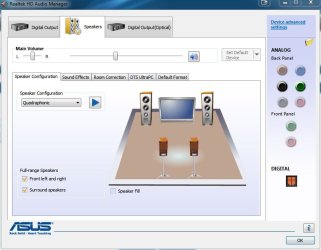
Look in the Realtek Audio software for speaker configuration. If you hover your mouse over the Analog section (see pic) it will tell you what the jacks are currently configured to do.
What kind of plug is at the end of your speaker cable and headphone cable? How many contacts are there on each? | My System Specs | | System Manufacturer/Model Number Self OS Main - Windows 7 Pro SP1 64-Bit; 2nd - Windows Server 2008 R2 CPU Main - Core i7 2600K; 2nd - Core i7 920 Motherboard Main - Asus P8Z68-V Pro/Gen3; 2nd - Gigabyte GA-EX58-UDR3 Memory Main - 16GB Corsair Vengeance; 2nd - 12GB Corsair Vengeance Graphics Card Main - XFX Radeon 6870 1GB; 2nd - XFX Radeon 4870 1GB Sound Card Both: Onboard Realtek Azalia Monitor(s) Displays Main - Hann 25" + I-INC 25" + Acer 23"; 2nd - Upgrading Soon Screen Resolution Main - 1920x1080 (All Three Monitors); 2nd - Upgrading Soon Keyboard Main - Razer Reclusa; 2nd - Old MS Keyboard Mouse Main - Logitech MX Revolution; 2nd - Old MS Mouse PSU Main - OCZ 600W Modular; 2nd - OCZ 600W Case Main - Thermaltake Element G; 2nd - NZXT something or other Cooling Main - Corsair H80; 2nd - Prolimatech Megahalems Hard Drives Main - (1) Crucial M4 128GB (Boot)
Main - (1) Seagate 2TB 64MB Cache (Data)
Main - (1) Seagate 2TB 64MB Cache (Data Backup)
2nd - (1) Intel X25-M SSD 80GB (Boot)
2nd - (3) Seagate 1TB 32MB Cache (Data Backup)
2nd - (1) Seagate 320GB (Because) Internet Speed 20Mbps Time-Warner Cable |
10 May 2012
|
#10 | | |
I am still lost. Crazy, I just cannot seem to get both speakers to play at once. Tried the back, tried the front. Who knows. It is always something. There is no test I can run that will let me know if something is wrong, like the microsoft fix it or something? | My System Specs | | System Manufacturer/Model Number HP OS Windows 8 Pro Memory 8gb Monitor(s) Displays 23 inch Acer One Speaker not working problems? All times are GMT -5. The time now is 12:00 AM. | |