
Windows 7 Forums


Windows 7: Stereo mix problem

02 May 2012   #1

Windows 7
 
 
Stereo mix problem

Hello, I'm new here, If I posted it in the wrong section please move.

Anyways I have problems with my Stereo mix, Everytime I play music the volume of the stereo mix is always "Green"
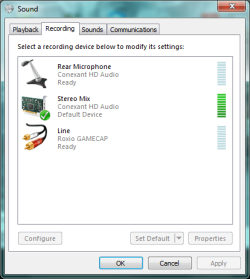
Stereo mix problem-error-1.png


Also I normally use Stereo mix to do commentary when I make videos
But every time I press "Listen to this device" I hear this repeating sound over and over again, It gets very annoying *I have no music playing or anything at all* It just very an annoying sound
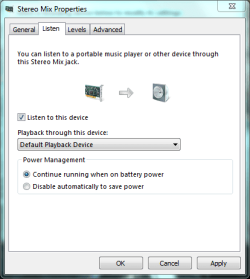
Stereo mix problem-error-2.png

I do have conexant HD Audio, I have tried uninstalling it and reinstalling it, Still has the same problem AFTER I use Stereo Mix. Any help will be nice
My System SpecsSystem Spec

02 May 2012   #2

Windows 7, 64 bit Home SP1, Win 8 Pro 64 bit
Citrus Co, FL


It looks like you have active inputs on both the Rear Microphone and the Line, as it states "Ready". I don't have anything connected to my line or microphone ports and they show "Currently Unavailable".
My System SpecsSystem Spec
02 May 2012   #3

Windows 7


Quote   Quote: Originally Posted by fireberd View Post
It looks like you have active inputs on both the Rear Microphone and the Line, as it states "Ready". I don't have anything connected to my line or microphone ports and they show "Currently Unavailable".
Hm... I do have something plugged in there which is my sub woofer, Do you think that's my problem?
My System SpecsSystem Spec
.


03 May 2012   #4

Windows 7, 64 bit Home SP1, Win 8 Pro 64 bit
Citrus Co, FL


Sub Woofer plugged into an "Input"???
My System SpecsSystem Spec
03 May 2012   #5

Windows 7


Quote   Quote: Originally Posted by fireberd View Post
Sub Woofer plugged into an "Input"???
It's plugged in my pink jack.
My System SpecsSystem Spec
03 May 2012   #6

Windows 7, 64 bit Home SP1, Win 8 Pro 64 bit
Citrus Co, FL


That is the microphone input jack, not an output jack. A speaker should not be plugged into that. Also, same with the Blue Line In.
My System SpecsSystem Spec
03 May 2012   #7

Windows 7


Quote   Quote: Originally Posted by fireberd View Post
That is the microphone input jack, not an output jack. A speaker should not be plugged into that. Also, same with the Blue Line In.
So I'm supposed to unplug whatever is plugged in the pink jack?
Edit: It's still making that annoying repetitive sound when i click on "Listen to this device" and it sounds like my speakers are going to blow up.
My System SpecsSystem Spec
03 May 2012   #8

Windows 7, 64 bit Home SP1, Win 8 Pro 64 bit
Citrus Co, FL


What is the Roxio Game Cap that is shown on the Line In?

What type of speakers do you have and where are they plugged in?
My System SpecsSystem Spec
03 May 2012   #9

Windows 7 Pro-x64
South Texas


Turn off "Listen to this device" unless you have a line-in input connected.
My System SpecsSystem Spec
04 May 2012   #10

Windows 7


Quote   Quote: Originally Posted by fireberd View Post
What is the Roxio Game Cap that is shown on the Line In?
What type of speakers do you have and where are they plugged in?
It's a line for my roxio game capture, The sound and stuff I have logitech speakers, Don't know what the type of logitech speakers it is though, All I know is that, It has a sub woofer. I used to have them plugged in, In the Green one and the Pink one, but I disconnected the pink one though
Quote   Quote: Originally Posted by carwiz View Post
Turn off "Listen to this device" unless you have a line-in input connected.
Yeah I have that part off, I turn it on to see if that annoying sound is still there.
My System SpecsSystem Spec
Reply

 Stereo mix problem problems?


Thread Tools


Similar help and support threads for: Stereo mix problem
Thread Forum
Solved Stereo Mix Problem on VAIO laptop Sound & Audio
Stereo Mix problem Sound & Audio
i got a another problem with stereo mix. (win7) Sound & Audio
Stereo Mix problem-can't seem to record any sound? Sound & Audio
Stereo Mix problem? Drivers


All times are GMT -5. The time now is 06:19 PM.


Windows 7 Forums is an independent web site and has not been authorized,
sponsored, or otherwise approved by Microsoft Corporation.
"Windows 7" and related materials are trademarks of Microsoft Corp.
© Designer Media Ltd