Configuring Sound for 5.1

Pieteree

New member
Hello,

I recently bought a 5.1 surround sound set, Logitech Z506. Whenever I try to configure the sound, I only hear the bass and front speakers.
When it's testing for the rear speakers and subwoofer all the sound comes through the 2 front speakers.
I know the set isn't damaged or anything like that, since I tested it in the store first. I have a 7.1 audio card from Icidu so it should work fine.
I'd like to know what to do to get it working! My audio card has the newest drivers and the surround sound set doesn't require any drivers.
 

My Computer

OS
Windows 7 Ultimate x64
CPU
Pentium Dual-Core E5200 @ 2,5ghz
Motherboard
ASUS P5Q SE
Memory
4gig 866mhz
Graphics Card(s)
NVidia 9600GT 512 mb
Screen Resolution
1280x1024
Other Info
my slow comp ;(
Welcome to seven forums Pieteree

If you have 7.1 Audio card and you insert the jack on the right color it should work.

Im suspecting you did not select the 7.1 audio card as default. Also i think you must disable the built in audio.
 

My Computer

Computer type
PC/Desktop
Computer Manufacturer/Model Number
Gigabyte Technology Co. Ltd.
OS
Windows 10 Pro 64-Bit
CPU
Intel(R) Core(TM) i5-4460 CPU @ 3.20 GHz(4CPU's), ~3.2GHz
Motherboard
Gigabyte B85M-HD3-A
Memory
8192 RAM
Graphics Card(s)
NVIDIA GeForce 710
Sound Card
Integrated High Definition audio with Realtek ALC888 codec
Monitor(s) Displays
Acer V183HV Ab 18.5" LCD Display
Screen Resolution
1366 x 768
Keyboard
HP
Mouse
HP
Internet Speed
100mbps
Antivirus
Microsoft Security Essentials
Browser
Chrome, Firefox
I have the jacks on the right places.

I deinstalled Realtek Audio Manager and High Definition Audio Device from my built in audio but still only 2 speakers work.
 

My Computer

OS
Windows 7 Ultimate x64
CPU
Pentium Dual-Core E5200 @ 2,5ghz
Motherboard
ASUS P5Q SE
Memory
4gig 866mhz
Graphics Card(s)
NVidia 9600GT 512 mb
Screen Resolution
1280x1024
Other Info
my slow comp ;(
Have you configured it in the 7.1 audio cards software?
 

My Computer

Computer type
PC/Desktop
Computer Manufacturer/Model Number
Gigabyte Technology Co. Ltd.
OS
Windows 10 Pro 64-Bit
CPU
Intel(R) Core(TM) i5-4460 CPU @ 3.20 GHz(4CPU's), ~3.2GHz
Motherboard
Gigabyte B85M-HD3-A
Memory
8192 RAM
Graphics Card(s)
NVIDIA GeForce 710
Sound Card
Integrated High Definition audio with Realtek ALC888 codec
Monitor(s) Displays
Acer V183HV Ab 18.5" LCD Display
Screen Resolution
1366 x 768
Keyboard
HP
Mouse
HP
Internet Speed
100mbps
Antivirus
Microsoft Security Essentials
Browser
Chrome, Firefox
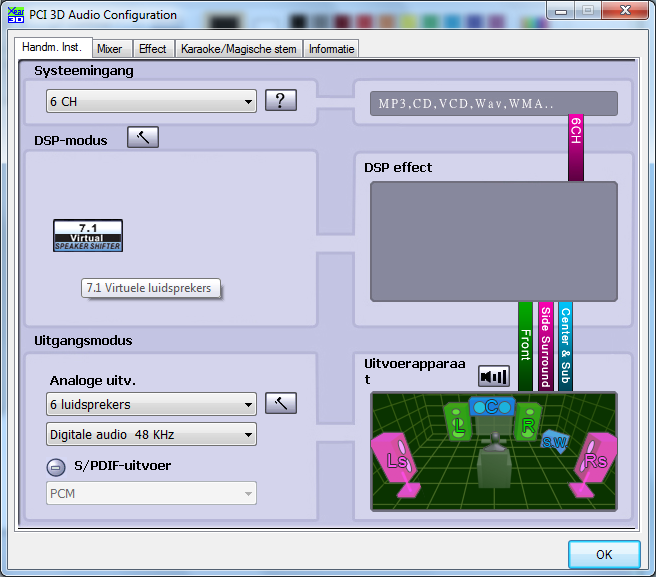
Yes. I tried through the audio software:
CMEDIA.png

(luidsprekers is speakers
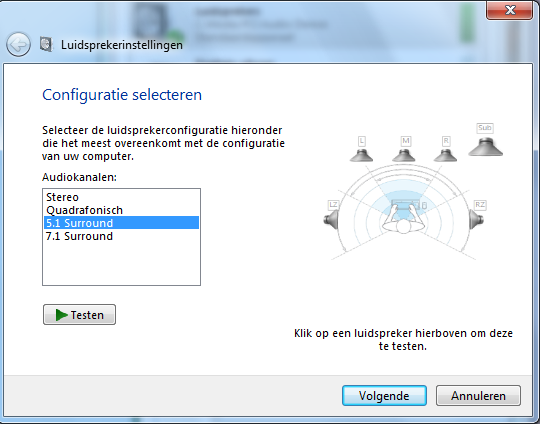
and through sound in the configuration screen:
configuratie.png


I disabled the sound in the BIOS as well and i reinstalled my drivers. My subwoofer works fine when I test it at configuration, but it does not play music whenever I listen to something. My rear speakers are still totally dead, except for a really soft noise.

Sorry for my broken english, I'm doing my best ;)
 

My Computer

OS
Windows 7 Ultimate x64
CPU
Pentium Dual-Core E5200 @ 2,5ghz
Motherboard
ASUS P5Q SE
Memory
4gig 866mhz
Graphics Card(s)
NVidia 9600GT 512 mb
Screen Resolution
1280x1024
Other Info
my slow comp ;(
Right click the volume icon on your taskbar and click volume control option, the 7.1 audio device should be selected there.
 

My Computer

Computer type
PC/Desktop
Computer Manufacturer/Model Number
Gigabyte Technology Co. Ltd.
OS
Windows 10 Pro 64-Bit
CPU
Intel(R) Core(TM) i5-4460 CPU @ 3.20 GHz(4CPU's), ~3.2GHz
Motherboard
Gigabyte B85M-HD3-A
Memory
8192 RAM
Graphics Card(s)
NVIDIA GeForce 710
Sound Card
Integrated High Definition audio with Realtek ALC888 codec
Monitor(s) Displays
Acer V183HV Ab 18.5" LCD Display
Screen Resolution
1366 x 768
Keyboard
HP
Mouse
HP
Internet Speed
100mbps
Antivirus
Microsoft Security Essentials
Browser
Chrome, Firefox
It wasn't, but since it was the standard audio device it worked anyways. i selected it but it doesn't seem to change anything.
 

My Computer

OS
Windows 7 Ultimate x64
CPU
Pentium Dual-Core E5200 @ 2,5ghz
Motherboard
ASUS P5Q SE
Memory
4gig 866mhz
Graphics Card(s)
NVidia 9600GT 512 mb
Screen Resolution
1280x1024
Other Info
my slow comp ;(
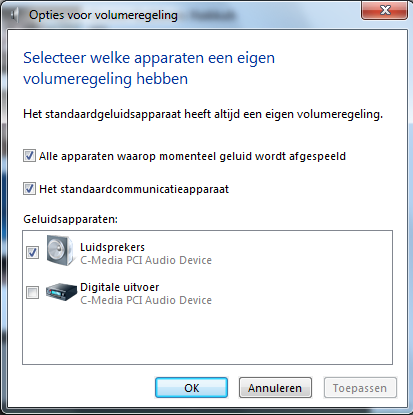
Kindly post the screen shot of your Volume Control Option
 

My Computer

Computer type
PC/Desktop
Computer Manufacturer/Model Number
Gigabyte Technology Co. Ltd.
OS
Windows 10 Pro 64-Bit
CPU
Intel(R) Core(TM) i5-4460 CPU @ 3.20 GHz(4CPU's), ~3.2GHz
Motherboard
Gigabyte B85M-HD3-A
Memory
8192 RAM
Graphics Card(s)
NVIDIA GeForce 710
Sound Card
Integrated High Definition audio with Realtek ALC888 codec
Monitor(s) Displays
Acer V183HV Ab 18.5" LCD Display
Screen Resolution
1366 x 768
Keyboard
HP
Mouse
HP
Internet Speed
100mbps
Antivirus
Microsoft Security Essentials
Browser
Chrome, Firefox
Volumeregeling.png
 

My Computer

OS
Windows 7 Ultimate x64
CPU
Pentium Dual-Core E5200 @ 2,5ghz
Motherboard
ASUS P5Q SE
Memory
4gig 866mhz
Graphics Card(s)
NVidia 9600GT 512 mb
Screen Resolution
1280x1024
Other Info
my slow comp ;(

My Computer

Computer type
PC/Desktop
Computer Manufacturer/Model Number
Gigabyte Technology Co. Ltd.
OS
Windows 10 Pro 64-Bit
CPU
Intel(R) Core(TM) i5-4460 CPU @ 3.20 GHz(4CPU's), ~3.2GHz
Motherboard
Gigabyte B85M-HD3-A
Memory
8192 RAM
Graphics Card(s)
NVIDIA GeForce 710
Sound Card
Integrated High Definition audio with Realtek ALC888 codec
Monitor(s) Displays
Acer V183HV Ab 18.5" LCD Display
Screen Resolution
1366 x 768
Keyboard
HP
Mouse
HP
Internet Speed
100mbps
Antivirus
Microsoft Security Essentials
Browser
Chrome, Firefox
That is what is going wrong, I tried that at my second picture. When I click test, I hear my subwoofer and front speakers plus bass. My rear speakers won't produce a sound at the test. The subwoofer only works at that test, not when I listen to a song for example.
 

My Computer

OS
Windows 7 Ultimate x64
CPU
Pentium Dual-Core E5200 @ 2,5ghz
Motherboard
ASUS P5Q SE
Memory
4gig 866mhz
Graphics Card(s)
NVidia 9600GT 512 mb
Screen Resolution
1280x1024
Other Info
my slow comp ;(
Does your sound card have a manual? I believe there's a configuration on that manual.
 

My Computer

Computer type
PC/Desktop
Computer Manufacturer/Model Number
Gigabyte Technology Co. Ltd.
OS
Windows 10 Pro 64-Bit
CPU
Intel(R) Core(TM) i5-4460 CPU @ 3.20 GHz(4CPU's), ~3.2GHz
Motherboard
Gigabyte B85M-HD3-A
Memory
8192 RAM
Graphics Card(s)
NVIDIA GeForce 710
Sound Card
Integrated High Definition audio with Realtek ALC888 codec
Monitor(s) Displays
Acer V183HV Ab 18.5" LCD Display
Screen Resolution
1366 x 768
Keyboard
HP
Mouse
HP
Internet Speed
100mbps
Antivirus
Microsoft Security Essentials
Browser
Chrome, Firefox
Yes but it´s very limited, nothing good on how to configure the sound.
 

Attachments

My Computer

OS
Windows 7 Ultimate x64
CPU
Pentium Dual-Core E5200 @ 2,5ghz
Motherboard
ASUS P5Q SE
Memory
4gig 866mhz
Graphics Card(s)
NVidia 9600GT 512 mb
Screen Resolution
1280x1024
Other Info
my slow comp ;(
Back
Top