Windows 7 Forums


Windows 7: speakers dont work when connected to my computer!!

29 Jul 2012   #1

MS Windows 7 Home Premium 64-bit SP1
 
 
speakers dont work when connected to my computer!!

i recently got a new computer case and installed windows 7. everything is working fine except for my sounds plugs and my LED's (that's going to be another thread). I've had a foxconn a88gmv for a while now (plugging in speakers in the green jack worked before). i have a coolermaster haf x (this is new). i also have all the drivers for the case and motherboard installed, and the speakers work when i plugin my ipod. i also have all the settings correctly setup. the problem is that they don't even appear when i plug them in the motherboard or in the front. could it be that the wires that connect the motherboard to the case a plugged in wrong(if so, then please give me specific instructions on how to plug them in because i've tried before(with the manual) and it still hasn't worked before)?
oh and, right now my sound works through the hdmi cable that connects to my tv.
dont hesitate to ask about more details.
thanks a lot in advance.


Last edited by computerNewbie; 29 Jul 2012 at 04:50 PM.. Reason: forgot some details
My System SpecsSystem Spec

29 Jul 2012   #2

Windows 7 Ultimate 64
Southern California


computerNewbie,
Welcome to SF. Are you saying that plugging your speakers into the rear mobo output or headphones/speakers into the front causes no sound to emit?
My System SpecsSystem Spec
29 Jul 2012   #3

Windows 7 Ultimate 64
Southern California


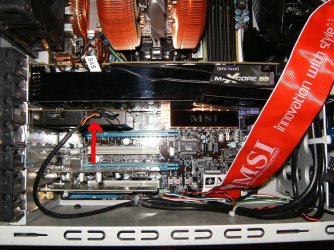
speakers dont work when connected to my computer!!-audio-header.jpgDid you plug the front panel mic and headphone connection into the audio header on the mobo? In this case the audio jack is plugged into its sound card.
My System SpecsSystem Spec
.


29 Jul 2012   #4

MS Windows 7 Home Premium 64-bit SP1


linnemeyerhere,
yes im saying that. and yes i'm pretty sure i did unless the the foxconn manual lied to me
My System SpecsSystem Spec
29 Jul 2012   #5

Windows 7 Ultimate 64
Southern California


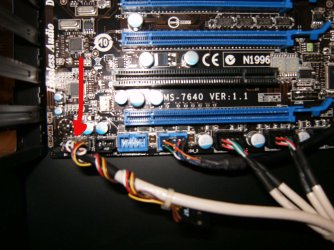
Here's the same to a new mobo header.
speakers dont work when connected to my computer!!-audio-plug-header.jpg
My System SpecsSystem Spec
29 Jul 2012   #6

win 7 X64 Ultimate SP1
Ohio (From WV)
 
 
First Things First

Type "sound" into your start search box. (no quotes) select sound from the results and check to see if your speakers are the default deivice.

Attachment 223844

Last edited by HammerHead; 16 Jan 2013 at 03:42 AM..
My System SpecsSystem Spec
29 Jul 2012   #7

MS Windows 7 Home Premium 64-bit SP1


shud i plug it into f_audio? and shud i plug in the ac'97 or hd audio?
My System SpecsSystem Spec
29 Jul 2012   #8

MS Windows 7 Home Premium 64-bit SP1


hammerhead,
THE SPeakers dont even appear on the sound panel.
My System SpecsSystem Spec
29 Jul 2012   #9

Windows 7 Ultimate 64
Southern California


Is the sound on board the mobo, or is it via a sound card? could you take some detailed pictures and post your system spec's you can use a free great program like ....Speccy @ Speccy - System Information - Free Download.

This info helps a lot!
My System SpecsSystem Spec
29 Jul 2012   #10

MS Windows 7 Home Premium 64-bit SP1


okay, im on it please wait a few minutes
My System SpecsSystem Spec
Reply

 speakers dont work when connected to my computer!! problems?


Thread Tools


Similar help and support threads for: speakers dont work when connected to my computer!!
Thread Forum
Network connected to internet, IE and Firefox dont work, Chrome does Network & Sharing
My computer speakers do not work but headset works fine. Sound & Audio
Mic+Speakers dont work after radeon 6850 Hardware & Devices
HP Touchsmart 310. Internal Speakers dont work Sound & Audio
5.1 speakers dont works on W7U x64bits Sound & Audio


All times are GMT -5. The time now is 07:07 PM.


Seven Forums Android App Seven Forums IOS App Follow us on Facebook

Windows 7 Forums is an independent web site and has not been authorized,
sponsored, or otherwise approved by Microsoft Corporation.
"Windows 7" and related materials are trademarks of Microsoft Corp.
© Designer Media Ltd
  

1 2 3 4 5 6 7 8 9 10 11 12 13 14 15 16 17 18 19 20 21 22 23 24 25 26 27 28 29 30 31 32