Windows 7 Forums Search
Welcome to Windows 7 Forums. Our forum is dedicated to helping you find solutions with any problems, errors or issues you are experiencing with Windows 7. The Windows 7 forum also covers news and updates and has an extensive Windows 7 tutorial section that covers a wide range of tips and tricks.


Windows 7 - Buzz noise - SB Audigy 2 ZS

 
05-31-2009   #31


Windows 7 Build 7137


not really a windows 7 issue

So I did some more messing with my system, and it turns out that having both my laptop soundcard and my desktop soundcard plugged into the two inputs on my speakers was causing the buzz.

Its strange that the buzz started after installing windows 7, but when i plug the windows 7 desktop exclusively into my speakers - no buzz!

My System SpecsSystem Spec
07-04-2009   #32


Windows RC + (can't remember)


Buzzing sound

I don't know if you fixed your buzzing sound yet but I did. I have an Audigy II Platinum Plus sound card. This all starting happeneing when I installed the CCCP codec pack but I don't that is the problem for this reason. Well, who knows where the problem REALLY is since it's all beta software. Here is what I did to fix it.

Pretty much just installed the driver Windows offered. I removed the SB Audity entry from the device manager list including drivers when asked > uninstalled all the Creative software from add remove programs > reboot as asked > Went to MS Updates in contol panel > scan for updates > click on 'optional updates' (Option was there for me) > installed the driver from MS > rebooted when asked > and I"m now able to play DVD's with Windows Media Center 7.

Haven't tested MKV playback yet but I will. I want to watch Barry Lyndon badly. I hope it works out.

UPDATE:

Actually, I just uninstalled the Windows SB Audigy driver and reinstalled the vista driver from the Creative website and the sound still works ok. So, for me, it was something w/ the CCCP Codec pack (probably ffdshow). So I'm not sure what to tell you guys. But maybe this will help you in some way.

Last edited by thearm; 07-04-2009 at 10:47 PM..
My System SpecsSystem Spec
07-05-2009   #33


Window 7 build 7600, Xp pro(VM)


Quote   Quote: Originally Posted by jas9000 View Post
So I did some more messing with my system, and it turns out that having both my laptop soundcard and my desktop soundcard plugged into the two inputs on my speakers was causing the buzz.

Its strange that the buzz started after installing windows 7, but when i plug the windows 7 desktop exclusively into my speakers - no buzz!
Hi....
While i was using windows 7 post-beta that is build 68** i experienced the same problem. Mine was caused due incompatible driver.
But i fixed it. You can try it.

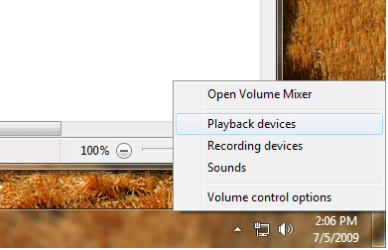
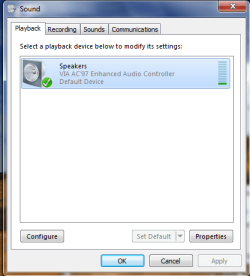
Ok right click on the volume notification icon and open playback devices.
Now double click the speaker. Now you will see another dialog box is opened.
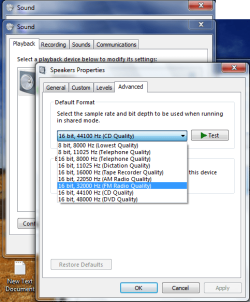
Go to advanced tab there you will find Default format Change it to fm radio quality then apply. Test it by playing any song. If it does not work again change the fm radio quality to am radio quality. And test it again.

And i know i am replying to 4 week old post..

Hope it will work..
Attached Thumbnails
Buzz noise - SB Audigy 2 ZS-untitled.png   Buzz noise - SB Audigy 2 ZS-untitled1.png   Buzz noise - SB Audigy 2 ZS-untitled2.png  
My System SpecsSystem Spec
.


10-10-2009   #34


Windows 7


Buzz

Hello,

I also had the buzzing problem in Windows 7.
No buzzing sounds in Linux or WinXP though.

In my case the cause of the problem turned out to be the CD Audio volume.
My CD device is not connected to the Sound Blaster board anyway so I just turned the volume all the way down.

Right click the volume control on the taskbar -> select Playback Devices'' -> Double click on 'Speakers'' -> Select the 'Levels' tab -> turn down CD Audio

I hope that helps
Attached Thumbnails
Buzz noise - SB Audigy 2 ZS-audigy.png  
My System SpecsSystem Spec
03-11-2010   #35


win7


Quote   Quote: Originally Posted by renthor View Post
Try selecting SPDIF Out as your default device in the Sound settings in Control Panel. Fixed the issue for me.
Wow, been looking for an answer to buzzing sounds every now and then with my audigy 2 zs with Windows 7 RTM and came across this thread via google. Im using headphones and by setting my default playback device to spdif it fixed it....lol, unreal as my headphones have nothing to do with a digital spdif yet it works...

My System SpecsSystem Spec
Reply

 Buzz noise - SB Audigy 2 ZS problems?


Thread Tools


Similar Threads for: Buzz noise - SB Audigy 2 ZS
Thread Forum
Aero Buzz Hardware & Devices
Google Buzz Chillout Room
Audio Buzz in WMC and WMP but not VLC Sound & Audio
Buzz with SB Live! 5.1 Sound & Audio
WMP Buzz Media Center


All times are GMT -5. The time now is 01:54 AM.


Windows 7 Forums is an independent web site and has not been authorized,
sponsored, or otherwise approved by Microsoft Corporation.
"Windows 7" and related materials are trademarks of Microsoft Corp.
© Designer Media Ltd
  

1 2 3 4 5 6 7 8 9 10 11 12 13 14 15 16 17 18 19 20 21 22 23 24 25 26 27 28 29 30