Windows 7 Forums


Windows 7: HDMI Audio Out, Realtek + Nvidia

08 Oct 2012   #1

Win 7 Pro x64
 
 
HDMI Audio Out, Realtek + Nvidia

Hi Guys,
I really need some help with this one.
I purchased a new PC, with a Gigabyte GA-H61MA-D2V motherboard that has on board realtek audio, I also purchased a nvidia geforce GT630 graphics card which has a built in audio processor and hdmi connection which is going to my LG 42PL6010 tv.

I've installed drivers for chipset, audio, graphics, but I'm unable to get any sound out of the HDMI port. I've set the default play back device as as the tv in control panel - sound. Choosing to test shows the audio bars moving but no sound comes out.
I've checked bios settings, tried with only audio drivers, or only graphics drivers, no joy.

I've tested the cable and tv with a hdmi equipped laptop, so can rule those out as a possible cause.

many thanks
Phill

My System SpecsSystem Spec

08 Oct 2012   #2

Windows 7, 64 bit Home SP1, Win 8 Pro 64 bit
Citrus Co, FL


The default playback, if you are using HDMI should be the HDMI. I've never seen one with a "TV" listed as the default playback device. However, in most cases when an HDMI cable is connected Windows automatically switches the default playback device from "speakers" (your PC's RealTek audio) to the HDMI.

Have you installed the NVIDIA supplied video drivers (which include the video card's audio driver)? If not, go to www.nvidia.com and download and install the latest driver for the GT630 and Windows 7 64 bit.

Here is the direct link http://www.geforce.com/drivers/results/48847
My System SpecsSystem Spec
08 Oct 2012   #3

Win 7 Pro x64


Hi Firebred, yea I've already got the latest nvidia drivers (tried the ones from the brand[palit] too incase they helped but didnt, so im still on latest nvidia 64bit drivers at the moment.)

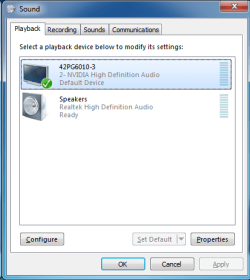
It doesn't list the word TV, it says the TV's model number, LG42PG6010-3 2-Nvidia High Definition Audio Device.
My System SpecsSystem Spec
.


08 Oct 2012   #4

Windows 7, 64 bit Home SP1, Win 8 Pro 64 bit
Citrus Co, FL


I've never seen one do that. This is a new one.

Where are you seeing this? In the device manager or in the Sound panel/playback section?
My System SpecsSystem Spec
08 Oct 2012   #5

Win 7 Pro x64


In PlayBack - in Sound in Control Panel.
Attached Thumbnails
HDMI Audio Out, Realtek + Nvidia-playback.png  
My System SpecsSystem Spec
08 Oct 2012   #6

Windows 7, 64 bit Home SP1, Win 8 Pro 64 bit
Citrus Co, FL


For whatever reason that is not showing the usual "HDMI".

RIGHT click in a blank area in the panel and then check the boxes to show disabled and disconnected devices. Does the HDMI now show up?
My System SpecsSystem Spec
08 Oct 2012   #7

Win 7 Pro x64


yea that screen is with all devices shown, even disconnected or disabled.
My System SpecsSystem Spec
08 Oct 2012   #8

Windows 7, 64 bit Home SP1, Win 8 Pro 64 bit
Citrus Co, FL


Uninstall the NVIDIA in the Device Manager then restart and it will be reinstalled see if that changes or helps things.

In the Device Manager RIGHT click on the entry for the NVIDIA Video Card, then LEFT click "Uninstall" DO NOT check the box to also uninstall the drivers. Restart the PC and when Windows starts it will detect and reinstall the video (and the audio from the Video card). This will screw up your video untill its reinstalled, but it will straighten out after that.
My System SpecsSystem Spec
Reply

 HDMI Audio Out, Realtek + Nvidia problems?


Thread Tools


Similar help and support threads for: HDMI Audio Out, Realtek + Nvidia
Thread Forum
Realtek HDMI Output ATI HDMI Audio -Not Plugged In- Sound & Audio
Headphones vs Monitor: HDMI audio, SRS for Monitors, & Realtek ??? Sound & Audio
Realtek HDMI+NVIDIA vc=No Sound Sound & Audio
No sound from HDMI device Nvidia and Realtek HD Audio Sound & Audio
Nvidia Geforce GTX 260 HDMI Out With Audio? Graphic Cards


All times are GMT -5. The time now is 11:22 AM.


Seven Forums Android App Seven Forums IOS App Follow us on Facebook

Windows 7 Forums is an independent web site and has not been authorized,
sponsored, or otherwise approved by Microsoft Corporation.
"Windows 7" and related materials are trademarks of Microsoft Corp.
© Designer Media Ltd
  

1 2 3 4 5 6 7 8 9 10 11 12 13 14 15 16 17 18 19 20 21 22 23 24 25 26 27 28 29 30 31 32