Windows 7 Forums


Windows 7: Creative X-Fi Xtreme Audio Driver Problems

27 Sep 2009   #1

Windows 7
 
 
Creative X-Fi Xtreme Audio Driver Problems

I recently installed Windows 7 on my computer and downloaded the new .90 driver for my "Creative Sound Blaster X-Fi Xtreme Audio" PCI. I can't seem to switch between the recording device "Microphone"(front Jack) and "Line-In"(Back).

Also I tried downloading the driver package that includes the "Creative audio console" but the installer for that says that it cannot find the driver specified. I really would like the Console back, it made switching audio devices and sound setups much easier. Any help would be appreciated, Thanks.

My System SpecsSystem Spec

27 Sep 2009   #2

Windows 7 Ultimate X64
43° 40' 0 N 79° 25' 0 W


Welcome to sevenforums SawedOn

Download this file again...reboot, and see if you still having problems.

File Name : XFXA_PCDRV_LB_1_04_0090.exe

  1. Download the file onto your local hard disk.
  2. Close all other Windows applications.
  3. Double-click the downloaded file.
  4. Follow the instructions on the screen.
I'm assuming you're running 32 bit.
My System SpecsSystem Spec
27 Sep 2009   #3

Windows 7


Ok I re downloaded, the installer and installed. It installed fine and I let it reboot my computer after it complete. After the reboot it asked me about the auto updater and I clicked cancel.

Unfortunatly the problem still persists. It still says

Line-In

SB X-Fi Xtreme Audio
Currently Unavailable

in the Recording devices menu.
My System SpecsSystem Spec
.


27 Sep 2009   #4

Windows 7 Ultimate X64
43° 40' 0 N 79° 25' 0 W


I'm curious did you disable the onboard audio devices?
You should...by having both enabled it can cause conflicts.
Go to your motherboard bios and disable it if you haven't done so.
My System SpecsSystem Spec
28 Sep 2009   #5

Windows 7


The this integrated audio devices have always said "Not Plugged in"

I'll go disable them now...

Last edited by SawedOn; 28 Sep 2009 at 03:03 PM..
My System SpecsSystem Spec
28 Sep 2009   #6

Windows 7


OK done, I disabled the HD Audio from the bios and the other audio devices are no longer detected by Windows 7

The problem still persists.
My System SpecsSystem Spec
28 Sep 2009   #7

Windows 7 Ultimate X64
43° 40' 0 N 79° 25' 0 W


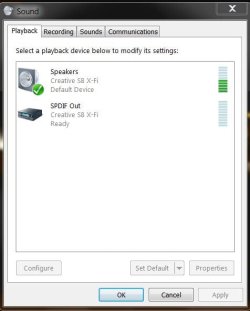
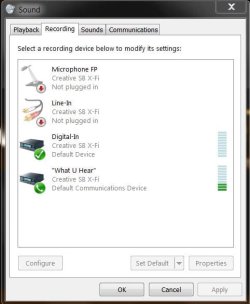
I have attached 2 screenshots here to give you an idea what it may look like as I am also using a Creative product but using an optical digital cable out, as you are using a different setup.

Did you checked and/or changed your default settings?
Did you check your connections in the back of your motherboard?
Try re- installing the console with the proper drivers.
I really hope you can get this to work
Let me know, ok?
Attached Thumbnails
Creative X-Fi Xtreme Audio Driver Problems-creative-playback.jpg   Creative X-Fi Xtreme Audio Driver Problems-creative-recording.jpg  
My System SpecsSystem Spec
28 Sep 2009   #8

Windows 7


YESS!! I finally got it working correctly thanks for all your help.

With the drivers installed I saw that Windows Update had an update for my creative sound device. After installing it and restarting my computer everything worked perfectly.

Thanks again!
My System SpecsSystem Spec
28 Sep 2009   #9

Windows 7 Ultimate X64
43° 40' 0 N 79° 25' 0 W


anytime SawedOn nothing makes me happier than helping a fellow member of SevenForums
Enjoy
My System SpecsSystem Spec
13 Oct 2009   #10

windows 7 prof


I got a similar problem and noticed the driver available via windows update.
But somehow I can't install it.
I select the driver as optional update, click on "install updates", wait while "preparing to install" and then I am back where I was before I clicked the button.
Tried to reboot serveral times too.
My System SpecsSystem Spec
Reply

 Creative X-Fi Xtreme Audio Driver Problems problems?


Thread Tools


Similar help and support threads for: Creative X-Fi Xtreme Audio Driver Problems
Thread Forum
Creative X-fi Xtreme Audio Sound & Audio
Sound Blaster X-Fi Xtreme Audio / Creative.com Sound & Audio
Creative X-Fi Xtreme Audio Sound & Audio
Creative Soundblaster X-Fi Xtreme Audio Drivers
Creative X-Fi Xtreme Audio x64 Sound & Audio


All times are GMT -5. The time now is 09:56 PM.


Seven Forums Android App Seven Forums IOS App Follow us on Facebook

Windows 7 Forums is an independent web site and has not been authorized,
sponsored, or otherwise approved by Microsoft Corporation.
"Windows 7" and related materials are trademarks of Microsoft Corp.
© Designer Media Ltd
  

1 2 3 4 5 6 7 8 9 10 11 12 13 14 15 16 17 18 19 20 21 22 23 24 25 26 27 28 29 30 31 32