
Windows 7 Forums


Windows 7: Sound coming from both headphone & speaker but headphone is not detect

03 Jan 2013   #1

Windows 7 Home Premium 32 bit
 
 
Sound coming from both headphone & speaker but headphone is not detect

I have Lenovo 3000 Y410 laptop having Windows 7 Home Premium installed on it. Realtek HD Audio latest driver is installed. But from the last 3 days, when I connect headphone through laptop, following things happen : -
1) Headphone connected popup doesn't show up.
2) Mic of Headphone connected pop shows up.

Sound coming from both headphone & speaker but headphone is not detect-1.png

3) When I play video, sound coming from both headphone & laptop speakers.
4) When I mute sound by muting sound icon in taskbar, sound then comes only from headphone.

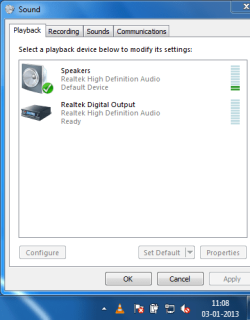
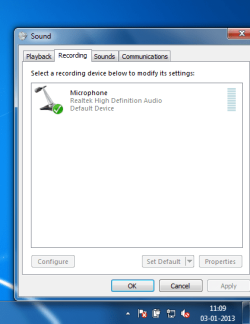
Sound coming from both headphone & speaker but headphone is not detect-3.png
Sound coming from both headphone & speaker but headphone is not detect-4.png
Sound coming from both headphone & speaker but headphone is not detect-5.png

What I have tried?
1) Installed new Realtek HD Audio Manager.
2) Installed OS again.
3) Tried to change settings in Realtek Hd Audio Manager. But Nothing changes.

When I input headphone & mic jacks into laptop, & then check Realtek HD Audio Manager. The following image shows this : -
Sound coming from both headphone & speaker but headphone is not detect-6.png

The green in realtek hd audio manager is for headphone & red is for mic. In the image, it is shown that headphone not connected & mic connected. But even headphone not connected shows up, sound coming form headphone.

I want to get sound from only headphone when headphone is connected. Is this a hardware problem ?

Please help....
My System SpecsSystem Spec

03 Jan 2013   #2

Windows 7, 64 bit Home SP1, Win 8 Pro 64 bit
Citrus Co, FL


My Realtek HD Audio Manager has more options than yours.

Also, I notice you only have the microphone in the Recording Section of the Sound Panel. RIGHT click in an empty space in that Panel and then LEFT click Show Disabled and Disconnected devices. The Stereo Mix should be shown and you can enable that and make it the default Recording device.

Where did you get the RealTek driver that you installed? If you are not using the Lenovo supplied sound driver, get that and install it as a first step. I have a Lenovo Laptop and it has Stereo Mix and other functions. I haven't looked at the RealTek HD manager so I'm not sure what all it shows.
My System SpecsSystem Spec
08 Jan 2013   #3

Windows 7 Home Premium 32 bit


Quote   Quote: Originally Posted by fireberd View Post
My Realtek HD Audio Manager has more options than yours.

Also, I notice you only have the microphone in the Recording Section of the Sound Panel. RIGHT click in an empty space in that Panel and then LEFT click Show Disabled and Disconnected devices. The Stereo Mix should be shown and you can enable that and make it the default Recording device.

Where did you get the RealTek driver that you installed? If you are not using the Lenovo supplied sound driver, get that and install it as a first step. I have a Lenovo Laptop and it has Stereo Mix and other functions. I haven't looked at the RealTek HD manager so I'm not sure what all it shows.
I have tried with your first solution by setting stereo mix as default recording device, that doesn't work. The time I had purchased laptop, it had Realtek HD Audio driver version 1.83 installed ( that was for windows Vista ). Then when I installed Windows 7, I installed version 2.65 of it. That was working fine for me. Few days back, the problems which I mentioned above started. Then I tried installing the latest version of Realtek HD Audio Manager , i.e. , version 2.70. I have tried everything that I can do by changing every options regarding sound. But that also didn't work. Now it looks to me a hardware problem in soundboard. Probably going tommorow to some laptop service centre for its repair. Can anybody tell about possibility that I can change sound board by myself ? I have heard that most of things in laptop is directly connected to board. If that is true, then I will not be able to replace it. It has to be done by some expert...Any suggestions....
My System SpecsSystem Spec
.


Reply

 Sound coming from both headphone & speaker but headphone is not detect problems?


Thread Tools


Similar help and support threads for: Sound coming from both headphone & speaker but headphone is not detect
Thread Forum
No Sound From Speaker Or Headphone, Realtek ALC665 AC'97 -Windows 7 64 Sound & Audio
Computer plays sound through only one speaker/headphone with fuzziness Sound & Audio
Strange noise , glitch, crack coming out of speaker / headphone Sound & Audio
No sound in speaker but in Headphone for IDT Codec Sound & Audio
Gateway laptop has no sound from Speaker but it has from headphone Sound & Audio


All times are GMT -5. The time now is 10:41 PM.


Seven Forums Android App Seven Forums IOS App Follow us on Facebook

Windows 7 Forums is an independent web site and has not been authorized,
sponsored, or otherwise approved by Microsoft Corporation.
"Windows 7" and related materials are trademarks of Microsoft Corp.
© Designer Media Ltd
  

1 2 3 4 5 6 7 8 9 10 11 12 13 14 15 16 17 18 19 20 21 22 23 24 25 26 27 28 29 30 31 32