
Windows 7 Forums


Windows 7: Microphone not working on Windows 7 Home Premium 64 Bit.

07 Jan 2013   #1

Windows 7 Home Premium 64 Bit
 
 
Microphone not working on Windows 7 Home Premium 64 Bit.

Recently upgraded from Windows XP to Windows 7 HP 64 Bit. Microphone was working fine before I upgraded the OS. Also I've noticed my previously working IDT Audio Control Panel is now missing, tried to re-install but to no avail. Currently in the Device Manager, the Audio Device is High Definition Audio Device. Also, under Sound, Recording, Microphone is not plugged in. I have already checked 'Show disconnected/disabled devices'. My speakers are working fine, just the microphone. It is plugged into the 3.5mm pink jack, I do not have any front microphone jacks. Have also tried to update the drivers but no changes.


I suppose installing an Audio Device Manager and identifying the devices according to the ports will work, but none of these audio managers like RealTek or IDT work for me, which I am not sure why.

Motherboard: Intel D946GZIS
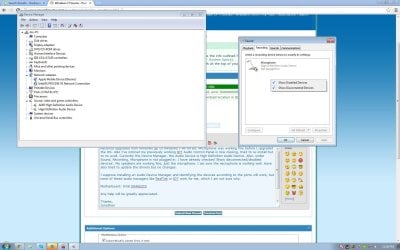
Microphone not working on Windows 7 Home Premium 64 Bit.-untitled.jpg
Any help will be greatly appreciated.

Thanks,
Jonathan
My System SpecsSystem Spec

07 Jan 2013   #2

Windows 7, 64 bit Home SP1, Win 8 Pro 64 bit
Citrus Co, FL


The IDT (previously called SigmaTel) drivers are needed. The Windows installed HD Audio Codec are a basic function driver and will provide sound, but depending on the hardware sound chip may not provide all functions.

Here is the IDT driver from the Intel downloads. Install this and see if fixes the problems.
http://downloadcenter.intel.com/Deta...*&DownloadType=
My System SpecsSystem Spec
07 Jan 2013   #3

Windows 7 Home Premium 64 Bit


Hi, fireberd. Thanks for the reply, however I received an error 'The hardware detected is not supported by this IDT package. The install will be aborted.' I believe I do not have any soundcards other than the built-in one.
My System SpecsSystem Spec
.


07 Jan 2013   #4

Windows 7, 64 bit Home SP1, Win 8 Pro 64 bit
Citrus Co, FL


The Intel list of applicable motherboards for this download lists your motherboard?

Download the Intel motherboard chipset driver and install that, then try the sound driver again. If the correct chipset drivers were not installed the devices on the motherboard will not be detected or correctly detected.
http://downloadcenter.intel.com/Deta...eng&iid=dc_rss
My System SpecsSystem Spec
07 Jan 2013   #5

Windows 7 Home Premium 64 Bit


Yes, it lists down my motherboard D946GZIS. Do I need to run the Audio Driver setup in compatibility mode or anything?
My System SpecsSystem Spec
07 Jan 2013   #6

Windows 7, 64 bit Home SP1, Win 8 Pro 64 bit
Citrus Co, FL


No, it should work as is. Vista drivers are valid for Win 7. Try the chipset drivers that I referenced first as that may make a difference.
My System SpecsSystem Spec
07 Jan 2013   #7

Windows 7 Home Premium 64 Bit


Hello, I have tried updating my chipset drivers and then the IDT drivers. Now everything works, thank you!
My System SpecsSystem Spec
Reply

 Microphone not working on Windows 7 Home Premium 64 Bit. problems?


Thread Tools


Similar help and support threads for: Microphone not working on Windows 7 Home Premium 64 Bit.
Thread Forum
TV USB digital not working with Windows 7 Home Premium General Discussion
Internet not working after re-installing windows 7 home premium Drivers
Windows 7 Home Premium 64bit gadget gallery is not working General Discussion
Windows 7 Home Premium 64 bit not working Installation & Setup
Windows 7 Home Premium 64 bit is not working . Need help, please. General Discussion


All times are GMT -5. The time now is 06:25 AM.


Seven Forums Android App Seven Forums IOS App Follow us on Facebook

Windows 7 Forums is an independent web site and has not been authorized,
sponsored, or otherwise approved by Microsoft Corporation.
"Windows 7" and related materials are trademarks of Microsoft Corp.
© Designer Media Ltd
  

1 2 3 4 5 6 7 8 9 10 11 12 13 14 15 16 17 18 19 20 21 22 23 24 25 26 27 28 29 30 31 32