| Windows 7: Realtek Audio on Intel DZ77GA-70K - no controls |
24 Jan 2013
|
#1 | | |
Realtek Audio on Intel DZ77GA-70K - no controls Hi...
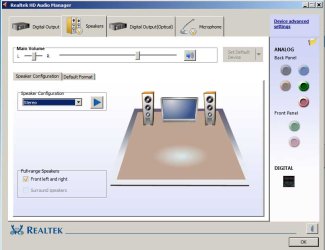
Just installed an (original) Intel DZ77GA-70K. I see that the Realtek Audio Manager has no controls... Meaning, it only has volume control. None of the follwing:
1. No mixer
2. No equalizer
3. No ambient effects, etc. etc.
(Screenshot attached.)
The Realtek is an ALC 899. Have tried the latest drivers from the Intel site: AUD_Win7_8_6.0.1.6804_PV.exe. No luck.
Grateful for any help... | My System Specs |
| OS Windows 7 Ultimate x64 |
24 Jan 2013
|
#2 | | Windows 7, 64 bit Home SP1, Win 8 Pro 64 bit Citrus Co, FL |
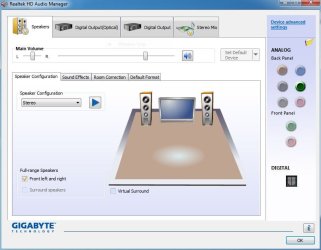
Do you have the option to set the "Stereo Mix" as the default recording device? (Stereo Mix or may be called System Mixer, is needed if you want to record streaming audio from the internet). Then, what options show up. Each RealTek control panel is customized by the PC or Motherboard vendor. e.g. my RealTek came from my Motherboard Vendor (Gigabyte) and its fairly basic too, however they also included the Creative SoundBlaster MB software enhancement and it has an EQ and several other effects that can be used.
To check for the System Mixer, go to the Control Panel/Hardware and Sounds and finally the Sound Panel. Click on the Recording Tab. If the System Mixer is shown, enable it if needed, then set it as the default recording device. If its not show, RIGHT click in an empty space in that panel then click to Show "Disabled" and "Disconnected" devices. If the Stereo Mix now shows, make it the default recording device. | My System Specs | | Computer type PC/Desktop System Manufacturer/Model Number My Own Build OS Windows 7, 64 bit Home SP1, Win 8 Pro 64 bit CPU Intel i7 3770 Motherboard Gigabyte GA-Z77X-UD5H Memory 16GB GSkill Ripsaw F3-14900CL9Q-16GBXL Graphics Card Sapphire HD7770 Sound Card RealTek Monitor(s) Displays Viewsonic VA2448 Series 24" LED Screen Resolution 1920X1080 Keyboard Kensington wired Mouse Logitech Wireless PSU Antec High Current Gamer HCG-620M Modular Case Coolermaster HAF XM Cooling Corsair H80 Liquid cooling with aftermarket Nexus quiet fans Hard Drives 240GB Intel 520 SSD for Win 7
128GB OCZ Vertex 4 SSD for Win 8
1 TB Seagate drive for backup Internet Speed 40 MB/sec (Cable) Antivirus Microsoft Security Essentials and Malwarebytes Browser I.E9/Firefox Other Info Sonar X2 Professional 64 bit Recording Software with Roland Octa-Capture and MAudio Fast Track Ultra 8R recording interfaces, Frontier Tranzport wireless control unit, Behringer BCF2000 Control Surface.
Five USB connected optical drives for CD Audio production using Nero 11
Other systems: Desktop with i5 3550 CPU, LenovoZ560 Laptop with Win 7 64 bit HP, SP1, new iPad |
24 Jan 2013
|
#3 | | |
Thanks for that fireberd... but doesn't really solve the problem. And, recording is out. There's no mike boost... | My System Specs | | OS Windows 7 Ultimate x64 |
24 Jan 2013
|
#4 | | Windows 7, 64 bit Home SP1, Win 8 Pro 64 bit Citrus Co, FL |
This is a current production motherboard, basically the same as my Gigabyte GAZ77X UD5H motherboard.
Did you install ALL the drivers and software from the Intel CD that came with the motherboard? That would be the first or best step, except for possibly McAfee if you don't use it.
I used to have an Intel motherboard on my previous PC and I found installing everything from the Intel CD was needed for everything on the motherboard to operate properly.
Mic Boost isn't normally needed with a Computer mic. If you are trying to use a standard P.A. type mike (e.g. a Shure SM58) even with the boost it won't really record correctly as the signal from a standard P.A. mike is way below the input level for PC sound inputs (more like Line Level). | My System Specs | | Computer type PC/Desktop System Manufacturer/Model Number My Own Build OS Windows 7, 64 bit Home SP1, Win 8 Pro 64 bit CPU Intel i7 3770 Motherboard Gigabyte GA-Z77X-UD5H Memory 16GB GSkill Ripsaw F3-14900CL9Q-16GBXL Graphics Card Sapphire HD7770 Sound Card RealTek Monitor(s) Displays Viewsonic VA2448 Series 24" LED Screen Resolution 1920X1080 Keyboard Kensington wired Mouse Logitech Wireless PSU Antec High Current Gamer HCG-620M Modular Case Coolermaster HAF XM Cooling Corsair H80 Liquid cooling with aftermarket Nexus quiet fans Hard Drives 240GB Intel 520 SSD for Win 7
128GB OCZ Vertex 4 SSD for Win 8
1 TB Seagate drive for backup Internet Speed 40 MB/sec (Cable) Antivirus Microsoft Security Essentials and Malwarebytes Browser I.E9/Firefox Other Info Sonar X2 Professional 64 bit Recording Software with Roland Octa-Capture and MAudio Fast Track Ultra 8R recording interfaces, Frontier Tranzport wireless control unit, Behringer BCF2000 Control Surface.
Five USB connected optical drives for CD Audio production using Nero 11
Other systems: Desktop with i5 3550 CPU, LenovoZ560 Laptop with Win 7 64 bit HP, SP1, new iPad |
24 Jan 2013
|
#5 | | |
Yup... installed all drivers and applications except for the third party ones such as McAfee, Acrobat Reader, etc.
From the word go, the whole interface seemed stripped down compared to earlier installs... uninstalled the drivers from the CD and reinstalled from the Intel website - latest, dated this month. Same problem.
Use a cheap ($2) mike... worked fine before with a decibel boost. But now, terrible. And the System Mixer just doesn't cut the ice. Also, overall audio levels playback can't be controlled except for volume.
What gives? How can one get the earlier interface back? | My System Specs | | OS Windows 7 Ultimate x64 |
24 Jan 2013
|
#6 | | Windows 7, 64 bit Home SP1, Win 8 Pro 64 bit Citrus Co, FL |
I notice earlier versions of the sound drivers on the Intel site. Try one of the earlier driver versions and see what happens.
I don't know if a RealTek driver from another vendor will work - some are set up to look for that vendor's hardware and if its not there it will not install. There may be a generic RealTek that you can install.
Here is the link to the Gigabyte site for my motherboard's RealTek. My motherboard is a Z77 type (and I have an i7 3770 CPU installed). GIGABYTE - Motherboard - Socket 1155 - GA-Z77X-UD5H (rev. 1.1)
No guarantee on this driver but worth a try. Create a System Restore point before installing (or attempting to install). | My System Specs | | Computer type PC/Desktop System Manufacturer/Model Number My Own Build OS Windows 7, 64 bit Home SP1, Win 8 Pro 64 bit CPU Intel i7 3770 Motherboard Gigabyte GA-Z77X-UD5H Memory 16GB GSkill Ripsaw F3-14900CL9Q-16GBXL Graphics Card Sapphire HD7770 Sound Card RealTek Monitor(s) Displays Viewsonic VA2448 Series 24" LED Screen Resolution 1920X1080 Keyboard Kensington wired Mouse Logitech Wireless PSU Antec High Current Gamer HCG-620M Modular Case Coolermaster HAF XM Cooling Corsair H80 Liquid cooling with aftermarket Nexus quiet fans Hard Drives 240GB Intel 520 SSD for Win 7
128GB OCZ Vertex 4 SSD for Win 8
1 TB Seagate drive for backup Internet Speed 40 MB/sec (Cable) Antivirus Microsoft Security Essentials and Malwarebytes Browser I.E9/Firefox Other Info Sonar X2 Professional 64 bit Recording Software with Roland Octa-Capture and MAudio Fast Track Ultra 8R recording interfaces, Frontier Tranzport wireless control unit, Behringer BCF2000 Control Surface.
Five USB connected optical drives for CD Audio production using Nero 11
Other systems: Desktop with i5 3550 CPU, LenovoZ560 Laptop with Win 7 64 bit HP, SP1, new iPad |
24 Jan 2013
|
#7 | | |
Just installed, as per your suggestion. No luck. The Realtek interface remains the same... as per the screen capture i attached earlier... all the extra i get is an additional Dolby panel for playback... | My System Specs | | OS Windows 7 Ultimate x64 |
24 Jan 2013
|
#8 | | Windows 7, 64 bit Home SP1, Win 8 Pro 64 bit Citrus Co, FL |
This is my RealTek control panel from the Gigabyte RealTek driver install. You may want to completely uninstall the RealTek in the Device Manager and also check the box to uninstall the drivers. Then restart the PC and when Windows starts it will detect and install the sound with the generic basic function HD Audio Codec drivers. After that is completed install the Gigabyte drivers again, restart the PC and then check the sound panel. | My System Specs | | Computer type PC/Desktop System Manufacturer/Model Number My Own Build OS Windows 7, 64 bit Home SP1, Win 8 Pro 64 bit CPU Intel i7 3770 Motherboard Gigabyte GA-Z77X-UD5H Memory 16GB GSkill Ripsaw F3-14900CL9Q-16GBXL Graphics Card Sapphire HD7770 Sound Card RealTek Monitor(s) Displays Viewsonic VA2448 Series 24" LED Screen Resolution 1920X1080 Keyboard Kensington wired Mouse Logitech Wireless PSU Antec High Current Gamer HCG-620M Modular Case Coolermaster HAF XM Cooling Corsair H80 Liquid cooling with aftermarket Nexus quiet fans Hard Drives 240GB Intel 520 SSD for Win 7
128GB OCZ Vertex 4 SSD for Win 8
1 TB Seagate drive for backup Internet Speed 40 MB/sec (Cable) Antivirus Microsoft Security Essentials and Malwarebytes Browser I.E9/Firefox Other Info Sonar X2 Professional 64 bit Recording Software with Roland Octa-Capture and MAudio Fast Track Ultra 8R recording interfaces, Frontier Tranzport wireless control unit, Behringer BCF2000 Control Surface.
Five USB connected optical drives for CD Audio production using Nero 11
Other systems: Desktop with i5 3550 CPU, LenovoZ560 Laptop with Win 7 64 bit HP, SP1, new iPad |
24 Jan 2013
|
#9 | | |
Nope... still don't get what you're getting...  My interface remains the same as my original screen capture.
Have completely uninstalled the Realtek drivers using RevoUnistall Pro. Uninstalled the High Definition Audio Devices using Device Manager. Did a reboot. Let Windows find the audio device. Did another reboot. Installed from the file you pointed me to, i.e. Gigabyte's mb_driver_audio_realtek_azalia_7series.exe. Still don't get the other options...
Oh! and the logo in the bottom left of the interface remains Realtek... not Gigabyte as in your screen cap. | My System Specs | | OS Windows 7 Ultimate x64 |
25 Jan 2013
|
#10 | | Windows 7, 64 bit Home SP1, Win 8 Pro 64 bit Citrus Co, FL |
If you are not seeing Gigabyte it suggests it was never installed???? | My System Specs | | Computer type PC/Desktop System Manufacturer/Model Number My Own Build OS Windows 7, 64 bit Home SP1, Win 8 Pro 64 bit CPU Intel i7 3770 Motherboard Gigabyte GA-Z77X-UD5H Memory 16GB GSkill Ripsaw F3-14900CL9Q-16GBXL Graphics Card Sapphire HD7770 Sound Card RealTek Monitor(s) Displays Viewsonic VA2448 Series 24" LED Screen Resolution 1920X1080 Keyboard Kensington wired Mouse Logitech Wireless PSU Antec High Current Gamer HCG-620M Modular Case Coolermaster HAF XM Cooling Corsair H80 Liquid cooling with aftermarket Nexus quiet fans Hard Drives 240GB Intel 520 SSD for Win 7
128GB OCZ Vertex 4 SSD for Win 8
1 TB Seagate drive for backup Internet Speed 40 MB/sec (Cable) Antivirus Microsoft Security Essentials and Malwarebytes Browser I.E9/Firefox Other Info Sonar X2 Professional 64 bit Recording Software with Roland Octa-Capture and MAudio Fast Track Ultra 8R recording interfaces, Frontier Tranzport wireless control unit, Behringer BCF2000 Control Surface.
Five USB connected optical drives for CD Audio production using Nero 11
Other systems: Desktop with i5 3550 CPU, LenovoZ560 Laptop with Win 7 64 bit HP, SP1, new iPad Realtek Audio on Intel DZ77GA-70K - no controls problems? All times are GMT -5. The time now is 04:26 AM. | |