Realtek Audio Manager Line In (Apple Headphones)

Chocothunda

New member
Member
Local time
5:52 PM
Messages
27
Location
U.S.A
Hi,

I recently purchased a new desktop for myself, and upon trying to plugin my apple headphones to watch netflix, I found that I was having some trouble.

When I plugin my apple head phones, I get a popup that looks like this:

03.19.2013-19.37.png


and I choose line in (so that the mic and the speaker can both work on the headphones so I can talk in skype).

After selecting that, I'm presented with this page:

03.19.2013-19.38.png


From there, I have no idea what to do to get my mic and speaker on the headphones to work. I tried the sound settings in control panel, and I tested the speakers but I didn't hear anything from them.

Appreciate any help.

Thanks!
 

My Computer My Computer

At a glance

Windows 7 Home Premium 64bit4.00 GB
Computer Manufacturer/Model Number
Hewlett-Packard/ HP Pavilion dm3 Notebook PC
OS
Windows 7 Home Premium 64bit
Memory
4.00 GB
Monitor(s) Displays
1. Mobile PC Display
Screen Resolution
1366 x 768
First, you need the Mic input for the microphone. Computer mic's (at least PC computer mic's) require 5VDC for the mic to work. Only a Mic input has this. The line input is two channel stereo and does not provide the needed 5VDC.

The Headphone side is different and independent of the microphone.

Recording, you want the CD Quality, 16bits 44.1Khz for standard audio. That is what is used for commercial CD's, audio wav files, etc.
 

My Computer My Computer

At a glance

Windows 10 64 bitIntel i7 6700K16GB Corsair DominatorIntel CPU Graphics
Computer type
PC/Desktop
Computer Manufacturer/Model Number
My Own Build
OS
Windows 10 64 bit
CPU
Intel i7 6700K
Motherboard
ASUS ROG Maximus VIII Hero
Memory
16GB Corsair Dominator
Graphics Card(s)
Intel CPU Graphics
Sound Card
RealTek
Monitor(s) Displays
27" Dell S2719dgf
Screen Resolution
2560X1440
Hard Drives
1 TB Samsung 850 EVO SSD for Win 10 Pro
500GB Samsung 850 EVO SSD for Win 10 Insider
2 TB drive for backup
PSU
EVGA Supernova 750G2
Case
BeQuiet Silent Base 600
Cooling
Deepcool Captain 120EX
Keyboard
Microsoft Wireless 2000
Mouse
Microsoft wireless
Internet Speed
100 MB/sec (Cable)
Antivirus
Microsoft Defender and Malwarebytes
Browser
Edge/Firefox
Other Info
Cakewalk (Sonar) by BandLab and Studio One 4.1 Pro recording studio software. MOTU 896Mk3 Hybrid recording interface, Frontier Tranzport wireless control unit, Behringer X-Touch Control Surface.
Five USB connected optical drives for CD Audio production using Nero BurningROM
First, you need the Mic input for the microphone. Computer mic's (at least PC computer mic's) require 5VDC for the mic to work. Only a Mic input has this. The line input is two channel stereo and does not provide the needed 5VDC.

The Headphone side is different and independent of the microphone.

Recording, you want the CD Quality, 16bits 44.1Khz for standard audio. That is what is used for commercial CD's, audio wav files, etc.

Is it possible to use one pair of apple head phones for both? Even though it can only be plugged into one spot?
 

My Computer My Computer

At a glance

Windows 7 Home Premium 64bit4.00 GB
Computer Manufacturer/Model Number
Hewlett-Packard/ HP Pavilion dm3 Notebook PC
OS
Windows 7 Home Premium 64bit
Memory
4.00 GB
Monitor(s) Displays
1. Mobile PC Display
Screen Resolution
1366 x 768
Which model Apple headset do you have? I've seen posts about headsets being used as a microphone, although I wouldn't try to do that myself (do a google search).
 

My Computer My Computer

At a glance

Windows 10 64 bitIntel i7 6700K16GB Corsair DominatorIntel CPU Graphics
Computer type
PC/Desktop
Computer Manufacturer/Model Number
My Own Build
OS
Windows 10 64 bit
CPU
Intel i7 6700K
Motherboard
ASUS ROG Maximus VIII Hero
Memory
16GB Corsair Dominator
Graphics Card(s)
Intel CPU Graphics
Sound Card
RealTek
Monitor(s) Displays
27" Dell S2719dgf
Screen Resolution
2560X1440
Hard Drives
1 TB Samsung 850 EVO SSD for Win 10 Pro
500GB Samsung 850 EVO SSD for Win 10 Insider
2 TB drive for backup
PSU
EVGA Supernova 750G2
Case
BeQuiet Silent Base 600
Cooling
Deepcool Captain 120EX
Keyboard
Microsoft Wireless 2000
Mouse
Microsoft wireless
Internet Speed
100 MB/sec (Cable)
Antivirus
Microsoft Defender and Malwarebytes
Browser
Edge/Firefox
Other Info
Cakewalk (Sonar) by BandLab and Studio One 4.1 Pro recording studio software. MOTU 896Mk3 Hybrid recording interface, Frontier Tranzport wireless control unit, Behringer X-Touch Control Surface.
Five USB connected optical drives for CD Audio production using Nero BurningROM
Which model Apple headset do you have? I've seen posts about headsets being used as a microphone, although I wouldn't try to do that myself (do a google search).

The new ones for iPhone 5.
 

My Computer My Computer

At a glance

Windows 7 Home Premium 64bit4.00 GB
Computer Manufacturer/Model Number
Hewlett-Packard/ HP Pavilion dm3 Notebook PC
OS
Windows 7 Home Premium 64bit
Memory
4.00 GB
Monitor(s) Displays
1. Mobile PC Display
Screen Resolution
1366 x 768
I've got an iPhone 5. Never used the headset/mic that came with it. Its still in the original packing.

There are ways of using these, that I found doing a google search for someone else who asked about these a while back. Do a google search and you will find lots of info on using these with a PC.
 

My Computer My Computer

At a glance

Windows 10 64 bitIntel i7 6700K16GB Corsair DominatorIntel CPU Graphics
Computer type
PC/Desktop
Computer Manufacturer/Model Number
My Own Build
OS
Windows 10 64 bit
CPU
Intel i7 6700K
Motherboard
ASUS ROG Maximus VIII Hero
Memory
16GB Corsair Dominator
Graphics Card(s)
Intel CPU Graphics
Sound Card
RealTek
Monitor(s) Displays
27" Dell S2719dgf
Screen Resolution
2560X1440
Hard Drives
1 TB Samsung 850 EVO SSD for Win 10 Pro
500GB Samsung 850 EVO SSD for Win 10 Insider
2 TB drive for backup
PSU
EVGA Supernova 750G2
Case
BeQuiet Silent Base 600
Cooling
Deepcool Captain 120EX
Keyboard
Microsoft Wireless 2000
Mouse
Microsoft wireless
Internet Speed
100 MB/sec (Cable)
Antivirus
Microsoft Defender and Malwarebytes
Browser
Edge/Firefox
Other Info
Cakewalk (Sonar) by BandLab and Studio One 4.1 Pro recording studio software. MOTU 896Mk3 Hybrid recording interface, Frontier Tranzport wireless control unit, Behringer X-Touch Control Surface.
Five USB connected optical drives for CD Audio production using Nero BurningROM
I've got an iPhone 5. Never used the headset/mic that came with it. Its still in the original packing.

There are ways of using these, that I found doing a google search for someone else who asked about these a while back. Do a google search and you will find lots of info on using these with a PC.

It's not the headphones that are broken, rather it's the Realtek Audio Manager that doesn't recognize them and allow me to use them.
 

My Computer My Computer

At a glance

Windows 7 Home Premium 64bit4.00 GB
Computer Manufacturer/Model Number
Hewlett-Packard/ HP Pavilion dm3 Notebook PC
OS
Windows 7 Home Premium 64bit
Memory
4.00 GB
Monitor(s) Displays
1. Mobile PC Display
Screen Resolution
1366 x 768
Check the Sound/Recording section. Go to the Control Panel/Hardware and Sound and finally the Sound Panel. In the Sound Panel, click on the Recording Tab. The mic should show up there. If its not showing, RIGHT click in a blank area in that panel and then click to show disabled and disconnected devices. Does it now show up? and can you enable it?

Actually, the Stereo Mix should be set as the Default Recording Device. This will allow recording streaming audio from the internet and using any device such as a mic that is plugged in.
 

My Computer My Computer

At a glance

Windows 10 64 bitIntel i7 6700K16GB Corsair DominatorIntel CPU Graphics
Computer type
PC/Desktop
Computer Manufacturer/Model Number
My Own Build
OS
Windows 10 64 bit
CPU
Intel i7 6700K
Motherboard
ASUS ROG Maximus VIII Hero
Memory
16GB Corsair Dominator
Graphics Card(s)
Intel CPU Graphics
Sound Card
RealTek
Monitor(s) Displays
27" Dell S2719dgf
Screen Resolution
2560X1440
Hard Drives
1 TB Samsung 850 EVO SSD for Win 10 Pro
500GB Samsung 850 EVO SSD for Win 10 Insider
2 TB drive for backup
PSU
EVGA Supernova 750G2
Case
BeQuiet Silent Base 600
Cooling
Deepcool Captain 120EX
Keyboard
Microsoft Wireless 2000
Mouse
Microsoft wireless
Internet Speed
100 MB/sec (Cable)
Antivirus
Microsoft Defender and Malwarebytes
Browser
Edge/Firefox
Other Info
Cakewalk (Sonar) by BandLab and Studio One 4.1 Pro recording studio software. MOTU 896Mk3 Hybrid recording interface, Frontier Tranzport wireless control unit, Behringer X-Touch Control Surface.
Five USB connected optical drives for CD Audio production using Nero BurningROM
03.22.2013-22.20.png


Doesn't let me test it though, and it still doesn't work.
 

My Computer My Computer

At a glance

Windows 7 Home Premium 64bit4.00 GB
Computer Manufacturer/Model Number
Hewlett-Packard/ HP Pavilion dm3 Notebook PC
OS
Windows 7 Home Premium 64bit
Memory
4.00 GB
Monitor(s) Displays
1. Mobile PC Display
Screen Resolution
1366 x 768
I've got an iPhone 5. Never used the headset/mic that came with it. Its still in the original packing.

There are ways of using these, that I found doing a google search for someone else who asked about these a while back. Do a google search and you will find lots of info on using these with a PC.

It's not the headphones that are broken, rather it's the Realtek Audio Manager that doesn't recognize them and allow me to use them.
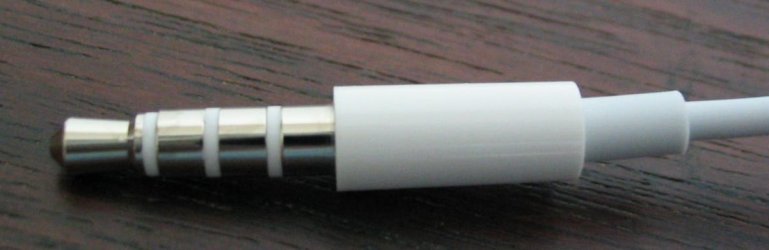
I don't think it's the Realtek Audio Manager if I'm right in guessing your headphones has a mic built into the cable and it has a single plug with 3 rings on it like this
iPhonePlug.jpg
If this is the case the you will need some kind of splitter to split the headphones L/R channels to a single plug and the mic channel to a seperate plug then plug the headphone plug into the line out port and the mic to the mic port or line in port.

I havn't seen PC that works with 3 channels yet only 2. I don't know how there wired but it you plug it into the line out port you will probably be able to use the headphones as they are.

If thats not the case then forget everything you just read.:D
 

My Computer My Computer

At a glance

Windows 7 Ultimate x64Intel Pentium Dual Core E5200 2.5GHz (3.77GHz...Corsair 4GB DDR2 (4x1GB CM2X1024-6400C4)Palit GeForce GTS 250 (1024MB)
Computer Manufacturer/Model Number
Self built
OS
Windows 7 Ultimate x64
CPU
Intel Pentium Dual Core E5200 2.5GHz (3.77GHz OC)
Motherboard
Asus P5Q-E
Memory
Corsair 4GB DDR2 (4x1GB CM2X1024-6400C4)
Graphics Card(s)
Palit GeForce GTS 250 (1024MB)
Sound Card
On Board (ADI AD2000B 8ch HD)
Monitor(s) Displays
Samsung 32in LCD TV
Screen Resolution
1360x768
Hard Drives
2 x 1TB Samsung 103SJ (Raid0)
2 x External 500GB Samsung 502IJ (NexStar 3 HD Enclosures)
PSU
550W Antec Neo HE 550
Case
Antec P180
Cooling
Xigmatex Red Scorpion CPU Cooler. 3x120mm Fans
Keyboard
Logitech MX5000 Laser (Combo)
Mouse
Logitech MX5000 Laser (Combo)
Internet Speed
ADSL2+ (avg 10 Mbps Down, 0.80 Mbps up)
Other Info
Gigabyte GN-WP01GS 54g Wireless Lan Card
Good point, Duzzy. A PC mic jack is looking for the Mic signal on the Tip and provides 5VDC on the Ring (plus ground). If the mic signal and voltage are not on those then you are correct that an adapter is needed.
 

My Computer My Computer

At a glance

Windows 10 64 bitIntel i7 6700K16GB Corsair DominatorIntel CPU Graphics
Computer type
PC/Desktop
Computer Manufacturer/Model Number
My Own Build
OS
Windows 10 64 bit
CPU
Intel i7 6700K
Motherboard
ASUS ROG Maximus VIII Hero
Memory
16GB Corsair Dominator
Graphics Card(s)
Intel CPU Graphics
Sound Card
RealTek
Monitor(s) Displays
27" Dell S2719dgf
Screen Resolution
2560X1440
Hard Drives
1 TB Samsung 850 EVO SSD for Win 10 Pro
500GB Samsung 850 EVO SSD for Win 10 Insider
2 TB drive for backup
PSU
EVGA Supernova 750G2
Case
BeQuiet Silent Base 600
Cooling
Deepcool Captain 120EX
Keyboard
Microsoft Wireless 2000
Mouse
Microsoft wireless
Internet Speed
100 MB/sec (Cable)
Antivirus
Microsoft Defender and Malwarebytes
Browser
Edge/Firefox
Other Info
Cakewalk (Sonar) by BandLab and Studio One 4.1 Pro recording studio software. MOTU 896Mk3 Hybrid recording interface, Frontier Tranzport wireless control unit, Behringer X-Touch Control Surface.
Five USB connected optical drives for CD Audio production using Nero BurningROM
@Duzzy, it's exactly like that one in the picture. Once I purchase a splitter, do I choose the line-in option?
 

My Computer My Computer

At a glance

Windows 7 Home Premium 64bit4.00 GB
Computer Manufacturer/Model Number
Hewlett-Packard/ HP Pavilion dm3 Notebook PC
OS
Windows 7 Home Premium 64bit
Memory
4.00 GB
Monitor(s) Displays
1. Mobile PC Display
Screen Resolution
1366 x 768
With a splitter/adaptor you should get 2 plugs one for the headphones that you would plug into the line out/speakers port and I would plug the second one for the mic into a mic port so you can take advantage of the mic boost functions and any other mic settings. Plug one in at a time then choose the appropriate option in the Realtek Manager for each.

I believe the line in port is generally used for devices that have a higher output than the mic port can support.

You can't just get any kind of splitter either. You can find splitters that will split your standard 2 channel into two plugs, just doubling your outputs and possibly a splitter that splits 2 channel into two 1 channel plugs, a plug for the left channel and a plug for the right channel.

What you need is something like this - Amazon.com: Headset Buddy Adapter, it doesn't state anything about 3 channel but the details/description pretty much tells you it'll work. It's colour coded too which helps.
 

My Computer My Computer

At a glance

Windows 7 Ultimate x64Intel Pentium Dual Core E5200 2.5GHz (3.77GHz...Corsair 4GB DDR2 (4x1GB CM2X1024-6400C4)Palit GeForce GTS 250 (1024MB)
Computer Manufacturer/Model Number
Self built
OS
Windows 7 Ultimate x64
CPU
Intel Pentium Dual Core E5200 2.5GHz (3.77GHz OC)
Motherboard
Asus P5Q-E
Memory
Corsair 4GB DDR2 (4x1GB CM2X1024-6400C4)
Graphics Card(s)
Palit GeForce GTS 250 (1024MB)
Sound Card
On Board (ADI AD2000B 8ch HD)
Monitor(s) Displays
Samsung 32in LCD TV
Screen Resolution
1360x768
Hard Drives
2 x 1TB Samsung 103SJ (Raid0)
2 x External 500GB Samsung 502IJ (NexStar 3 HD Enclosures)
PSU
550W Antec Neo HE 550
Case
Antec P180
Cooling
Xigmatex Red Scorpion CPU Cooler. 3x120mm Fans
Keyboard
Logitech MX5000 Laser (Combo)
Mouse
Logitech MX5000 Laser (Combo)
Internet Speed
ADSL2+ (avg 10 Mbps Down, 0.80 Mbps up)
Other Info
Gigabyte GN-WP01GS 54g Wireless Lan Card
The Line In port is a stereo (two channel) input. The Mic input is a mono input. They both work on the same audio signal levels (basically near "line level"). A standard "PC mic" is a condenser type mic and requires 5VDC to operate, thus the mic input jack has the signal on the "tip", 5VDC on the "Ring" and the third connection is ground.

Some Laptop PC's have a combination Mic/Line In jack and it senses what is plugged in (mic or stereo input).
 

My Computer My Computer

At a glance

Windows 10 64 bitIntel i7 6700K16GB Corsair DominatorIntel CPU Graphics
Computer type
PC/Desktop
Computer Manufacturer/Model Number
My Own Build
OS
Windows 10 64 bit
CPU
Intel i7 6700K
Motherboard
ASUS ROG Maximus VIII Hero
Memory
16GB Corsair Dominator
Graphics Card(s)
Intel CPU Graphics
Sound Card
RealTek
Monitor(s) Displays
27" Dell S2719dgf
Screen Resolution
2560X1440
Hard Drives
1 TB Samsung 850 EVO SSD for Win 10 Pro
500GB Samsung 850 EVO SSD for Win 10 Insider
2 TB drive for backup
PSU
EVGA Supernova 750G2
Case
BeQuiet Silent Base 600
Cooling
Deepcool Captain 120EX
Keyboard
Microsoft Wireless 2000
Mouse
Microsoft wireless
Internet Speed
100 MB/sec (Cable)
Antivirus
Microsoft Defender and Malwarebytes
Browser
Edge/Firefox
Other Info
Cakewalk (Sonar) by BandLab and Studio One 4.1 Pro recording studio software. MOTU 896Mk3 Hybrid recording interface, Frontier Tranzport wireless control unit, Behringer X-Touch Control Surface.
Five USB connected optical drives for CD Audio production using Nero BurningROM
@Fireberd
:o I should have known that considering your've already mentioned that in previous posts so thanks for clearing that up.

So the OP should try selecting Mic in the Realtek Manager and if that doesn't work then the line in should, could, maybe, it is a computer (AKA Stress Machine:banghead:) after all?
 

My Computer My Computer

At a glance

Windows 7 Ultimate x64Intel Pentium Dual Core E5200 2.5GHz (3.77GHz...Corsair 4GB DDR2 (4x1GB CM2X1024-6400C4)Palit GeForce GTS 250 (1024MB)
Computer Manufacturer/Model Number
Self built
OS
Windows 7 Ultimate x64
CPU
Intel Pentium Dual Core E5200 2.5GHz (3.77GHz OC)
Motherboard
Asus P5Q-E
Memory
Corsair 4GB DDR2 (4x1GB CM2X1024-6400C4)
Graphics Card(s)
Palit GeForce GTS 250 (1024MB)
Sound Card
On Board (ADI AD2000B 8ch HD)
Monitor(s) Displays
Samsung 32in LCD TV
Screen Resolution
1360x768
Hard Drives
2 x 1TB Samsung 103SJ (Raid0)
2 x External 500GB Samsung 502IJ (NexStar 3 HD Enclosures)
PSU
550W Antec Neo HE 550
Case
Antec P180
Cooling
Xigmatex Red Scorpion CPU Cooler. 3x120mm Fans
Keyboard
Logitech MX5000 Laser (Combo)
Mouse
Logitech MX5000 Laser (Combo)
Internet Speed
ADSL2+ (avg 10 Mbps Down, 0.80 Mbps up)
Other Info
Gigabyte GN-WP01GS 54g Wireless Lan Card
Back
Top