Windows 7 Forums


Windows 7: System mute in W7?

28 Oct 2009   #1

W7
 
 
System mute in W7?

Hope this question is simple! I need to have or make a keyboard shortcut to mute all sounds from the system quickly, as in when I have to pick up the phone. I know F7 works if I'm in Windows Media Player, but I'm usually working in another program and it's time consuming to click over to WMP running over on another monitor to mute. I can use the Volume Control, but again that's a matter of locating it on the hidden toolbar with the mouse, click, click.

I tried a macro with Macro Express, but the Toggle Audio Mute command there doesn't seem to do anything in Windows 7.

Enlightenment and/or suggestions would be appreciated. BTW, sound is from motherboard, VIA VT1708S, latest (7300) drivers. Sounds great!

My System SpecsSystem Spec

29 Oct 2009   #2

7600.20510 x86


Here is a perfect solution for you.


Create a Shortcut or Hotkey to Mute the System Volume in Windows :: the How-To Geek

Please let me know if you like this as much as I do.

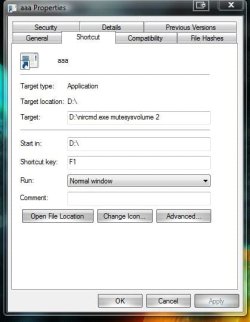
As shown in screenshot, I am using F1 key to mute and un-mute audio perfectly. I can also use mouse to click on the shortcut to activate/deactivate, same as using F1.
Attached Thumbnails
System mute in W7?-capture.jpg  
My System SpecsSystem Spec
30 Oct 2009   #3

W7


Thanks! I had forgotten about nircmd, and I'm glad to know it works in Windows 7. Problem solved!
My System SpecsSystem Spec
.


Reply

 System mute in W7? problems?


Thread Tools


Similar help and support threads for: System mute in W7?
Thread Forum
Mute WMC Only Media Center
Solved How to keep System Sounds at 0 volume or mute? Sound & Audio
Solved How do I change sound mute key in W7 Pro Sound & Audio
System Event - Changing sound makes a sound, how to mute it? Sound & Audio
total system mute by WMC 7 Media Center


All times are GMT -5. The time now is 11:21 PM.


Seven Forums Android App Seven Forums IOS App Follow us on Facebook

Windows 7 Forums is an independent web site and has not been authorized,
sponsored, or otherwise approved by Microsoft Corporation.
"Windows 7" and related materials are trademarks of Microsoft Corp.
© Designer Media Ltd
  

1 2 3 4 5 6 7 8 9 10 11 12 13 14 15 16 17 18 19 20 21 22 23 24 25 26 27 28 29 30 31 32