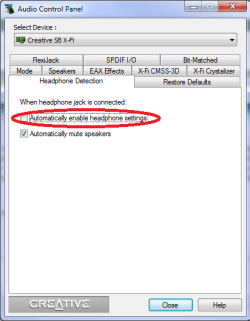
I'm using Windows 7 x64 with the latest drivers for the X-Fi xtremegamer sound card. It seems that my volume control unit no longer automatically knows that my headphones are plugged in (using creative inspire t5400). I have to open up the control panel and manually change from 5.1 -> headphones any time I make the switch which is kind of annoying. On XP I could have it set up to 5.1, and at night just plug in my headphones and hear things just fine. Now under Windows 7 I set it to 5.1 and plug in my headphones and all of a sudden I can't hear anything until I manually make the change in the control panel. Whats going on?
Thanks!
Thanks!
Last edited:
My Computer
At a glance
Windows 7 Professional x64Intel C2D E8400 @ 3.0ghzGSkill 4GB DDR2 800 (F2-6400CL4D-2GBPK)Nvidia 8800GTS 512 G92
- Computer Manufacturer/Model Number
- Self-Build
- OS
- Windows 7 Professional x64
- CPU
- Intel C2D E8400 @ 3.0ghz
- Motherboard
- GA-P35-DS3L Rev. A2 (BIOS F9C)
- Memory
- GSkill 4GB DDR2 800 (F2-6400CL4D-2GBPK)
- Graphics Card(s)
- Nvidia 8800GTS 512 G92
- Sound Card
- Creative X-Fi Extreme Gamer
- Monitor(s) Displays
- Viewsonic A91+
- Screen Resolution
- 1280 x 1024 @75hz
- Hard Drives
- WD5000AAKS
- PSU
- PC Power and Cooling 610W
- Case
- Antec 900
- Cooling
- Blades that spin
- Keyboard
- Microsoft Internet Keyboard
- Mouse
- Logitech MX510