Windows 7 Forums Search
Welcome to Windows 7 Forums. Our forum is dedicated to helping you find solutions with any problems, errors or issues you are experiencing with Windows 7. The Windows 7 forum also covers news and updates and has an extensive Windows 7 tutorial section that covers a wide range of tips and tricks.


Windows 7 - Possible To Import Vista Sound Scheme Into W7?

 
02-13-2009   #1


Vista Ultimate SP2/Windows 7 Ultimate SP1/x64/XP SP3 x86 in VM


Possible To Import Vista Sound Scheme Into W7?

I'm rather fond of the Tinker sound scheme and would like to import it, but have only found a way of importing a whole bunch of sounds meaning it would take forever to configure each item under "Sounds".

It would be far easier if one could just switch schemes.

Addendum: I've managed to find and install the Glass and Pearl sound schemes but every Tinker one I find extracts to individual sound files which is too complicated to use....looking for the actual scheme still. (Hope this legal...LOL!!)

I have tried copying the Tinker scheme from Vista into the Windows 7 schemes folder but it never shows up in Sounds. What am I doing wrong?


Last edited by Ex_Brit; 02-13-2009 at 11:10 AM..
My System SpecsSystem Spec
02-13-2009   #2


Windows 7 Ultimate 32-bit & 64-bit both SP1


Hi Peter,

I'm working on this, and should be able to provide a solution later on. In the meantime, I would be grateful if you (or someone else) can send me the following information from the registry as I forgot to save this before experimenting

Computer\HKEY_CURRENT_USER\AppEvents\Schemes\Names

In particular, I need the contents of the following sub-keys:

.Default and .None
My System SpecsSystem Spec
02-13-2009   #3


Vista Ultimate SP2/Windows 7 Ultimate SP1/x64/XP SP3 x86 in VM


.Default is Windows Default

.None is @mmres.dll,-801

Enough info?
My System SpecsSystem Spec
.


02-13-2009   #4


Vista Ultimate SP2/Windows 7 Ultimate SP1/x64/XP SP3 x86 in VM


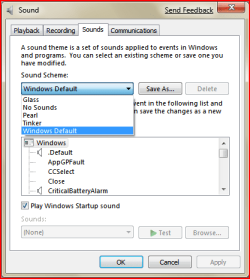
Forgot to ask should I remove the Tinker folder that I imported from Vista in the meanwhile? It isn't showing up in sounds after all.
Attached Thumbnails
Possible To Import Vista Sound Scheme Into W7?-capture.jpg  
My System SpecsSystem Spec
02-13-2009   #5


Windows 7 Ultimate 32-bit & 64-bit both SP1


Thanks, Peter. Will get back to you later.
My System SpecsSystem Spec
02-13-2009   #6


Windows 7 Ultimate 32-bit & 64-bit both SP1


Hi Peter,

The following will enable you to enjoy the Glass, Pearl, and Tinker sound schemes, just like you could in Vista Ultimate.

In Vista Ultimate, browse to the following location:

C:\Windows\Media

Right click on the sub-folder Schemes and Copy this folder to a USB memory stick.

In Windows 7, browse to the same location and Paste the folder that you previously saved to the USB memory stick. When you have finished, the above mentioned location will contain a folder Schemes with 3 sub-folders, viz Glass, Pearl, and Tinker.

Extract the following registry file and click on it to merge it into the registry.
Sound Schemes.zip

The following image shows the result of this:
Possible To Import Vista Sound Scheme Into W7?-capture.png

That's it.
My System SpecsSystem Spec
02-13-2009   #7


Vista Ultimate SP2/Windows 7 Ultimate SP1/x64/XP SP3 x86 in VM


Before I do that, I already installed and have working Glass and Pearl as I found an installer online, but the Tinker one you see in the pic I posted earlier was merely copied and pasted from Vista. So I guess I delete that last one right?

The other two, not sure what to do as I didn't set a restore point and the only one I see is for a Windows Update yesterday - should I restore to that first?
My System SpecsSystem Spec
02-13-2009   #8


Windows 7 Ultimate 32-bit & 64-bit both SP1


Hi Peter,

As I have a multi-boot system like you, I simply copied the whole Schemes folder over. I then booted into Vista Ultimate and copied the relevant registry key to my external HDD. Booting back into Windows 7, I deleted that key in the registry before merging the previously saved registry key from my external HDD. It was at this point that I realised the error in the Names sub-key. I was able to correct the errors for the additional sound schemes, but couldn't for the life of me remember the correct values for other entries, hence my earlier message.
My System SpecsSystem Spec
02-13-2009   #9


Vista Ultimate SP2/Windows 7 Ultimate SP1/x64/XP SP3 x86 in VM


Dwarf,

Thanks very much for all this help...it worked.

I started with a clean slate using restore.

On a weird note, installing the scheme disabled my M$ Entertainment Keyboard 8000 and now it wont reinstall. It happened exactly the same yesterday...LOL

The cure is to unplug/replug the Bluetooth dongle....very strange.

At least I keep a wired one always plugged in and hidden away!

Thanks again.
My System SpecsSystem Spec
02-13-2009   #10


Windows 7 Ultimate 32-bit & 64-bit both SP1


You're welcome, Peter. The side effects you are having can only be described as weird. I'm sorry that I can't help you with those as I don't have that model of keyboard or use Bluetooth - perhaps someone else can help you with that.
My System SpecsSystem Spec
Reply

 Possible To Import Vista Sound Scheme Into W7? problems?


Thread Tools


Similar Threads for: Possible To Import Vista Sound Scheme Into W7?
Thread Forum
Sound Scheme changes not remembered Sound & Audio
Sound Scheme Changes Sound & Audio
Can you have 2 different sound scheme's Sound & Audio
Import XP sound scheme into Windows 7? Sound & Audio
Missing Sound Scheme(s) Sound & Audio


All times are GMT -5. The time now is 01:58 AM.


Windows 7 Forums is an independent web site and has not been authorized,
sponsored, or otherwise approved by Microsoft Corporation.
"Windows 7" and related materials are trademarks of Microsoft Corp.
© Designer Media Ltd
  

1 2 3 4 5 6 7 8 9 10 11 12 13 14 15 16 17 18 19 20 21 22 23 24 25 26 27 28 29 30