| Windows 7: Audacity will not record what-u-hear SB X-Fi |
26 Nov 2009
|
#1 | | Windows 7 Pro x64 (dual-booting XPSP3 and Win7) Earth/SolSys/OrionSpur/MilkyWay/BigU |
Audacity will not record what-u-hear SB X-Fi Hi All;
I know that this is partially addressed in other threads, but I've not found a solution to my specific problem.
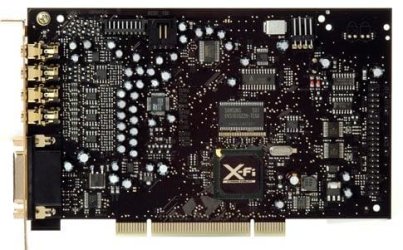
I have a Dell T3400 with Creative SB X-Fi Model SB0770. SB077x.pdf
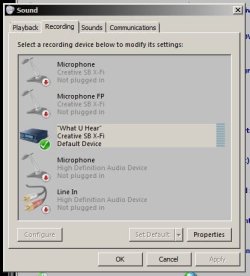
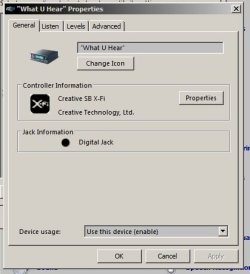
Everything works fine in XP on the same dual-boot box. It is a new Vista-ready system and I was able to use the supplied Creative CD to install the Creative software. after installing from the CD Windows 7 offered to go to the 'net and update the Creative drivers, and I let it. Sound works great, all the Creative applications appear to work OK, except for recording from what-u-hear. I can see the required devices in both Windows Sound Control panel and in Audacity ® 1.3.9 (Unicode). The device is enabled, and everything looks OK. No newer drivers for the SB0770 are listed on the soundblaster site, and Windows 7 thinks the drivers are the newest available. Here are some screenshots:
The Creative Recorder also sees no input (Following taken while plenty of sound coming out of speakers):
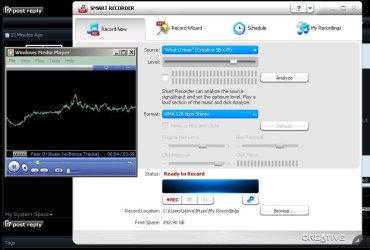
Audacity reports this:
Device ID: 1
Device name: MME: "What U Hear" (Creative SB X-Fi
Input channels: 2
Device ID: 6
Device name: Windows DirectSound: "What U Hear" (Creative SB X-Fi)
Input channels: 2
This is really driving me nuts! I'm not going to resort to looping the analog out back in.
Help! Save Me! Please...
Last edited by Raargh; 27 Nov 2009 at 12:06 PM..
Reason: Additional info ++
| My System Specs |
| System Manufacturer/Model Number Dell T3400 OS Windows 7 Pro x64 (dual-booting XPSP3 and Win7) CPU Intel Core-2 Quad Memory 4GB 800 Mhz PC2 unbuffered ECC Graphics Card NVIDIA Quadro FX 570 Sound Card Creative SB X-Fi model SB0770 Monitor(s) Displays Dell 19" FP Screen Resolution 1680x1050 Hard Drives SATA disk0 250GB disk1 500GB Internet Speed TW RR Other Info Just a baby compared to my work box! |
27 Nov 2009
|
#2 | | Windows 7, 64 bit Home SP1, Win 8 Pro 64 bit Citrus Co, FL |
I do a lot of support on the Dell users forum. Have you tried the Windows 7 Beta drivers on the Creative (SoundBlaster) downloads for the Xfi? Other users on the Dell users forum have found they work better with Win 7. I'm not sure about the "What You Hear" though and that is primarily what you are after.
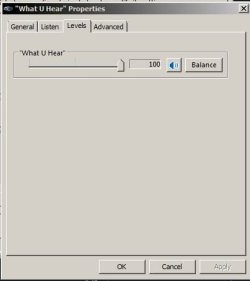
One other item, if you doubleclick on the What you hear icon in the Sound/Recording Panel, another panel will come up with Options. There is a "Levels" panel and make sure the levels are set at 100 and that the speaker is not muted (there will be a red dot if it's muted). On the Advanced Tab make sure it's set for "Default". I don't have a SoundBlaster, I have an HT Omega Striker 7.1 sound card that has the "System Mixer" (the same thing as "What You Hear" - Soundblaster's name for the system mixer). | My System Specs | | Computer type PC/Desktop System Manufacturer/Model Number My Own Build OS Windows 7, 64 bit Home SP1, Win 8 Pro 64 bit CPU Intel i7 3770 Motherboard Gigabyte GA-Z77X-UD5H Memory 16GB GSkill Ripsaw F3-14900CL9Q-16GBXL Graphics Card Sapphire HD7770 Sound Card RealTek Monitor(s) Displays Viewsonic VA2448 Series 24" LED Screen Resolution 1920X1080 Keyboard Kensington wired Mouse Logitech Wireless PSU Antec High Current Gamer HCG-620M Modular Case Coolermaster HAF XM Cooling Corsair H80 Liquid cooling with aftermarket Nexus quiet fans Hard Drives 240GB Intel 520 SSD for Win 7
128GB OCZ Vertex 4 SSD for Win 8
1 TB Seagate drive for backup Internet Speed 40 MB/sec (Cable) Antivirus Microsoft Security Essentials and Malwarebytes Browser I.E9/Firefox Other Info Sonar X2 Professional 64 bit Recording Software with Roland Octa-Capture and MAudio Fast Track Ultra 8R recording interfaces, Frontier Tranzport wireless control unit, Behringer BCF2000 Control Surface.
Five USB connected optical drives for CD Audio production using Nero 11
Other systems: Desktop with i5 3550 CPU, LenovoZ560 Laptop with Win 7 64 bit HP, SP1, new iPad |
27 Nov 2009
|
#3 | | Windows 7 Pro x64 (dual-booting XPSP3 and Win7) Earth/SolSys/OrionSpur/MilkyWay/BigU |
@firebird;
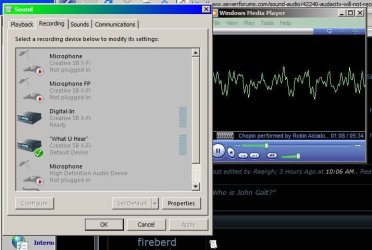
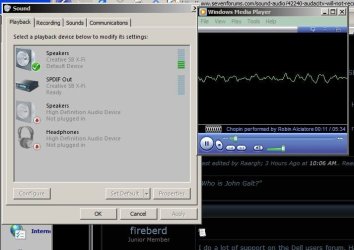
Thanks for the reply! It's lonely in here. I really appreciate your suggestions. Alas, I had already tried the levels thing. In the following screen shots, notice how the level meters for playback show activity, but nothing on recording:
I just spent an unpleasant hour on the phone with Dell Precision Workstation support. They had nothing to offer. He at first told me I should get the updated drivers from Creative. I explained that the SB0770 is not listed, and the drivers I downloaded for the board described as Soundblaster PCI X-Fi Extreme (XFXA_PCDRV_LB_1_04_0090.exe) would not install on my system (When I run it the installer says the hardware is incompatible). The Dell tech also claimed that even though they are shipping the SB0770 Creative SB X-Fi with new T3400's pre-loaded with Windows 7 64-bit, they can't guarantee the what-u-hear will work! Creative support tells me that the SB0770 is an OEM model, and there are no drivers available for download on the creative site - I have to get them, and all tech support, from Dell. A classic case of finger-pointing.
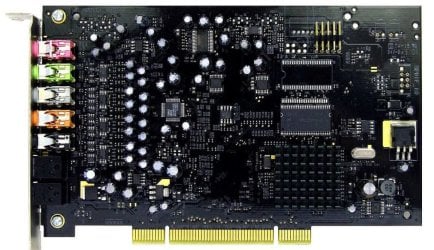
I would love to try a beta driver - just not sure which one will work. This PDF SB077x.pdf shows a picture that looks exactly like my card, but on the Creative site none of the pictures match, nor do the model numbers.
Again, I really appreciate your taking the time to reply. I'm about to open a Dell support chat session - apparently that is the only way one can establish email communications with Dell tech support.
Raargh | My System Specs | | System Manufacturer/Model Number Dell T3400 OS Windows 7 Pro x64 (dual-booting XPSP3 and Win7) CPU Intel Core-2 Quad Memory 4GB 800 Mhz PC2 unbuffered ECC Graphics Card NVIDIA Quadro FX 570 Sound Card Creative SB X-Fi model SB0770 Monitor(s) Displays Dell 19" FP Screen Resolution 1680x1050 Hard Drives SATA disk0 250GB disk1 500GB Internet Speed TW RR Other Info Just a baby compared to my work box! |
27 Nov 2009
|
#4 | | Windows 7, 64 bit Home SP1, Win 8 Pro 64 bit Citrus Co, FL |
According to the Dell downloads listing that is a "PCI Express SoundBlaster Xfi Titanium".
Here is the Beta version that many on the Dell forum have reported work OK on XPS desktop models. It's worth a try. Creative Worldwide Support | My System Specs | | Computer type PC/Desktop System Manufacturer/Model Number My Own Build OS Windows 7, 64 bit Home SP1, Win 8 Pro 64 bit CPU Intel i7 3770 Motherboard Gigabyte GA-Z77X-UD5H Memory 16GB GSkill Ripsaw F3-14900CL9Q-16GBXL Graphics Card Sapphire HD7770 Sound Card RealTek Monitor(s) Displays Viewsonic VA2448 Series 24" LED Screen Resolution 1920X1080 Keyboard Kensington wired Mouse Logitech Wireless PSU Antec High Current Gamer HCG-620M Modular Case Coolermaster HAF XM Cooling Corsair H80 Liquid cooling with aftermarket Nexus quiet fans Hard Drives 240GB Intel 520 SSD for Win 7
128GB OCZ Vertex 4 SSD for Win 8
1 TB Seagate drive for backup Internet Speed 40 MB/sec (Cable) Antivirus Microsoft Security Essentials and Malwarebytes Browser I.E9/Firefox Other Info Sonar X2 Professional 64 bit Recording Software with Roland Octa-Capture and MAudio Fast Track Ultra 8R recording interfaces, Frontier Tranzport wireless control unit, Behringer BCF2000 Control Surface.
Five USB connected optical drives for CD Audio production using Nero 11
Other systems: Desktop with i5 3550 CPU, LenovoZ560 Laptop with Win 7 64 bit HP, SP1, new iPad |
27 Nov 2009
|
#5 | | Windows 7 Pro x64 (dual-booting XPSP3 and Win7) Earth/SolSys/OrionSpur/MilkyWay/BigU |
@fireberd
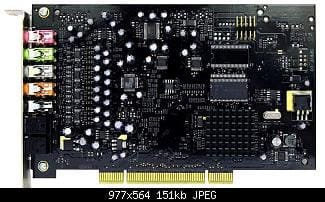
Have a look at this image from the sb077x.pdf datasheet and you can see the card is a PCI, not a PCI-express. I pulled my card out to verify it was PCI. It's definitely not the Titanium. My card matches the picture in every way, including the model number.
Now, with that in mind, r u saying that the drivers for the Titanium will work with the older SB0770?
Thanks! Please keep the suggestions coming.
Raargh | My System Specs | | System Manufacturer/Model Number Dell T3400 OS Windows 7 Pro x64 (dual-booting XPSP3 and Win7) CPU Intel Core-2 Quad Memory 4GB 800 Mhz PC2 unbuffered ECC Graphics Card NVIDIA Quadro FX 570 Sound Card Creative SB X-Fi model SB0770 Monitor(s) Displays Dell 19" FP Screen Resolution 1680x1050 Hard Drives SATA disk0 250GB disk1 500GB Internet Speed TW RR Other Info Just a baby compared to my work box! |
28 Nov 2009
|
#6 | | Windows 7, 64 bit Home SP1, Win 8 Pro 64 bit Citrus Co, FL |
All I know is that on the Dell Users Forum, Desktop Audio Section, users are reporting that the Beta drivers are working with their Dell supplied Xfi models on Windows 7 (mostly 64 bit). Generally, the SB drivers seem to be "all model" drivers rather than specific for one particular card. Create a System Restore point before trying these Beta Drivers, so if they don't work you can easily fall back.
The Dell downloads only reference the PCIe version of the card, not the older PCI version for your model Dell PC. Additionally, about a year ago a Dell forum moderator made a statement that what Dell was using for sound cards, video cards, etc were retail equivalents, not custom Dell OEM models and that retail drivers will work. All the posts on the Dell users forum in the last year or so have referenced the retail soundblaster drivers. At one time (about 4 or 5 years ago) the Dell optional SoundBlaster cards were special Dell models and not the same as the Retail models as the Dell models included a custom connection to the front panel headphone/mic jacks that the Retail models didn't have at the time and those models did need Dell drivers to work. | My System Specs | | Computer type PC/Desktop System Manufacturer/Model Number My Own Build OS Windows 7, 64 bit Home SP1, Win 8 Pro 64 bit CPU Intel i7 3770 Motherboard Gigabyte GA-Z77X-UD5H Memory 16GB GSkill Ripsaw F3-14900CL9Q-16GBXL Graphics Card Sapphire HD7770 Sound Card RealTek Monitor(s) Displays Viewsonic VA2448 Series 24" LED Screen Resolution 1920X1080 Keyboard Kensington wired Mouse Logitech Wireless PSU Antec High Current Gamer HCG-620M Modular Case Coolermaster HAF XM Cooling Corsair H80 Liquid cooling with aftermarket Nexus quiet fans Hard Drives 240GB Intel 520 SSD for Win 7
128GB OCZ Vertex 4 SSD for Win 8
1 TB Seagate drive for backup Internet Speed 40 MB/sec (Cable) Antivirus Microsoft Security Essentials and Malwarebytes Browser I.E9/Firefox Other Info Sonar X2 Professional 64 bit Recording Software with Roland Octa-Capture and MAudio Fast Track Ultra 8R recording interfaces, Frontier Tranzport wireless control unit, Behringer BCF2000 Control Surface.
Five USB connected optical drives for CD Audio production using Nero 11
Other systems: Desktop with i5 3550 CPU, LenovoZ560 Laptop with Win 7 64 bit HP, SP1, new iPad |
29 Nov 2009
|
#7 | | Windows 7 Pro x64 (dual-booting XPSP3 and Win7) Earth/SolSys/OrionSpur/MilkyWay/BigU |
@fireberd;
Thanks,
Yeah, my card has that special connector. I've been trying various drivers from the Creative site and none will install - beta or otherwise. Kinda pissed that my brand-new T3400 came with a 2007 card!
I'm hoping someone else with an SB0770 will read this thread. On Monday, if I can't get a straight answer from Dell Tech, I'm going to get the Dell rep for my company (we buy millions of $$ worth of Dell) to intervene. At this point I just want Dell to tell me which Dell-supplied Creative card, that has the functions of my existing card (meaning the ones that work under XP) I can buy and install and have everything work in Windows 7-64.
In the meantime - it works from XP - part of the reason I dual-boot! <sigh>
Raargh | My System Specs | | System Manufacturer/Model Number Dell T3400 OS Windows 7 Pro x64 (dual-booting XPSP3 and Win7) CPU Intel Core-2 Quad Memory 4GB 800 Mhz PC2 unbuffered ECC Graphics Card NVIDIA Quadro FX 570 Sound Card Creative SB X-Fi model SB0770 Monitor(s) Displays Dell 19" FP Screen Resolution 1680x1050 Hard Drives SATA disk0 250GB disk1 500GB Internet Speed TW RR Other Info Just a baby compared to my work box! |
29 Nov 2009
|
#8 | | Windows 7, 64 bit Home SP1, Win 8 Pro 64 bit Citrus Co, FL |
If you are going to "buy" a sound card that will do what you want, look at the HT Omega Striker 7.1 sound card. That is what I'm using in Windows 7, 64 bit. It has the "system mixer" so you can record streaming audio. It is 7.1 compatible, has Windows 7 64 bit drivers, etc. I got mine at www.newegg.com
Here is the link to the HT Omega site and the 7.1 HT Omega - Striker7.1 | My System Specs | | Computer type PC/Desktop System Manufacturer/Model Number My Own Build OS Windows 7, 64 bit Home SP1, Win 8 Pro 64 bit CPU Intel i7 3770 Motherboard Gigabyte GA-Z77X-UD5H Memory 16GB GSkill Ripsaw F3-14900CL9Q-16GBXL Graphics Card Sapphire HD7770 Sound Card RealTek Monitor(s) Displays Viewsonic VA2448 Series 24" LED Screen Resolution 1920X1080 Keyboard Kensington wired Mouse Logitech Wireless PSU Antec High Current Gamer HCG-620M Modular Case Coolermaster HAF XM Cooling Corsair H80 Liquid cooling with aftermarket Nexus quiet fans Hard Drives 240GB Intel 520 SSD for Win 7
128GB OCZ Vertex 4 SSD for Win 8
1 TB Seagate drive for backup Internet Speed 40 MB/sec (Cable) Antivirus Microsoft Security Essentials and Malwarebytes Browser I.E9/Firefox Other Info Sonar X2 Professional 64 bit Recording Software with Roland Octa-Capture and MAudio Fast Track Ultra 8R recording interfaces, Frontier Tranzport wireless control unit, Behringer BCF2000 Control Surface.
Five USB connected optical drives for CD Audio production using Nero 11
Other systems: Desktop with i5 3550 CPU, LenovoZ560 Laptop with Win 7 64 bit HP, SP1, new iPad |
30 Nov 2009
|
#9 | | Windows 7 Pro x64 (dual-booting XPSP3 and Win7) Earth/SolSys/OrionSpur/MilkyWay/BigU |

Quote: Originally Posted by fireberd If you are going to "buy" a sound card that will do what you want, look at the HT Omega Striker 7.1 sound card. That is what I'm using in Windows 7, 64 bit. It has the "system mixer" so you can record streaming audio. It is 7.1 compatible, has Windows 7 64 bit drivers, etc. I got mine at www.newegg.com
Here is the link to the HT Omega site and the 7.1 HT Omega - Striker7.1
Hmm.... this is tempting. I've always used SoundBlaster products because that's what came with my Dells - I've been buying Dells for home for over 7 years. But, considering that I just received another stupid non-answer from Dell tech support, perhaps it is time to jump ship.
Questions: Does the 7.1 HT support the equivalent of "what-u-hear"?
Can I connect it to the T3400's front panel jacks?
I've never heard of them - but I'm not really into audio.
Your comments most welcome!
Thanks,
Raargh | My System Specs | | System Manufacturer/Model Number Dell T3400 OS Windows 7 Pro x64 (dual-booting XPSP3 and Win7) CPU Intel Core-2 Quad Memory 4GB 800 Mhz PC2 unbuffered ECC Graphics Card NVIDIA Quadro FX 570 Sound Card Creative SB X-Fi model SB0770 Monitor(s) Displays Dell 19" FP Screen Resolution 1680x1050 Hard Drives SATA disk0 250GB disk1 500GB Internet Speed TW RR Other Info Just a baby compared to my work box! |
01 Dec 2009
|
#10 | | Windows 7, 64 bit Home SP1, Win 8 Pro 64 bit Citrus Co, FL |
The Striker 7.1 has the "system mixer" function (What SoundBlaster calls "what you hear") so it will record streaming audio. The front panel connection on the Striker 7.1 is the standard Intel HD Audio 5 plus 5 pin connection. Whether it will interface with the Dell front panel is iffy - but then ANY aftermarket Sound Card whether a SoundBlaster (even if it's bought from Dell) or whatever is in the same boat. On new Dell PC's that come with an optional SoundBlaster sound card, they have the needed cabling installed. But, if a PC is ordered without the optional sound card (just the basic Integrated - on the motherboard - audio) then the cabling is not included. (I go though this almost every day on the Dell users forum). On some Dell's the front panel headset and microphone jack cable connection is the standard Intel ATX connection so you can use a "Retail" cable. On some others there is a proprietary connection and further in some models the front panel connections are integrated with the one cable that comes from the front panel to the motherboard and this connection is a Dell proprietary and undocumented connection.
I'm not familiar with the T3400 as I primarily work with the Home/Consumer models (e.g. the Inspiron and XPS line desktops). | My System Specs | | Computer type PC/Desktop System Manufacturer/Model Number My Own Build OS Windows 7, 64 bit Home SP1, Win 8 Pro 64 bit CPU Intel i7 3770 Motherboard Gigabyte GA-Z77X-UD5H Memory 16GB GSkill Ripsaw F3-14900CL9Q-16GBXL Graphics Card Sapphire HD7770 Sound Card RealTek Monitor(s) Displays Viewsonic VA2448 Series 24" LED Screen Resolution 1920X1080 Keyboard Kensington wired Mouse Logitech Wireless PSU Antec High Current Gamer HCG-620M Modular Case Coolermaster HAF XM Cooling Corsair H80 Liquid cooling with aftermarket Nexus quiet fans Hard Drives 240GB Intel 520 SSD for Win 7
128GB OCZ Vertex 4 SSD for Win 8
1 TB Seagate drive for backup Internet Speed 40 MB/sec (Cable) Antivirus Microsoft Security Essentials and Malwarebytes Browser I.E9/Firefox Other Info Sonar X2 Professional 64 bit Recording Software with Roland Octa-Capture and MAudio Fast Track Ultra 8R recording interfaces, Frontier Tranzport wireless control unit, Behringer BCF2000 Control Surface.
Five USB connected optical drives for CD Audio production using Nero 11
Other systems: Desktop with i5 3550 CPU, LenovoZ560 Laptop with Win 7 64 bit HP, SP1, new iPad Audacity will not record what-u-hear SB X-Fi problems? All times are GMT -5. The time now is 05:03 AM. | |