Windows 7 Forums Search
Welcome to Windows 7 Forums. Our forum is dedicated to helping you find solutions with any problems, errors or issues you are experiencing with Windows 7. The Windows 7 forum also covers news and updates and has an extensive Windows 7 tutorial section that covers a wide range of tips and tricks.


Windows 7 - Problems separating audio streams to different outputs

 
11-28-2009   #1


Windows 7 64Bit


Problems separating audio streams to different outputs

I've been using Windows XP for several years then Vista for a month (on this same machine). In both I could play media player through my head phones then change the default device to the digital output and start other application and their sound would play though the digital output.

In Windows 7 using the same equipment, the latest Realtek drivers (or even the windows provided drivers) and the same method and settings, all I get is all the sounds being played on the same output device. It will switch the device but it wont separate them.

My System SpecsSystem Spec
11-28-2009   #2


WCP ONLY


Quote   Quote: Originally Posted by clippin7 View Post
I've been using Windows XP for several years then Vista for a month (on this same machine). In both I could play media player through my head phones then change the default device to the digital output and start other application and their sound would play though the digital output.

In Windows 7 using the same equipment, the latest Realtek drivers (or even the windows provided drivers) and the same method and settings, all I get is all the sounds being played on the same output device. It will switch the device but it wont separate them.
Hi and welcome

Nine out ten times its the driver. can you check device manager ot see if the driver is present and correctly installed (should not have a yellow tirangle on it or be missing). let us know

Kenn J++
My System SpecsSystem Spec
11-28-2009   #3


Windows 7 64Bit


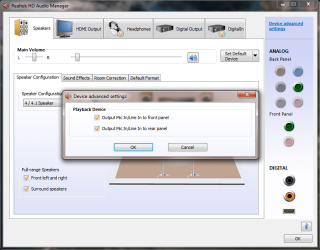
The current driver looks appropriate (Realtek Semiconductor Corp. Version: 6.0.1.5983, Dated: 11/17/09). No warnings showing. I had also tried uninstalling the drivers and using the windows generic one, but that driver behaves in the same manner. Can anyone [IMG]file:///C:/Users/Chris/AppData/Local/Temp/moz-screenshot.png[/IMG]tell me how it is suppose to operate under Windows 7? Maybe it is operating correctly and I am just miss understanding. I am not sure what the "Make front and rear output devices play two different audio streams" options purpose is if it does not behave as I describe.

[IMG]file:///C:/Users/Chris/AppData/Local/Temp/moz-screenshot-1.png[/IMG]Problems separating audio streams to different outputs-device-advanced-settings.png
My System SpecsSystem Spec
.


01-31-2010   #4


windows 7


Hello, Cllipin.

I have word for word the exact same issue you have.

I have a HP Pavillion that came with the same audio card. On Vista, I was able to enjoy two audio streams via the technique you described, and now it's gone.

Somehow I want to think that what we were enjoying was actually just a vista bug that wasn't supposed to do that, and we were able to exploit it.

But now that I have windows 7, I can't listen to my music while my wife watches recorded TV from the same computer.
My System SpecsSystem Spec
02-01-2010   #5


Windows 7 64Bit


That's exactly what I am having an issue with. My wife will watch recorded shows while I'm listening to music or playing games. I also could do this on this same computer with XP. Windows 7 is the first system I have had an issue with. I have noticed since that certain application will occasionally split streams (I can play a game over the surround sound speakers and talk to friends through the headset) but it works randomly. I don't get it to work every time.
My System SpecsSystem Spec
02-01-2010   #6


windows 7


Funny thing is, I USED to have the program exactly as it is in that screenshot you posted. NOW, the program dropdown only has the options "Output MiC In/LineIn to Front Panel" and "Output MiC In/LineIn to Rear Panel".

Problems separating audio streams to different outputs-realekscreenshot.png

Any idea about how I can get the one you have back? I used to have that when I used windows vista.
My System SpecsSystem Spec
02-02-2010   #7


Windows 7 64Bit


I actually just installed the latest realtek drivers this past weekend and I am fairly certain the pop-up options that I displayed in my original pic is still the same. I'll check when I get home. I'm not sure why the options would have changed for you and not for me other than different drivers.
My System SpecsSystem Spec
02-03-2010   #8


Windows 7 64Bit


I checked last night and the "Device Advanced Settings" gives me the pop-up dialog I originally showed. I have no clue why yours would not do the same.
My System SpecsSystem Spec
05-07-2010   #9


windows 7 64 Bit


I also have an HP Pavillion I bought last November and I have the same problems as you Hell. I downloaded the latest drivers for Realtek yet I still have the same advanced settings you have. Fix anyone?
My System SpecsSystem Spec
05-12-2010   #10


windows 7 64 Bit


bump
My System SpecsSystem Spec
Reply

 Problems separating audio streams to different outputs problems?


Thread Tools


Similar Threads for: Problems separating audio streams to different outputs
Thread Forum
How to choose from multiple audio streams in WMP 12? Media Center
2 MP3 audio streams playing simultaneously Media Center
Two different sound streams out of seperate outputs Sound & Audio
Audio to two outputs Sound & Audio


All times are GMT -5. The time now is 01:59 AM.


Windows 7 Forums is an independent web site and has not been authorized,
sponsored, or otherwise approved by Microsoft Corporation.
"Windows 7" and related materials are trademarks of Microsoft Corp.
© Designer Media Ltd
  

1 2 3 4 5 6 7 8 9 10 11 12 13 14 15 16 17 18 19 20 21 22 23 24 25 26 27 28 29 30