Windows 7 Forums


Windows 7: simpler sndvol

02 Dec 2009   #1

Win7 ultimate
 
 
simpler sndvol

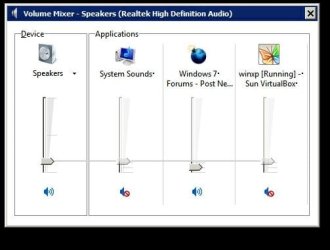
When I click on sndvol.exe I would like to see the Device volume slider and nothing else. That is, I do NOT want the list of 3 applications (in pic) next to it, where you can adjust the volume case by case. I just want to use one master volume. Is it possible to get Windows 7 to display only the device slider and not the applications?

Attached Thumbnails
simpler sndvol-000002.jpg  
My System SpecsSystem Spec

02 Dec 2009   #2

W7x64 Pro, SuSe 12.1/** W7 x64 Pro, XP MCE
Indian Territory


To each his own, but it is that aspect of control that I like most about Windows 7. I really hate it when listening to one thing to have another blare out or be inaudible, but if you only want one control, then simply use the single control displayed, without clicking the mixer link.
My System SpecsSystem Spec
02 Dec 2009   #3

Windows 7 Pro & Vista Home Premium
Pennsylvania


I know of no way to change that,. it's simply a part of Windows 7.
My System SpecsSystem Spec
.


02 Dec 2009   #4

Win7 ultimate


Quote   Quote: Originally Posted by seekermeister View Post
To each his own, but it is that aspect of control that I like most about Windows 7. I really hate it when listening to one thing to have another blare out or be inaudible, but if you only want one control, then simply use the single control displayed, without clicking the mixer link.
Thank you, but I do not know what you mean. I assume sndvol.exe is the mixer, but what is the "control displayed". I am looking for a master volume control
My System SpecsSystem Spec
02 Dec 2009   #5

Windows 7 Pro (64bit).
Origin: London, UK. Now: Fort Worth TX.


Quote   Quote: Originally Posted by johnhoh View Post
Quote   Quote: Originally Posted by seekermeister View Post
To each his own, but it is that aspect of control that I like most about Windows 7. I really hate it when listening to one thing to have another blare out or be inaudible, but if you only want one control, then simply use the single control displayed, without clicking the mixer link.
Thank you, but I do not know what you mean. I assume sndvol.exe is the mixer, but what is the "control displayed". I am looking for a master volume control
Johnhoh...

On the taskbar, if I just click the loudspeaker icon, I get exactly what you seem to be after.

You may have to change the option for that icon in the "Show hidden Icons" so it is always displayed, if it isn't displayed by default.

I only get the full display - as you posted in your picture - if I click on "Mixer" at the bottom of the single (or master) volume control display.

My System SpecsSystem Spec
02 Dec 2009   #6

Win 8 Release candidate 8400


Quote   Quote: Originally Posted by johnhoh View Post
When I click on sndvol.exe I would like to see the Device volume slider and nothing else. That is, I do NOT want the list of 3 applications (in pic) next to it, where you can adjust the volume case by case. I just want to use one master volume. Is it possible to get Windows 7 to display only the device slider and not the applications?


Hi john and welcome

You mean like this pic? If you single (left) click you should get that. If you right click you get what you are displaying. Unless there is a problem


Ken J+

Last edited by zigzag3143; 19 Nov 2011 at 06:12 AM..
My System SpecsSystem Spec
02 Dec 2009   #7

Win7 ultimate


Thanks yes, I have the tray icon working. I was just hoping to be able to use a shortcut that points to an exe file such as sndvol
My System SpecsSystem Spec
Reply

 simpler sndvol problems?


Thread Tools


Similar help and support threads for: simpler sndvol
Thread Forum
Can't access SndVol Sound & Audio
PCI Simpler Controller again... Drivers


All times are GMT -5. The time now is 06:32 PM.


Windows 7 Forums is an independent web site and has not been authorized,
sponsored, or otherwise approved by Microsoft Corporation.
"Windows 7" and related materials are trademarks of Microsoft Corp.
© Designer Media Ltd