Windows 7 Forums Search
Welcome to Windows 7 Forums. Our forum is dedicated to helping you find solutions with any problems, errors or issues you are experiencing with Windows 7. The Windows 7 forum also covers news and updates and has an extensive Windows 7 tutorial section that covers a wide range of tips and tricks.


Windows 7 - No Sound when Playing DVDs in Media Player

 
12-08-2009   #1


xp/Windows 7


No Sound when Playing DVDs in Media Player

Hey all,
I've got full sound in everything else and the latest sound blaster drivers. I insert a DVD and play it in Windows Media Player or Center and I get no Audio (*shakes head).

I play the DVD in VLC and it plays and sounds fine, but the Quality of the DVD video in VLC blows.

What's the fix (and why does there need to be a fix) for Windows Media Player? You'd think Windows Media CENTER could at least play a DVD...

My System SpecsSystem Spec
12-11-2009   #2


Windows 7 Professional x64


Try removing WMC and reinstalling it. Open "Turn Windows features on or off" and remove it, reboot, and check the box again.
My System SpecsSystem Spec
05-08-2010   #3


Windows 7


Still unresolved

Dudes, I have a similar problem but its not just DVD's
I cannot get sound from any video files that have an audio encoding of MPEG Version 1 Audio
I think many DVD's have MPEG Version 1 Audio format and so you may have the same issue

The problem just happened randomly one day as everything used to play fine.

I have tried
- uninstalling / re-installing sound drivers
- uninstalling reinstalling shark 2007 codecs
- installing most recent Klite codecs
- uninstalling reinstalling media player
- Restoring Media Library
- Playing with every setting for my sound card
- Playing with every setting in Media Player including advanced - codecs

Nothing so far has fixed the problem. Every other type of video works.
Also theres no problem at all from any other type of media player e.g. media player classic is fine
Most of my older AVI files have MPEG Version 1 Audio !! I cant use my playlists now !!
(p.s. You can tell what type of audio encoding has been used in a file by running Media Info (for Klite codec pack) or choosing Analyse Media File (Shark 2007 codec advanced settings)
My System SpecsSystem Spec
.


05-08-2010   #4


Windows 7 RTM X64


Quote   Quote: Originally Posted by Benway View Post
Hey all,
I've got full sound in everything else and the latest sound blaster drivers. I insert a DVD and play it in Windows Media Player or Center and I get no Audio (*shakes head).

I play the DVD in VLC and it plays and sounds fine, but the Quality of the DVD video in VLC blows.

What's the fix (and why does there need to be a fix) for Windows Media Player? You'd think Windows Media CENTER could at least play a DVD...
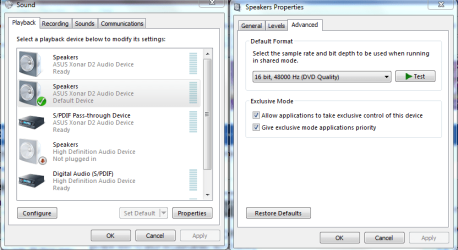
It might help to go into the sound settings and change to this setting 16 bit 48000hz in the picture below.
Attached Thumbnails
No Sound when Playing DVDs in Media Player-application-control-device.png  
My System SpecsSystem Spec
Reply

 No Sound when Playing DVDs in Media Player problems?


Thread Tools


Similar Threads for: No Sound when Playing DVDs in Media Player
Thread Forum
Windows Media Player - how to prevent it playing DVDs? Sound & Audio
Windows Media player 12 stuttering while playing DVDs Music, Pictures & Video
windows media player 11 only playing sound in... Music, Pictures & Video
Media Player won't play DVDs Music, Pictures & Video
MC not playing DVDs Properly (sound issue) Media Center


All times are GMT -5. The time now is 01:59 AM.


Windows 7 Forums is an independent web site and has not been authorized,
sponsored, or otherwise approved by Microsoft Corporation.
"Windows 7" and related materials are trademarks of Microsoft Corp.
© Designer Media Ltd
  

1 2 3 4 5 6 7 8 9 10 11 12 13 14 15 16 17 18 19 20 21 22 23 24 25 26 27 28 29 30