| Windows 7: SB Audigy SE - driver works, sound doesn't |
10 Dec 2009
|
#1 | | |
SB Audigy SE - driver works, sound doesn't So I have a SB Audigy SE (SB0570) and I installed Windows 7 about a month ago. Initially, my sound did not work even though I installed the drivers correctly. It began working one day when I restarted the computer in safe mode and then restarted it again normally.
Today, however, it failed again. The only thing that I can think of that has changed is that I installed drivers and software for my Sony Handycam last night. I've since uninstalled the software, but to no avail. When I click on the sound icon in the system tray with Winamp playing, I can see the green bar jumping up and down, signifying that there is sound. I've tried using speakers and headphones, so I know it's the sound card that's causing the problem.
I have uninstalled my drivers and I've tried daniel_k's drivers (first the ones that were too new for the SE - lol - and then the ones that were designed for the SE, the 2.0 version), the drivers that Windows 7 automatically downloaded for me, the 917x support pack, and the drivers that Creative provides on their site for Windows 7. None of them made any difference. My current driver reports its version as 5.12.1.2020, and Windows says that it's working correctly.
Can anyone tell me why I can't get sound even though my drivers seem to work? What might have caused this seemingly random problem? | My System Specs |
| |
10 Dec 2009
|
#2 | | Windows 7, 64 bit Home SP1, Win 8 Pro 64 bit Citrus Co, FL |
Have you checked the Control Panel/Sound Panel to verify your Audigy SE is set as the Default Playback device?
Instead of uninstalling the Sony Handicam drivers, to determine if that was the cause, you could have used the System Restore function and restore to a date PRIOR to installing the Sony. You can also use the System Restore now and see if that fixes it. System Restore can be accessed from Start/Programs/Accessories/System Tools. | My System Specs | | Computer type PC/Desktop System Manufacturer/Model Number My Own Build OS Windows 7, 64 bit Home SP1, Win 8 Pro 64 bit CPU Intel i7 3770 Motherboard Gigabyte GA-Z77X-UD5H Memory 16GB GSkill Ripsaw F3-14900CL9Q-16GBXL Graphics Card Sapphire HD7770 Sound Card RealTek Monitor(s) Displays Viewsonic VA2448 Series 24" LED Screen Resolution 1920X1080 Keyboard Kensington wired Mouse Logitech Wireless PSU Antec High Current Gamer HCG-620M Modular Case Coolermaster HAF XM Cooling Corsair H80 Liquid cooling with aftermarket Nexus quiet fans Hard Drives 240GB Intel 520 SSD for Win 7
128GB OCZ Vertex 4 SSD for Win 8
1 TB Seagate drive for backup Internet Speed 40 MB/sec (Cable) Antivirus Microsoft Security Essentials and Malwarebytes Browser I.E9/Firefox Other Info Sonar X2 Professional 64 bit Recording Software with Roland Octa-Capture and MAudio Fast Track Ultra 8R recording interfaces, Frontier Tranzport wireless control unit, Behringer BCF2000 Control Surface.
Five USB connected optical drives for CD Audio production using Nero 11
Other systems: Desktop with i5 3550 CPU, LenovoZ560 Laptop with Win 7 64 bit HP, SP1, new iPad |
10 Dec 2009
|
#3 | | Windows 7 Ult, Windows 8 Pro, San Diego |

Quote: Originally Posted by frogitts So I have a SB Audigy SE (SB0570) and I installed Windows 7 about a month ago. Initially, my sound did not work even though I installed the drivers correctly. It began working one day when I restarted the computer in safe mode and then restarted it again normally.
Today, however, it failed again. The only thing that I can think of that has changed is that I installed drivers and software for my Sony Handycam last night. I've since uninstalled the software, but to no avail. When I click on the sound icon in the system tray with Winamp playing, I can see the green bar jumping up and down, signifying that there is sound. I've tried using speakers and headphones, so I know it's the sound card that's causing the problem.
I have uninstalled my drivers and I've tried daniel_k's drivers (first the ones that were too new for the SE - lol - and then the ones that were designed for the SE, the 2.0 version), the drivers that Windows 7 automatically downloaded for me, the 917x support pack, and the drivers that Creative provides on their site for Windows 7. None of them made any difference. My current driver reports its version as 5.12.1.2020, and Windows says that it's working correctly.
Can anyone tell me why I can't get sound even though my drivers seem to work? What might have caused this seemingly random problem? This type of behavior is par for the course with Creative drivers, once they get hosed you need to go into the file location where the Creative files were and delate every last bit of them. After that you can reinstall them and they will work.
CCleaner and driver sweeper can help but sometimes you need to dig a bit deeper to get all the old files out. | My System Specs | | System Manufacturer/Model Number Home built OS Windows 7 Ult, Windows 8 Pro, CPU Q9650-4.275GHz, E8600 4.5GHz, E6750-3.8GHz Motherboard Evga 780i FTW Memory G.Skill PC2 9600 1200Mhz 5 5 5 15 2T Graphics Card GTX480 Sound Card Asus Xonar D2 Monitor(s) Displays HannsG Screen Resolution 1680X1050 Keyboard Logitech G15 Mouse Logitech G9 PSU ThermalTake Toughpower 1000Watt modular Case ThermalTake XaserV Cooling Xigmatek S1283 Hard Drives GSkill Phoenix Pro 120GB SSD Internet Speed T1 |
10 Dec 2009
|
#4 | | |
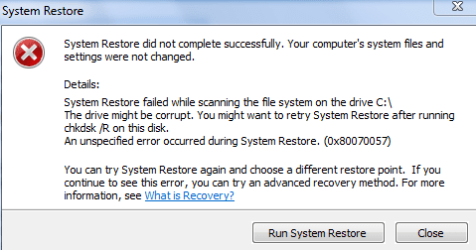
Quote: This type of behavior is par for the course with Creative drivers, once they get hosed you need to go into the file location where the Creative files were and delate every last bit of them. Thanks, that's good advice. Any guidance as to which files, exactly? I'll give this a shot, but I'm flying blind for the most part. Quote: Have you checked the Control Panel/Sound Panel to verify your Audigy SE is set as the Default Playback device? Yes. In fact, the mixer shows that I have the Audigy selected and that sound is indeed being passed to the card. The only other sound device I have installed is motherboard sound, and that is disabled. Digital output is not selected. Quote: Instead of uninstalling the Sony Handicam drivers, to determine if that was the cause, you could have used the System Restore function and restore to a date PRIOR to installing the Sony. Good idea! I upgraded from XP, so I was a little wary of system restore, but it seems to automate itself very well in 7. Unfortunately, even after running a chkdsk /r on my Windows drive, I still get an error, no matter which restore point I choose. See the attachment for detail. | My System Specs | | |
11 Dec 2009
|
#5 | | |
Just a small update - I uninstalled the driver, prevented Windows from automatically reinstalling it, ran CCleaner on the registry, and then reinstalled the appropriate daniel_k drivers. I got a new message that I had never received during the installation process before: Windows wanted me to verify that I really wanted to install the drivers even though it couldn't verify them. I said yes, restarted, and the problem remains. It looks like I have sound, but I have no sound | My System Specs | | |
11 Dec 2009
|
#6 | | Windows 7 Ultimate - 64-bit | Windows 8 Pro - 64-bit |
Hi frogitts,
You could try this
1) Open Device Manager, locate your soundcard, right click it, choose Uninstall, check "Delete driver files" and click on OK. Reboot when prompted to do so.
2) Boot into Safe Mode:
For 32-bit: Open the \Windows\System32 folder and delete APOIM32.EXE, APOMngr.dll, CmdRtr.dll.
For 64-bit: Open the \Windows\System32 folder and delete APOMgr64.dll, CmdRtr64.dll.
Now open the \Windows\SysWOW64 folder and delete APOIM64.EXE, APOMngr.dll and CmdRtr.dll.
Now delete the following registry trees:
For 32-bit: HKEY_LOCAL_MACHINE\SOFTWARE\Creative Tech\Software Installed\APOIM
HKEY_LOCAL_MACHINE\SOFTWARE\Creative Tech\Installation\CTRedist\APOIM
For 64-bit: HKEY_LOCAL_MACHINE\SOFTWARE\Wow6432Node\Creative Tech\Software Installed\APOIM
HKEY_LOCAL_MACHINE\SOFTWARE\Wow6432Node\Creative Tech\Installation\CTRedist\APOIM
3) Reboot and install the Support Pack.
Hope that helps | My System Specs | | System Manufacturer/Model Number Samsung NP550P5C-S02IN OS Windows 7 Ultimate - 64-bit | Windows 8 Pro - 64-bit CPU Intel® Core™ i7 Processor 3,610QM (2.30Hz, 6MB L3 Cach Memory 8 GB Graphics Card NVIDIA® GeForce® GT 650M 2GB Graphics, Optimus™ techno Sound Card SoundAlive™ JBL 3 Speakers (With sub-Woofer) Monitor(s) Displays 39.62cm (15.6) SuperBright 300nit HD+ LED Display Screen Resolution 1,600 x 900, Anti-Reflective Hard Drives 1TB S-ATA II Hard Drive (5,400RPM) |
11 Dec 2009
|
#7 | | Windows 7 Ult, Windows 8 Pro, San Diego |

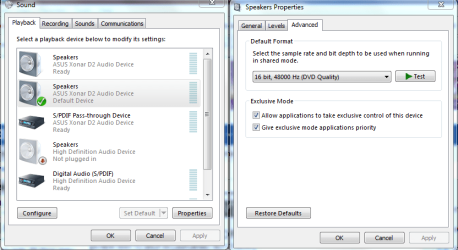
Quote: Originally Posted by frogitts Just a small update - I uninstalled the driver, prevented Windows from automatically reinstalling it, ran CCleaner on the registry, and then reinstalled the appropriate daniel_k drivers. I got a new message that I had never received during the installation process before: Windows wanted me to verify that I really wanted to install the drivers even though it couldn't verify them. I said yes, restarted, and the problem remains. It looks like I have sound, but I have no sound  Try doing this in sound properties, change to DVD quality 48000. | My System Specs | | System Manufacturer/Model Number Home built OS Windows 7 Ult, Windows 8 Pro, CPU Q9650-4.275GHz, E8600 4.5GHz, E6750-3.8GHz Motherboard Evga 780i FTW Memory G.Skill PC2 9600 1200Mhz 5 5 5 15 2T Graphics Card GTX480 Sound Card Asus Xonar D2 Monitor(s) Displays HannsG Screen Resolution 1680X1050 Keyboard Logitech G15 Mouse Logitech G9 PSU ThermalTake Toughpower 1000Watt modular Case ThermalTake XaserV Cooling Xigmatek S1283 Hard Drives GSkill Phoenix Pro 120GB SSD Internet Speed T1 |
11 Dec 2009
|
#8 | | |
Quote: You could try this
1) Open Device Manager, locate your soundcard, right click it, choose Uninstall, check "Delete driver files" and click on OK. Reboot when prompted to do so.
2) Boot into Safe Mode:
For 32-bit: Open the \Windows\System32 folder and delete APOIM32.EXE, APOMngr.dll, CmdRtr.dll.
For 64-bit: Open the \Windows\System32 folder and delete APOMgr64.dll, CmdRtr64.dll.
Now open the \Windows\SysWOW64 folder and delete APOIM64.EXE, APOMngr.dll and CmdRtr.dll.
Now delete the following registry trees:
For 32-bit: HKEY_LOCAL_MACHINE\SOFTWARE\Creative Tech\Software Installed\APOIM
HKEY_LOCAL_MACHINE\SOFTWARE\Creative Tech\Installation\CTRedist\APOIM
For 64-bit: HKEY_LOCAL_MACHINE\SOFTWARE\Wow6432Node\Creative Tech\Software Installed\APOIM
HKEY_LOCAL_MACHINE\SOFTWARE\Wow6432Node\Creative Tech\Installation\CTRedist\APOIM
3) Reboot and install the Support Pack. Tried that, and no change. Interestingly enough, the only file or key that existed on my computer was APOIM32.EXE (I'm running 32-bit). I also tried deleting all Creative registry keys, but still no change. Quote: Try doing this in sound properties, change to DVD quality 48000. Good thought, but it's already set to DVD Quality 48000.
I'm starting to wonder how I even got this working in the first place! | My System Specs | | |
12 Dec 2009
|
#9 | | |
Problem solved!
After countless restarts, the problem was solved by simply turning my computer off, leaving it off for a few hours, and turning it back on. I would imagine that this indicates a hardware issue, but that's a story for another day. | My System Specs | | |
12 Dec 2009
|
#10 | | Windows 7 Ultimate - 64-bit | Windows 8 Pro - 64-bit |
Glad that you got it working. Thank You for posting back | My System Specs | | System Manufacturer/Model Number Samsung NP550P5C-S02IN OS Windows 7 Ultimate - 64-bit | Windows 8 Pro - 64-bit CPU Intel® Core™ i7 Processor 3,610QM (2.30Hz, 6MB L3 Cach Memory 8 GB Graphics Card NVIDIA® GeForce® GT 650M 2GB Graphics, Optimus™ techno Sound Card SoundAlive™ JBL 3 Speakers (With sub-Woofer) Monitor(s) Displays 39.62cm (15.6) SuperBright 300nit HD+ LED Display Screen Resolution 1,600 x 900, Anti-Reflective Hard Drives 1TB S-ATA II Hard Drive (5,400RPM) SB Audigy SE - driver works, sound doesn't problems? All times are GMT -5. The time now is 12:13 PM. | |