Windows 7 Forums


Windows 7: DPC Latency causing audio stuttering, crackling

21 Dec 2009  
gordijn

Windows 7
 
 
DPC Latency causing audio stuttering, crackling

Hi,

For the past few days I've been trying to fix the sound stuttering when I'm listening to music, and after monitoring the dpc latency it seems to be caused by a bad driver. I've updated all my drivers and tried finding which one is causing the latency spikes but no luck so far.

DPC latency when i'm not getting stutters:
Yfrog - dpc1

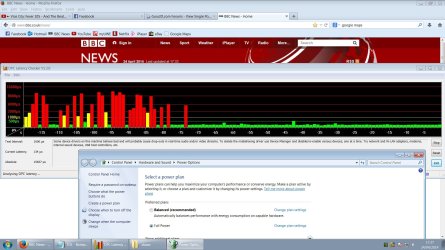
Stuttering:
Yfrog - dpc2
Yfrog - dpc3


Also, I don't know if this means anything but when I open up hwinfo32 and the hardware summary is shown, i get this pattern:
Yfrog - hwinfodpc (big screenshot)

When I close the summary it's back to normal. Does this mean it's related to one of the parts shown in the hwinfo32 summary?
I've tried disabling wlan, vga, sound, and modem in device manager, uninstalled daemon tools and it's driver etc, but that didn't change anything.

Any advice?
I'm using an Acer Aspire 5715Z laptop, Realtek HD audio
My System SpecsSystem Spec

21 Dec 2009  
fireberd

Windows 7, 64 bit Home SP1, Win 8 Pro 64 bit
Citrus Co, FL


Uninstall the Realtek in the Device Manager then restart the PC and when Windows starts it will detect it and reinstall. Sometimes the reinstall will put it on a different IRQ and fix the problem. No guarantee but worth a try.

FWIW I have an Acer 7720 laptop with Realtek and Win 7 32 bit and it doesn't do it on mine.
My System SpecsSystem Spec
21 Dec 2009  
gordijn

Windows 7


Just tried that now, still getting huge dpc latency spikes, and audio stuttering because of it.
My System SpecsSystem Spec
.


20 Jan 2010  
marcus00

Windows 7 Home Premium - 64 Bit


Did you ever get this fixed? I have been getting a lot of high DPC readings which are causing pops and clicks in my audio, too. Below is a link to my post if you want more information.

DPC Latency

I don't think it's an audio driver issue because I've had it with my Creative Labs Xfi and Audio Kontrol interface.
My System SpecsSystem Spec
20 Jan 2010  
Nikolay

Windows 7 Ultimate x64 | Windows XP Pro x86 | Windows Vista Ultimate x86
Massachusetts


Have the exact same problem.
My System SpecsSystem Spec
21 Jan 2010  
gordijn

Windows 7


somehow I fixed it, but I'm not really sure what caused it. I think it was the daemon tools sptd driver which I uninstalled. when I finally figured out how to use xperf and xperfview, to really get a detailed summary of dpc latency, an 'unknown' driver was at the top, uninstalling the sptd driver that comes with daemon tools seems to have fixed this.
so, my advice is: download xperf & xperfview ( it's in the microsoft windows performance toolkit ) and take a good look at the dpc latency summary, this will tell you exactly what's causing the spikes. there's a really good guide i used, to figure out how to use xperf: Pointless Blathering : Measuring DPC time
also take a look at this topic VIRTUAL DJ SOFTWARE - DPC Latency Questions
My System SpecsSystem Spec
24 Apr 2010  
21grams

Windows 7 x86


Mostly on laptops it is Power Management causes this problem. It changes processor rate to save the power, and this changing of CPU rate causes increased DPC latency.

Fixing the problem:
Simply you can just create (or modify current) a new special power plan in: Control Panel\Hardware and Sound\Power Options
When you do this, just go to plan settings, click advanced settings, and set the minimum and maximum processor rate to equal (minimum = maximum), so this prevents changing of your CPU speed. Personally, I have 60% in my settings, because listening to music does not require a lot o CPU resources.

Just adjust these minimum/maximum settings anyway you want. Just remember to set them two equally.
You can set 100% (maximum performance) but then your CPU will generate more heat and the fun will be noisy... So just choose the best setting for you.

So static CPU rate should solve high DPC latency and fix the sound crackling problem.. It works for me fine!
My System SpecsSystem Spec
Reply

 DPC Latency causing audio stuttering, crackling problems?


Thread Tools


Similar help and support threads for: DPC Latency causing audio stuttering, crackling
Thread Forum
Computer stuttering randomly. And high Latency on windows 7 Hardware & Devices
High DPC latency, ndis.sys potential culprit. Stuttering I/O Hardware & Devices
Crackling, Distortion, Latency and Lag (after extended use) Sound & Audio
Overheat causing stuttering in game Graphic Cards
Unknown CPU Usage Causing Stuttering Audio General Discussion


All times are GMT -5. The time now is 12:51 PM.


Windows 7 Forums is an independent web site and has not been authorized,
sponsored, or otherwise approved by Microsoft Corporation.
"Windows 7" and related materials are trademarks of Microsoft Corp.
© Designer Media Ltd