Windows 7 Forums


Windows 7: hdmi audio/std. speakers switching

29 Dec 2009   #1

windows 7
 
 
hdmi audio/std. speakers switching

ok to uncomplicate things ive read thru the forums and could not find anything concrete on this problem of mine..

i have a gigabyte mobo/amd cpu w/onboard hdmi

my issue is sound switching right now as it stands, i need to manually switch on my pc between the HDMI audio as my main device and my PC speakers as my main device... on my laptops this is not a problem, it can automatically detect if hdmi is plugged in and switch sound over..

the main reason is its a slight pain to keep going over after a movie and switch over, nor do i want to disconnect a hdmi cable every time..

any suggestions how to automate this problem???

My System SpecsSystem Spec

30 Dec 2009   #2

Windows 7, 64 bit Home SP1, Win 8 Pro 64 bit
Citrus Co, FL


Laptops have built in speakers and probably the reason the laptop has the needed hardware (and/or software) to accomplish this. On a desktop, speakers are not an "internal" device and probably the reason for this. I see the same issue posted on the Dell users forum.
My System SpecsSystem Spec
31 Dec 2009   #3

windows 7


i know that its an issue, however im looking for an automated solution....

i wonder if i can forward this issue to microsoft itself... it sure would be nice to run it all in one on a desktop....
My System SpecsSystem Spec
.


08 Mar 2012   #4

Windows 7 Home Premium 32bit.
 
 
Realtek audio switching speakers/HDMI

Did anybody come up with an answer to this annoyance? At the moment we have to set default device to either HDMI or speakers. We would like to transmit audio to both.
Thanking you in advance, Fred
My System SpecsSystem Spec
08 Mar 2012   #5

Win 7 Pro x64 SP1, Win 7 Ult x86 SP1
NC, USA


Hello and welcome to SevenForums.

Here's a possible work-around you can play with.

I can listen to two audio outputs at the same time, but the audio is a bit out of sync between the two.
That may or may not matter to you depending on what you are listening to and how.

i.e. If listening to music in two different rooms, it may not matter that they are not in sync.

I never figured out how to sync them or if it's possible, but i never pursued that.

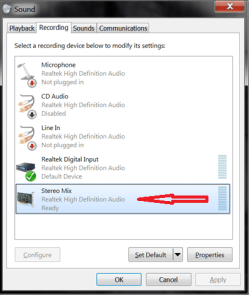
In Sounds / Recording enable "Stereo Mix"
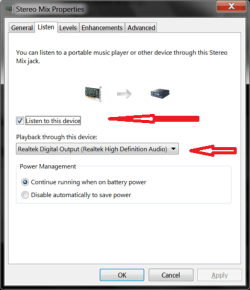
In "Stereo Mix" properties:
  • Check "Listen to this device"
  • For "Playback through this device" select the 2nd audio device you want to use.
hdmi audio/std. speakers switching-sound-dual-screenprint-01.png

hdmi audio/std. speakers switching-sound-dual-screenprint-02.png

hdmi audio/std. speakers switching-sound-dual-screenprint-03.png

hope this helps.
david
My System SpecsSystem Spec
Reply

 hdmi audio/std. speakers switching problems?


Thread Tools


Similar help and support threads for: hdmi audio/std. speakers switching
Thread Forum
Sony vaio Onboard HDMI audio auto-switching not working Sound & Audio
Solved Quickly switch default audio from speakers to HDMI and visa versa Sound & Audio
AMD high-definition device switching HDMI/Local-Speakers/Headphone Sound & Audio
switching between speakers and headphones Sound & Audio
Windows 7 - HDMI out no audio - Intel HDMI audio Sound & Audio


All times are GMT -5. The time now is 01:53 AM.


Seven Forums Android App Seven Forums IOS App Follow us on Facebook

Windows 7 Forums is an independent web site and has not been authorized,
sponsored, or otherwise approved by Microsoft Corporation.
"Windows 7" and related materials are trademarks of Microsoft Corp.
© Designer Media Ltd
  

1 2 3 4 5 6 7 8 9 10 11 12 13 14 15 16 17 18 19 20 21 22 23 24 25 26 27 28 29 30 31 32