|
Welcome to Windows 7 Forums. Our forum is dedicated to helping you find solutions with any problems, errors or issues you are experiencing with Windows 7. The Windows 7 forum also covers news and updates and has an extensive Windows 7 tutorial section that covers a wide range of tips and tricks.
|
03-14-2009
|
#1 | | Windows 7RC 64bit build710 |
audio jacks IN Windows 7 how do I make it so that both the rear and front audio jacks work? Currently, my front jacks are registered devices in my sounds but when I put a headphone jack in nothing happens
| My System Specs | | OS Windows 7RC 64bit build710 CPU Intel Q9400 Quad: 2.66Ghz, 1333FSB Motherboard EVGA 750i SLI FTW Memory 8 gigs of OCZ Graphics Card XFX 9600GT 512GDDR3 700Mhz Overclocked. Sound Card Onboard 7.1 Monitor(s) Displays 22" WS Samsung, 19" LG Screen Resolution 1680X1050 and 1280X1024 Keyboard Razer Lycosa Mouse Logitech MX Revolution PSU Coolmaster 600W Case Ultra Cooling two 120mm fans at each end, and one 80mm on the case window. Hard Drives Dual 1.5Tb Seagate Sata2 Internet Speed AT&T Uverse |
03-15-2009
|
#2 | | Windows 7 Ultimate 32-bit & 64-bit both SP1 |
Hi XeRo,
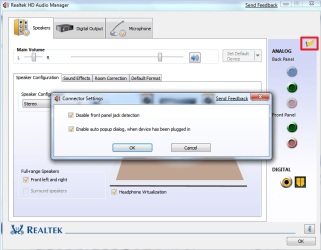
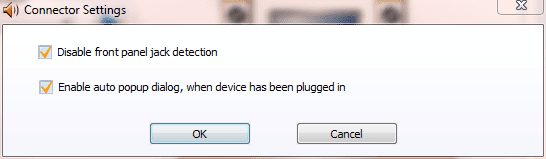
Open the Realtek HD Audio Manager and left click the folder icon (shown within the red box). In the dialogue panel that appears, Connector Settings, ensure that both options are selected and then click OK. 
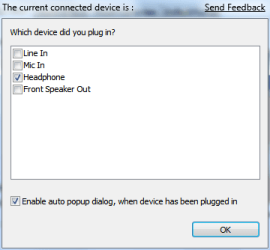
Right click the appropriate socket and select Connector Retasking... (alternatively, double left click). This brings up the following panel. This is from my front green socket. Select the required option and click OK. 
You can now close the Realtek HD Audio Manager by clicking OK. | My System Specs | | System Manufacturer/Model Number Home Built, N/A OS Windows 7 Ultimate 32-bit & 64-bit both SP1 CPU AMD Athlon (tm) 64 X2 Dual Core Processor 7550 @2.5GHz Motherboard Gigabyte GA-MA770-ES3 Memory 2 x 2GB PC2-6400 (DDR2-800), Ganged Mode, (4GB total) Graphics Card Nvidia GeForce GTX 550 Ti 1GB Sound Card Realtek High Definition on board solution (ALC 892) Monitor(s) Displays ViewSonic VA1912w Widescreen (VGA) Screen Resolution 1440x900 Keyboard Microsoft Digital Media Pro Keyboard (USB) Mouse Microsoft Comfort Optical Mouse 3000 (USB) PSU XFX Pro Series 850W Semi-Modular Case Antec NSK 4000B II Cooling 1 x 80mm Front Inlet (with filter) 1 x 120mm Rear Exhaust Hard Drives OCZ Petrol SSD 64GB SATA III
OCZ Petrol SSD 128GB SATA III
Samsung HD501LJ 500GB SATA II x2
Hitachi HDS721010CLA332 1TB SATA II
1 x Iomega 1.5TB Ext USB 2.0 Internet Speed NetGear DG834Gv3 ADSL Modem/Router (Ethernet) ~4.0 Mb/s (O2) Other Info PCI-Express SATA III controller (Marvell 88SE9128 chipset)
Optical Drive: HL-DT-ST BD-RE BH10LS30 SATA Bluray
Lexmark S305 Printer/Scanner/Copier (USB)
CTF-430 Tablet & Pen
WEI Score: |
03-15-2009
|
#3 | | Windows 7RC 64bit build710 |
I will need to download the HD audio manager. Thanks | My System Specs | | OS Windows 7RC 64bit build710 CPU Intel Q9400 Quad: 2.66Ghz, 1333FSB Motherboard EVGA 750i SLI FTW Memory 8 gigs of OCZ Graphics Card XFX 9600GT 512GDDR3 700Mhz Overclocked. Sound Card Onboard 7.1 Monitor(s) Displays 22" WS Samsung, 19" LG Screen Resolution 1680X1050 and 1280X1024 Keyboard Razer Lycosa Mouse Logitech MX Revolution PSU Coolmaster 600W Case Ultra Cooling two 120mm fans at each end, and one 80mm on the case window. Hard Drives Dual 1.5Tb Seagate Sata2 Internet Speed AT&T Uverse |
03-16-2009
|
#4 | | Windows 7 Ultimate 32-bit & 64-bit both SP1 |
Hi XeRo,
This is included with the driver - see Latest Realtek HD Audio Driver Version for details of the latest version. It is possible that the version of the driver that you have does not include this feature, particularly if it has been modified by the motherboard manufacturer. | My System Specs | | System Manufacturer/Model Number Home Built, N/A OS Windows 7 Ultimate 32-bit & 64-bit both SP1 CPU AMD Athlon (tm) 64 X2 Dual Core Processor 7550 @2.5GHz Motherboard Gigabyte GA-MA770-ES3 Memory 2 x 2GB PC2-6400 (DDR2-800), Ganged Mode, (4GB total) Graphics Card Nvidia GeForce GTX 550 Ti 1GB Sound Card Realtek High Definition on board solution (ALC 892) Monitor(s) Displays ViewSonic VA1912w Widescreen (VGA) Screen Resolution 1440x900 Keyboard Microsoft Digital Media Pro Keyboard (USB) Mouse Microsoft Comfort Optical Mouse 3000 (USB) PSU XFX Pro Series 850W Semi-Modular Case Antec NSK 4000B II Cooling 1 x 80mm Front Inlet (with filter) 1 x 120mm Rear Exhaust Hard Drives OCZ Petrol SSD 64GB SATA III
OCZ Petrol SSD 128GB SATA III
Samsung HD501LJ 500GB SATA II x2
Hitachi HDS721010CLA332 1TB SATA II
1 x Iomega 1.5TB Ext USB 2.0 Internet Speed NetGear DG834Gv3 ADSL Modem/Router (Ethernet) ~4.0 Mb/s (O2) Other Info PCI-Express SATA III controller (Marvell 88SE9128 chipset)
Optical Drive: HL-DT-ST BD-RE BH10LS30 SATA Bluray
Lexmark S305 Printer/Scanner/Copier (USB)
CTF-430 Tablet & Pen
WEI Score: |
03-27-2009
|
#5 | | |
Hello,
I am having a similar problem to Xero - only one of the jacks at the rear of my computer seems to work, and it's a different one to the jack I used for my speakers before I reinstalled windows.
I also do not have the HD Audio Manager, and have tried reinstalling the drivers 3 times but still dont seem to have the Manager.
I may just be being a bit dim here, but where should I find the audio manager? (I've tried searching for it on my computer but found nothing?)
Do you have any other suggestions? | My System Specs | | |
03-28-2009
|
#6 | | |

Quote: Originally Posted by TheOneWithin I may just be being a bit dim here, but where should I find the audio manager? (I've tried searching for it on my computer but found nothing? It is in the Control Panel. | My System Specs | | |
03-28-2009
|
#7 | | Windows 7 Ultimate x64, Mint 9 |

Quote: Originally Posted by YupYup It is in the Control Panel. Actually, it should start with the system in the tray if it is installed. If not, Brink was nice enough to post a sticky with the latest Realtek drivers (which I used as well  ) Latest Realtek HD Audio Driver Version
~Lordbob | My System Specs | | System Manufacturer/Model Number Hera OS Windows 7 Ultimate x64, Mint 9 CPU Intel i5-2500k Motherboard ASUS P8P67 Pro Memory 2x 4Gb Corsair VENGEANCE DDR3-1600 Graphics Card NVidia GeForce N260GTX Twin Frozr Sound Card Realtek HD OnBoard Audio Monitor(s) Displays ASUS 24" Monitor Screen Resolution 1920x1080 Keyboard Razer Tarantula Mouse Razer Lachesis PSU Cooler Master Real Power Pro 750W Case Cooler Master Haf 932 Cooling Fans Hard Drives G.SKILL Phoenix Series 60GB SATA II MLC Internal Solid State Drive (SSD)
SAMSUNG Spinpoint F3R 1TB 7200 RPM 32MB Cache SATA II Internet Speed not fast enough |
03-28-2009
|
#8 | | |
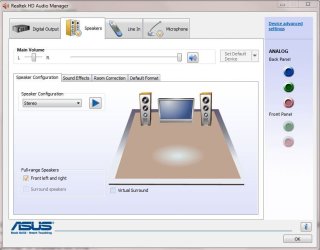
Aha, I had a look under "Sound Effect Manager" and changed the speaker configuration from 8CD + S/PDIF to 6CD + S/PDIF... this means I'm now using the jack I was originally using lol.
I still have no Realtek Audio manager though...
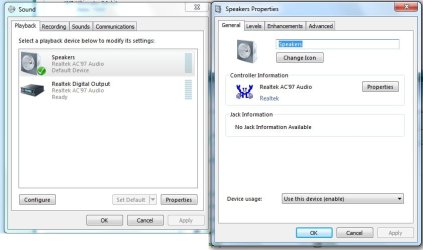
When I go to the control panel and click on "sound", this window appears (see attachment) | My System Specs | | |
03-28-2009
|
#9 | | Windows 7 Ultimate x64, Mint 9 |

Quote: Originally Posted by TheOneWithin Aha, I had a look under "Sound Effect Manager" and changed the speaker configuration from 8CD + S/PDIF to 6CD + S/PDIF... this means I'm now using the jack I was originally using lol.
I still have no Realtek Audio manager though...
When I go to the control panel and click on "sound", this window appears (see attachment) As I said before, check out Brink's thread, and download and install it.
~Lordbob | My System Specs | | System Manufacturer/Model Number Hera OS Windows 7 Ultimate x64, Mint 9 CPU Intel i5-2500k Motherboard ASUS P8P67 Pro Memory 2x 4Gb Corsair VENGEANCE DDR3-1600 Graphics Card NVidia GeForce N260GTX Twin Frozr Sound Card Realtek HD OnBoard Audio Monitor(s) Displays ASUS 24" Monitor Screen Resolution 1920x1080 Keyboard Razer Tarantula Mouse Razer Lachesis PSU Cooler Master Real Power Pro 750W Case Cooler Master Haf 932 Cooling Fans Hard Drives G.SKILL Phoenix Series 60GB SATA II MLC Internal Solid State Drive (SSD)
SAMSUNG Spinpoint F3R 1TB 7200 RPM 32MB Cache SATA II Internet Speed not fast enough |
03-28-2009
|
#10 | | |

Quote: Originally Posted by Lordbob75 As I said before, check out Brink's thread, and download and install it.
~Lordbob I've already tried that =x | My System Specs | | All times are GMT -5. The time now is 02:00 AM. |  |