Windows 7 Forums


Windows 7: Creative's Sound Blaster X-Fi Xtreme Audio PCI Express

25 Jan 2010   #1

Windows 7 Ultimate
 
 
Creative's Sound Blaster X-Fi Xtreme Audio PCI Express

Hey mates,


Today I bought and installed a new sound card. Creative's Sound Blaster X-Fi Xtreme Audio PCI Express. More information about the card can be found here:

Creative Labs Online Store (Europe) | Sound Blaster | Buy Creative PCI Express X-Fi Xtreme Audio

Anyway, this card is a little bit weird because it has line-in and microphone in one port.

I read a costomer review from the internet:
Quote:
Pros: Everything on this card works. EAX, Open AL, I cant think of something that doesnt work.

Cons: The mic does not work at first yes we know, theres a reason why though. read below to everyone having problems with this. i had this problem too!!

Other Thoughts: You need to install the drivers that come on the cd, or on the creative website. once you have creatives programs install, you need to go in and switch the Line in over to Microphone. Creative allows you to do that, its something that comes with The software that they bundle. then you just have to make sure it doesnt start up with your computer and you are good to use your mic now.

Now the problem is that when I connect my mic it detects it as a line-in thingy and says microphone not connected. Now, I'm trying to find out how to switch from line in over to microphone?

Can anyone help me do that? I have windows 7 ultimate.


And I don't know if its anyone connected to it I hear and see that others who have Creative's X-Fi have some kind of "What U hear" thing also? I don't see it anywhere :/ I have the latest drivers and some creative applications installed


Thanks

My System SpecsSystem Spec

26 Jan 2010   #2

Windows 7 Ultimate


Anyone? all I need to know is how to switch from line-in to microphone.
My System SpecsSystem Spec
26 Jan 2010   #3

Windows 7, 64 bit Home SP1, Win 8 Pro 64 bit
Citrus Co, FL


What happens if you select "What You Hear" as the "Recording" device in the Sound panel, in the Control Panel? I looked at mine and the rear mic is listed as "unavailable".
My System SpecsSystem Spec
.


26 Jan 2010   #4

Windows 7 Ultimate


Well, that's the thing. I don't have What U hear option available. I have "Microphone FP" ; "Line-in" and "Digital Audio (S/PDIF)" and I have both show disabled devices and show not allowed devices on.
My System SpecsSystem Spec
27 Jan 2010   #5

Windows 7, 64 bit Home SP1, Win 8 Pro 64 bit
Citrus Co, FL


Uninstall the SoundBlaster in the Device Manager (DO NOT uninstall the Drivers) and then restart the PC and when Windows starts it should detect and reinstall the sound card. This may fix it.

If not, reinstall the Creative drivers (get the latest drivers from the Creative site). You should have the What You Hear (what SoundBlaster calls the "System Mixer") and the other missing recording devices.
My System SpecsSystem Spec
27 Jan 2010   #6

Windows 7 Ultimate


Did what you told me, no results.

http://img237.imageshack.us/img237/2151/dekstop.jpg
My System SpecsSystem Spec
28 Jan 2010   #7

Windows 7 Ultimate


Anyone?
My System SpecsSystem Spec
28 Jan 2010   #8

Windows 7


go to the 'Creative Audio Control Panel'- FlexiJack tab, there you can choose your option.

There should be a Creative icon in the notifications near your clock.
or go to All Programs- Creative.
My System SpecsSystem Spec
28 Jan 2010   #9

Win 7 Ultimate x64
Etobicoke, Ontario


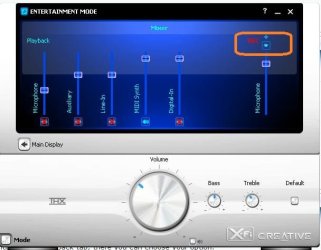
Open this,

Creative's Sound Blaster X-Fi Xtreme Audio PCI Express-miclinein.jpg

click on the little arrow and from the dropdown set it to microphone.
My System SpecsSystem Spec
28 Jan 2010   #10

Windows 7 Ultimate


Yea I figure that would help IF I had that kind of a control panel

All I have is what I posted on my picture... And on that control panel there is no FlexiJack tab tag. Any ideas? I mean I did download the latest drivers and some other stuff...
My System SpecsSystem Spec
Reply

 Creative's Sound Blaster X-Fi Xtreme Audio PCI Express problems?


Thread Tools


Similar help and support threads for: Creative's Sound Blaster X-Fi Xtreme Audio PCI Express
Thread Forum
Creative Sound Blaster X-Fi Xtreme Audio PCI - microphone problem Sound & Audio
Sound Blaster X-Fi Xtreme Audio 70SB104000001 Sound & Audio
Sound Blaster X-Fi Xtreme Audio / Creative.com Sound & Audio
Creative sound blaster X-FI audio card PCI Express - Options Missing Sound & Audio
Creative Sound Blaster X-Fi Xtreme Audio Sound & Audio


All times are GMT -5. The time now is 09:59 AM.


Seven Forums Android App Seven Forums IOS App Follow us on Facebook

Windows 7 Forums is an independent web site and has not been authorized,
sponsored, or otherwise approved by Microsoft Corporation.
"Windows 7" and related materials are trademarks of Microsoft Corp.
© Designer Media Ltd
  

1 2 3 4 5 6 7 8 9 10 11 12 13 14 15 16 17 18 19 20 21 22 23 24 25 26 27 28 29 30 31 32