Windows 7 Forums


Windows 7: Accidentally disabled my speakers

28 Jan 2010   #1

Windows 7
 
 
Accidentally disabled my speakers

I was trying to adjust some of my sound settings and I disabled both my headset sound and my external speakers. Now when I pull up my sound menu "playback devices" neither the headsets nor speakers are there.

They were both visible/working before I disabled them. Where can I go to enable them again?

My System SpecsSystem Spec

28 Jan 2010   #2

Windows 7 x64 Ultimate
A Finnish immigrant in Leipzig, Germany


Hello, Dbivian, welcome to the Seven Forums.

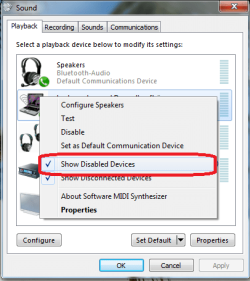
Open Playback Devices, right click anywhere in the Select a playback device-area and check the option Show Disabled Devices.

Accidentally disabled my speakers-audio_devices.png

Kari
My System SpecsSystem Spec
28 Jan 2010   #3

Windows 7


Perfect. Thanks! I feel like such a Noob!
My System SpecsSystem Spec
.


28 Jan 2010   #4

Windows 7 x64 Ultimate
A Finnish immigrant in Leipzig, Germany


I'm a reformed n00b-hugger so no problem
My System SpecsSystem Spec
Reply

 Accidentally disabled my speakers problems?


Thread Tools


Similar help and support threads for: Accidentally disabled my speakers
Thread Forum
Speakers disabled when I plugged in and out the headsets Sound & Audio
Accidentally disabled a recording device. How do i get it back? Sound & Audio
Solved I accidentally disabled the headset from the processes in TaskManager Sound & Audio
I disabled 'Speakers' in the volume mixer... Sound & Audio
Accidentally Disabled Admin Account General Discussion


All times are GMT -5. The time now is 10:27 PM.


Seven Forums Android App Seven Forums IOS App Follow us on Facebook

Windows 7 Forums is an independent web site and has not been authorized,
sponsored, or otherwise approved by Microsoft Corporation.
"Windows 7" and related materials are trademarks of Microsoft Corp.
© Designer Media Ltd
  

1 2 3 4 5 6 7 8 9 10 11 12 13 14 15 16 17 18 19 20 21 22 23 24 25 26 27 28 29 30 31 32