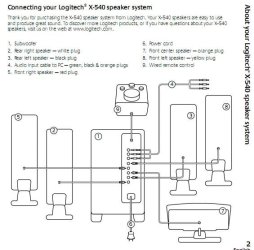
Ok this post is probably going to make me 'sound' like a wing-nut but here it goes.
First, always been happy with plain old stereo speakers before, no frills decent sound. Now, with 7 and media center I'm looking to go 2.1 maybe 4/5.1 for movies and jazz up a few games.
Good plan? So I check the manual and this is the jazz I see:
First, always been happy with plain old stereo speakers before, no frills decent sound. Now, with 7 and media center I'm looking to go 2.1 maybe 4/5.1 for movies and jazz up a few games.
Good plan? So I check the manual and this is the jazz I see:
Center/Subwoofer Speaker Out Jack (Orange)
Use this audio jack to connect center/subwoofer speakers in a 5.1/7.1-channel audio configuration.
Rear Speaker Out Jack (Black)
Use this audio jack to connect rear speakers in a 4/5.1/7.1-channel audio configuration.
Side Speaker Out Jack (Gray)
Use this audio jack to connect side speakers in a 7.1-channel audio configuration.
Line Out Jack (Green)
The default line out jack. Use this audio jack for a headphone or 2-channel speaker. This jack can be used to connect front speakers in a 4/5.1/7.1-channel audio configuration.
Use this audio jack to connect center/subwoofer speakers in a 5.1/7.1-channel audio configuration.
Rear Speaker Out Jack (Black)
Use this audio jack to connect rear speakers in a 4/5.1/7.1-channel audio configuration.
Side Speaker Out Jack (Gray)
Use this audio jack to connect side speakers in a 7.1-channel audio configuration.
Line Out Jack (Green)
The default line out jack. Use this audio jack for a headphone or 2-channel speaker. This jack can be used to connect front speakers in a 4/5.1/7.1-channel audio configuration.
I don't want to buy the wrong speakers/set-up. So for a plain 2.1 I would use just the (Green) jack and I'm told this will do 2.1 but what gives with the (Orange) jack.
I guess 4.1 is out of the question unless I do two sets of stereo speakers and a seprate sub?
That leaves 5.1 I guess. I don't understand what the deal/use of the (orange) jack is all about if 2.1 4/5.1 speaker sets bleed off the (green) for .. is it to early to start drinking? :huh:
I guess 4.1 is out of the question unless I do two sets of stereo speakers and a seprate sub?
That leaves 5.1 I guess. I don't understand what the deal/use of the (orange) jack is all about if 2.1 4/5.1 speaker sets bleed off the (green) for .. is it to early to start drinking? :huh:
My Computer
At a glance
10 x64 | 7 x64AMD FX-9590 Vishera 4.7 | i5 Sandy Bridge16 gigs Crucial Ballistix | 8 gigs Adata ddr3...RX-570 4gd5 | Intel HD 3000
- Computer type
- PC/Desktop
- Computer Manufacturer/Model Number
- Self - Build | Asus K53e Laptop
- OS
- 10 x64 | 7 x64
- CPU
- AMD FX-9590 Vishera 4.7 | i5 Sandy Bridge
- Motherboard
- MSI 990 FXA | K53e
- Memory
- 16 gigs Crucial Ballistix | 8 gigs Adata ddr3 1600
- Graphics Card(s)
- RX-570 4gd5 | Intel HD 3000
- Sound Card
- Realtek HD OnBoard Audio
- Monitor(s) Displays
- Samsung 22" & 37" Toshiba | 15.6
- Hard Drives
- ADATA 240 ssd & 750 Caviar Black 7200 sata | 250 840 EVO ssd & samsung ssd
- PSU
- Thermaltake 700 | 65w
- Case
- CoolMaster Centurion 534+
- Cooling
- Corsair H60
- Keyboard
- Rosewill RK-800G PS/2 Gaming Keyboard | Asus Chiclet
- Mouse
- Ventus | MS w/side buttons
- Internet Speed
- RoadRunner
- Other Info
- I hate the smell of friggin corn chip butt breath snacks.


 but sometimes the manuals can be a bit terse and not fully explaing things. Give 2.1 a try, it'll either work or it wont. But given that 4 ch has no sub listed there may not actually be any 2.1 either. I'd try it anyway, you never know.