| Windows 7: no sound on my right earphone |
08 Feb 2010
|
#1 | | Microsoft Windows 7 Ultimate x64 6.1.7601 Service Pack 1 |
URGENT!no sound on my right earphone i have sonicgear earphone..my earphone working fine about three month but today it suddenly got a problem..my right earphone got no sound,but in left it still got a sound..for the first thought,i think mayb my earphone itself got a problem,but when i try plug it on others pc and laptop,both right n left side is working fine..so i start to realize that my earphone still in good condition but mayb there is some sound setting i need to adjust.i already try to set it to default but still i got the same prob,only my left got a sound .. and i already check in my device manger,still there is no sign that i missing my sound driver..so actually what is my prob?can anybody help me to solve this problem..plz
I USE realtek ac 97 audio driver.. | My System Specs |
| System Manufacturer/Model Number Satellite E300 / PSE30L-009007 OS Microsoft Windows 7 Ultimate x64 6.1.7601 Service Pack 1 CPU Intel(R) Core(TM) i5-2410M CPU @ 2.30GHz Motherboard Intel Corp. Base Board Product Name (CPU1) Memory 4.00 GB Dual-Channel DDR3 @ 665MHz (9-9-9-24) Graphics Card Intel(R) HD Graphics Family version=8.15.10.2353 Sound Card onexant SmartAudio HD, Intel(R) Display Audio version=6.14 Screen Resolution 1366 x 768 Pixels Mouse e-view Hard Drives 625GB TOSHIBA TOSHIBA MK6465GSXN (SATA) Other Info NETWORK CARD
-HUAWEI Mobile Connect - 3G Network Card version=6,0,1,279
-Intel(R) Centrino(R) Advanced-N 6230 version=15.3.1.2
-Atheros AR8152/8158 PCI-E Fast Ethernet Controller (NDIS 6.20) version=2.0.15.16 |
08 Feb 2010
|
#2 | | Windows 7 Home Premium x64 Hampton Roads, VA |
Well, check your balance and make sure it isn't panned left. Also try instead of plugging into your rear input plug it into your front panel input to rule out the jack. | My System Specs | | System Manufacturer/Model Number Home built OS Windows 7 Home Premium x64 CPU AMD Phenom II X4 945 Motherboard ASUS M4N98TD EVO AM3 NVIDIA nForce 980a SLI Memory 8 GB G-Skill 1.5v DDR 3 1333Mhz Graphics Card (2) MSI 512MB GTS 250 SLI Sound Card Soundblaster Audigy 2 platinum Monitor(s) Displays Samsung 2255BW 22" Screen Resolution 1650 x 1050 Keyboard Zboard Merc Mouse Logitech MX-518 PSU Antec TP-750. The ultimate bang for the buck PSU Case Raidmax Cooling Sycthe Slipstream cooling fans(4) Hard Drives 2 WD 250GB 7500RPM Internet Speed 3MB Other Info LG Blu-Ray/DVD combo drive/LG DVD-RW w/ lightscribe |
08 Feb 2010
|
#3 | | Microsoft Windows 7 Ultimate x64 6.1.7601 Service Pack 1 |

Quote: Originally Posted by WDAexodus Well, check your balance and make sure it isn't panned left. Also try instead of plugging into your rear input plug it into your front panel input to rule out the jack. well sir,can u please specified what u talking..where can i find that balance setting..n what u mean with 'rear input plug n front input plug'..i use desktop, i think i just have one input plug at the rear of my cpu | My System Specs | | System Manufacturer/Model Number Satellite E300 / PSE30L-009007 OS Microsoft Windows 7 Ultimate x64 6.1.7601 Service Pack 1 CPU Intel(R) Core(TM) i5-2410M CPU @ 2.30GHz Motherboard Intel Corp. Base Board Product Name (CPU1) Memory 4.00 GB Dual-Channel DDR3 @ 665MHz (9-9-9-24) Graphics Card Intel(R) HD Graphics Family version=8.15.10.2353 Sound Card onexant SmartAudio HD, Intel(R) Display Audio version=6.14 Screen Resolution 1366 x 768 Pixels Mouse e-view Hard Drives 625GB TOSHIBA TOSHIBA MK6465GSXN (SATA) Other Info NETWORK CARD
-HUAWEI Mobile Connect - 3G Network Card version=6,0,1,279
-Intel(R) Centrino(R) Advanced-N 6230 version=15.3.1.2
-Atheros AR8152/8158 PCI-E Fast Ethernet Controller (NDIS 6.20) version=2.0.15.16 |
08 Feb 2010
|
#4 | | Windows 7 Ultimate 64 bit NC |
Most newer desktops have jacks in the rear via onboard mother board or a seperate sound card as well as a set of jacks on the top of case or on the front of case some where. Generally there are accompaing usb ports as well in the front panel. Look for those. If you click the arrow in the notification area you should see your audio icon. Right click it and click the main board app. This is where you check your settings. Also check to see if there is a driver update. | My System Specs | | System Manufacturer/Model Number Custom built OS Windows 7 Ultimate 64 bit CPU AMD Phenom II X4 965 Black Edition Motherboard Gigabyte GA-MA790X-DS4 Memory GSkill 4 X 2 GB PC 8500 Graphics Card XFX Radeon HD 6790 D Sound Card On board RealTek HD Monitor(s) Displays Dual monitors:Samsung SyncMaster S20B300 Screen Resolution 1600 X 900 Keyboard Logitech G510 Mouse Razor DeathAdder PSU Ultra X4 750 watt fully modular Case Thermaltake Overseer RX 1 full tower Cooling Core-Contact 92 mm CPU Cooler Hard Drives Seagate Barracuda 1TB (primary)
Seagate Barracuda 2 X 320 GB Internet Speed 50/5 Mbps UL/DL Other Info Optical: Super Muliti DVD burner w/lightscribe, Hauppauge WinTV HVR-1800 |
08 Feb 2010
|
#5 | | Microsoft Windows 7 Ultimate x64 6.1.7601 Service Pack 1 |

Quote: Originally Posted by bassfisher6522 Most newer desktops have jacks in the rear via onboard mother board or a seperate sound card as well as a set of jacks on the top of case or on the front of case some where. Generally there are accompaing usb ports as well in the front panel. Look for those. If you click the arrow in the notification area you should see your audio icon. Right click it and click the main board app. This is where you check your settings. Also check to see if there is a driver update.
already checked but still the same..still got sound only on my left earphone..how to determine whether my jack is broken or not? | My System Specs | | System Manufacturer/Model Number Satellite E300 / PSE30L-009007 OS Microsoft Windows 7 Ultimate x64 6.1.7601 Service Pack 1 CPU Intel(R) Core(TM) i5-2410M CPU @ 2.30GHz Motherboard Intel Corp. Base Board Product Name (CPU1) Memory 4.00 GB Dual-Channel DDR3 @ 665MHz (9-9-9-24) Graphics Card Intel(R) HD Graphics Family version=8.15.10.2353 Sound Card onexant SmartAudio HD, Intel(R) Display Audio version=6.14 Screen Resolution 1366 x 768 Pixels Mouse e-view Hard Drives 625GB TOSHIBA TOSHIBA MK6465GSXN (SATA) Other Info NETWORK CARD
-HUAWEI Mobile Connect - 3G Network Card version=6,0,1,279
-Intel(R) Centrino(R) Advanced-N 6230 version=15.3.1.2
-Atheros AR8152/8158 PCI-E Fast Ethernet Controller (NDIS 6.20) version=2.0.15.16 |
08 Feb 2010
|
#6 | | Windows 7 Ultimate x64 Service Pack 1 Doncaster, UK |
Try plugging in another set of speakers/headphones that you know are in working order. | My System Specs | | Computer type PC/Desktop System Manufacturer/Model Number Dwarf Dwf/11/2012 OS Windows 7 Ultimate x64 Service Pack 1 CPU Intel Core-i5-3570K 4-core @ 3.4GHz (Ivy Bridge) (OC 4.2GHz) Motherboard ASRock Z77 Extreme4-M Memory 4 x 4GB DDR3-1600 Corsair Vengeance CMZ8GX3M2A1600C9B (16GB) Graphics Card 2 x AMD Radeon HD7770 1GB CrossFired (OC 1100MHz/1250MHz) Sound Card Realtek High Definition on board solution (ALC 898) Monitor(s) Displays ViewSonic VA1912w Widescreen (VGA) Screen Resolution 1440x900 Keyboard Microsoft Comfort Curve Keyboard 3000 (USB) Mouse Microsoft Comfort Mouse 3000 for Business (USB) PSU XFX Pro Series 850W Semi-Modular Case Gigabyte IF233 Cooling 1 x 120mm Front Inlet 1 x 120mm Rear Exhaust Hard Drives OCZ Agility 3 SSD 120GB SATA III x2 (RAID 0)
Samsung HD501LJ 500GB SATA II x2
Hitachi HDS721010CLA332 1TB SATA II
Iomega 1.5TB Ext USB 2.0
WD 2.0TB Ext USB 3.0 Internet Speed NetGear DG834Gv3 ADSL Modem/Router (Ethernet) ~4.0 Mb/s (O2) Antivirus Avast! 8.0.1483 Browser IE 9 Other Info Optical Drive: HL-DT-ST BD-RE BH10LS30 SATA Bluray
Lexmark S305 Printer/Scanner/Copier (USB)
CTF-430 Tablet & Pen
WEI Score: 7.7/7.9/7.4/7.4/7.9
Asus Eee PC 1011PX Netbook (Windows 7 x86 Starter) |
08 Feb 2010
|
#7 | | Microsoft Windows 7 Ultimate x64 6.1.7601 Service Pack 1 |

Quote: Originally Posted by Dwarf Try plugging in another set of speakers/headphones that you know are in working order. already do that before..and all the headphone that connected to my jack,all of them got no sound on right earphone..but still i'm not satisfied with that..i'm still thinking that my jack is still in good condition,bcause if it really broken it will not produce any output to headphone..i still thinking i missconfigured something..am i right? | My System Specs | | System Manufacturer/Model Number Satellite E300 / PSE30L-009007 OS Microsoft Windows 7 Ultimate x64 6.1.7601 Service Pack 1 CPU Intel(R) Core(TM) i5-2410M CPU @ 2.30GHz Motherboard Intel Corp. Base Board Product Name (CPU1) Memory 4.00 GB Dual-Channel DDR3 @ 665MHz (9-9-9-24) Graphics Card Intel(R) HD Graphics Family version=8.15.10.2353 Sound Card onexant SmartAudio HD, Intel(R) Display Audio version=6.14 Screen Resolution 1366 x 768 Pixels Mouse e-view Hard Drives 625GB TOSHIBA TOSHIBA MK6465GSXN (SATA) Other Info NETWORK CARD
-HUAWEI Mobile Connect - 3G Network Card version=6,0,1,279
-Intel(R) Centrino(R) Advanced-N 6230 version=15.3.1.2
-Atheros AR8152/8158 PCI-E Fast Ethernet Controller (NDIS 6.20) version=2.0.15.16 |
08 Feb 2010
|
#8 | | Windows 7 Ultimate 64 bit NC |
If you look at the jack stud on the headset there are two grooves one is for the left and the other is for the right. The same thing on the receiving end of the input. Those grooves are what makes the connection. They can and do go bad from time to time, either the left or right side or both sides. If you have used a known good head set and it is doing the exact same thing you have now how confirmed it's a bad input jack. Sounds cards are fairly cheap and as an add on card they are very easy to install. My suggestion is to replace the sound card with an add on PCI card and your problem is solved. To repair the jack itself is possible but would cost more in the long run then it's worth but it can be done. That is if your up to soldering and knowledgeable of the techniques involved. Best of luck. | My System Specs | | System Manufacturer/Model Number Custom built OS Windows 7 Ultimate 64 bit CPU AMD Phenom II X4 965 Black Edition Motherboard Gigabyte GA-MA790X-DS4 Memory GSkill 4 X 2 GB PC 8500 Graphics Card XFX Radeon HD 6790 D Sound Card On board RealTek HD Monitor(s) Displays Dual monitors:Samsung SyncMaster S20B300 Screen Resolution 1600 X 900 Keyboard Logitech G510 Mouse Razor DeathAdder PSU Ultra X4 750 watt fully modular Case Thermaltake Overseer RX 1 full tower Cooling Core-Contact 92 mm CPU Cooler Hard Drives Seagate Barracuda 1TB (primary)
Seagate Barracuda 2 X 320 GB Internet Speed 50/5 Mbps UL/DL Other Info Optical: Super Muliti DVD burner w/lightscribe, Hauppauge WinTV HVR-1800 |
08 Feb 2010
|
#9 | | Windows 7 Professional x64 Rednecksville |
Hello Mie333,
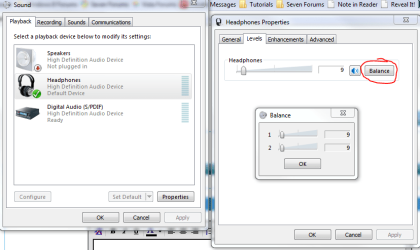
To adjust the balance, go to Control Panel>Sound and right-click on Headphones. Hit Properties, and under the Levels tab, you will find Balance.
Hope this helps,
~JK | My System Specs | | System Manufacturer/Model Number Custom OS Windows 7 Professional x64 CPU Intel i7 2600K OC'd @ 4620 MHz Motherboard Asus P8Z68-V Pro Memory 16GB GSkill Sniper 2133 Mhz (4x4GB) Graphics Card EVGA GeForce GTX 480 SuperClocked+ Sound Card Realtek High Definition Audio Monitor(s) Displays 2x Acer S273HLbmii 27" Screen Resolution 2 x 1920x1080 Keyboard Logitech MK320 (wireless) Mouse Logitech MK320 (wireless) PSU Corsair HW Series 750w (modular) Case Cooler Master HAF 932 Advanced Blue Edition Cooling CM Hyper 212+ CPU cooler, 3x 230mm + 1x 140mm case fans Hard Drives 64GB Crucial M4 SSD
Storage: Hitachi 1TB 5400RPM, Samsung 1.5TB 5400RPM Internet Speed 30 Mb/s : 2 Mb/s |
08 Feb 2010
|
#10 | | |
I had problems with those Nvidia Geforce 4 drivers on my old PC with Windows 7. The headphone jack worked perfect in XP but no luck with Windows 7. | My System Specs | | OS Windows 7 64-bit CPU AMD Athlon II X4 620 Propus @ 2.6ghz Motherboard GIGABYTE GA-MA785GM-US2H Memory OCZ Platinum 4GB (2 x 2GB) 240-Pin DDR2 SDRAM DDR2 1066 (PC2 Graphics Card ATI Radeon HD 4200 [on board] Sound Card Realtek ALC889A [on board] Case APEVIA X-QPACK-NW-BK/420 Black Aluminum no sound on my right earphone problems? All times are GMT -5. The time now is 12:31 AM. | |