Windows 7 Forums Search
Welcome to Windows 7 Forums. Our forum is dedicated to helping you find solutions with any problems, errors or issues you are experiencing with Windows 7. The Windows 7 forum also covers news and updates and has an extensive Windows 7 tutorial section that covers a wide range of tips and tricks.


Windows 7 - No Headphone Icon

 
03-16-2010   #1


No Headphone Icon

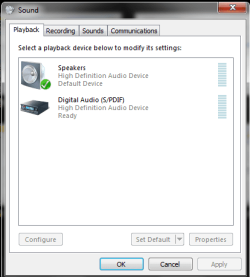
Okay so i just Windows 7, and one of the first things i did was listen to music. I switched from headphones to speakers, but there was no sound. so i right clicked on the sound icon in the system tray and i clicked 'playback devices'. After that i clicked on the headphones and then clicked on properties. From there in device usage (at the bottom) i clicked on 'dont use this device (disable)' and pressed ok. Now the headphone icon is gone and the headphone jack does not work, and yes prior to me disabling the headphones did work. So does anyone know how to get the headphone icon back?

i attached a picture of what my playback devices are.

Attached Thumbnails
No Headphone Icon-playback-devices.png  
My System SpecsSystem Spec
03-16-2010   #2


Windows 7 Professional x64


Welcome!

No problem, just right-click in the Playback tab and select Show Disabled Devices.
My System SpecsSystem Spec
03-16-2010   #3


Thank youuu! one more thing, how do i make it so that i can have both speakers and headphones working at the same time? meaning when there is no headphones sound plays through the speakers, otherwise through headphones?
My System SpecsSystem Spec
.


03-16-2010   #4


Windows 7 Professional x64


As far as I know, that is not possible, without doing some hardware tweaking.
My System SpecsSystem Spec
03-16-2010   #5


alright well thanks for your help
My System SpecsSystem Spec
03-16-2010   #6


Windows 7 Professional x64


No problem. If you have any more questions/problems, we are happy to help you.
My System SpecsSystem Spec
03-11-2012   #7


windwos 7 ultimate 32 bit


i have the same problem. No headphone icon and i have shown disabled devices
My System SpecsSystem Spec
03-11-2012   #8


Windows 7 Pro-x64


Check both boxes. The other is Show Disconnected Devices.
My System SpecsSystem Spec
03-17-2012   #9


windwos 7 ultimate 32 bit


I have, and i fixed the problem. It would seem that Realtek was the problem. I uninstalled it and it's fine now. Tnx for help anyway
My System SpecsSystem Spec
Reply

 No Headphone Icon problems?


Thread Tools


Similar Threads for: No Headphone Icon
Thread Forum
Headphone working but icon not shown Sound & Audio
Headphone recommendations Sound & Audio
Headphone Issues Sound & Audio
Bluetooth Headphone Sound & Audio
Headphone help Sound & Audio


All times are GMT -5. The time now is 12:42 AM.


Windows 7 Forums is an independent web site and has not been authorized,
sponsored, or otherwise approved by Microsoft Corporation.
"Windows 7" and related materials are trademarks of Microsoft Corp.
© Designer Media Ltd
  

1 2 3 4 5 6 7 8 9 10 11 12 13 14 15 16 17 18 19 20 21 22 23 24 25 26 27 28 29 30